
Free Load Testing Tools for APIs and Websites (2026 Guide)
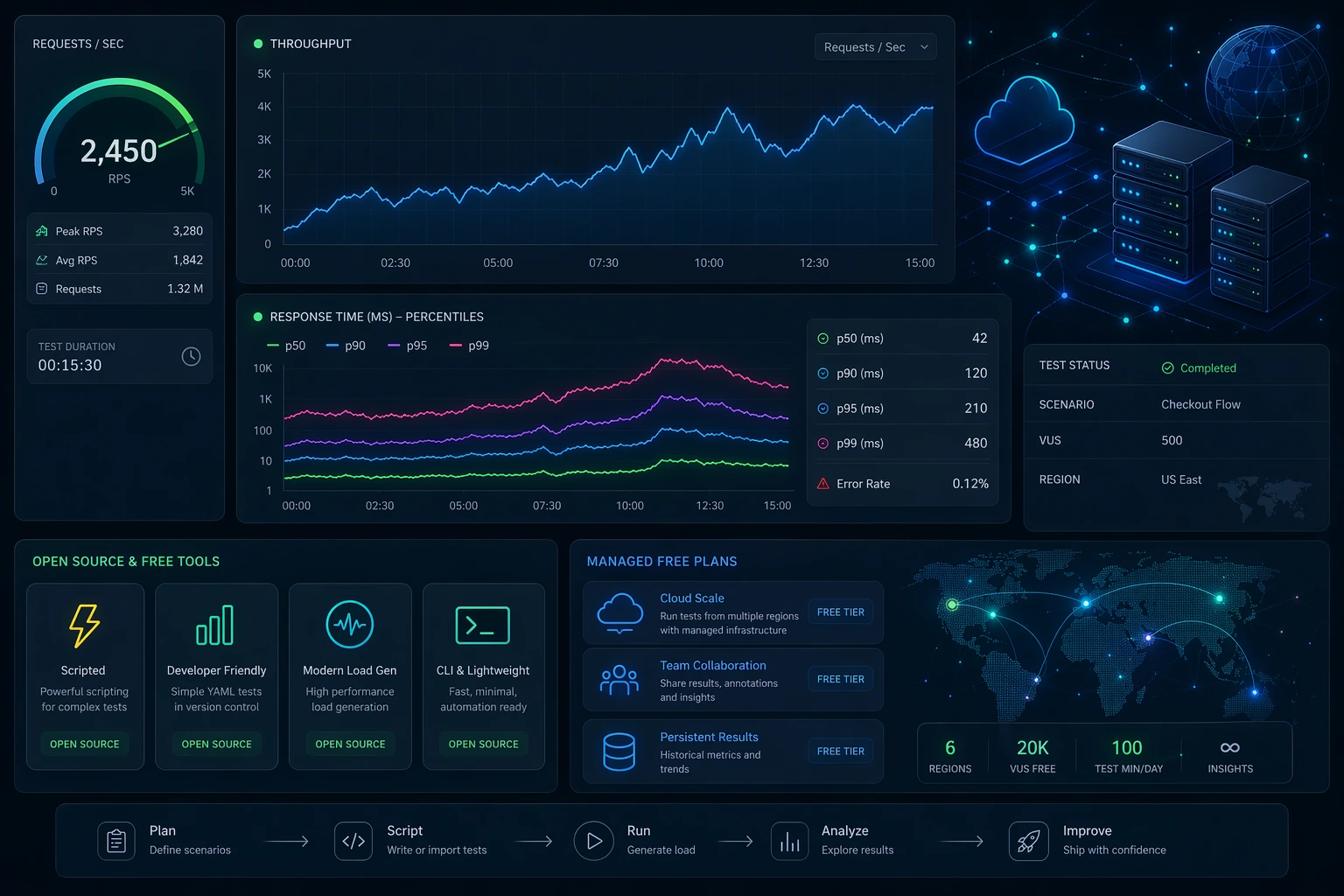
The phrase free load testing tools sounds simple, but in practice it covers several very different realities. Sometimes “free” means a mature open-source project that can absolutely power serious work if your team is willing to own scripts, runners, dashboards, storage, and process. Sometimes it means a slim command-line utility that can answer one narrow question quickly and then gets stretched beyond its natural limits. Sometimes it means a vendor-managed free tier that is intentionally limited in scale but dramatically easier to live with. Those categories are not interchangeable, and that is why so many tool roundups end up being less useful than they look.
This guide is deliberately narrower and more practical than a generic list of popular names. It is not trying to re-create our broader best load testing tools guide. That page looks at the market as a whole. This one focuses on a different question: if you want to start without budget approval, which free options actually make sense, and what tradeoffs come with each one? That means we care less about popularity and more about fit. A free tool is not automatically the right first step. The right free tool is the one that helps you run a meaningful test now without quietly creating a workflow problem later.
We will cover the free options most teams genuinely consider: LoadTester’s free forever plan, k6, JMeter, Locust, Gatling Community Edition, Vegeta, hey, Siege, ApacheBench, and h2load. We will also talk about the hidden cost of “free,” because license cost is rarely the main source of friction. The expensive part is usually team time: building and maintaining scenarios, managing execution, stitching together reports, and making sure the next person can rerun the test without mythology and tribal knowledge.
If you are early in the subject, read What Is Load Testing? first, then come back here. If you already know the basics and want help choosing a model, this page is built for that exact moment.
Quick answer: which free load testing tools are worth considering?
If you only want the short answer, here it is. k6 is one of the best open-source starting points for code-first teams, especially for HTTP and API testing. Locust is a smart fit when Python already anchors your internal tooling. JMeter is still relevant if you value maturity or already have existing investment in it, even if the experience feels heavier than newer tools. Gatling Community Edition is strong for engineering-led teams that actively want its style of workflow. Vegeta, hey, Siege, and ApacheBench are useful as quick command-line tools, not as full team systems. h2load is valuable when the question is specifically about HTTP/2 behavior.
LoadTester belongs in this conversation for a different reason. It is not another open-source framework; it is a free load testing service designed for low-friction HTTP and API testing. The free plan supports up to 10 virtual users or 50 requests per second, with unlimited tests and unlimited runs. That makes it useful when your goal is not only “generate traffic” but also “set up a repeatable test without building a small platform around it.” If your evaluation lens is pure breadth across both paid and free tools, go to Best Load Testing Tools (2026). If your lens is specifically cost-free starting points, keep reading.
What counts as “free” in load testing?
"Free" means three different things in load testing, and the difference matters. Open-source self-operated: you download, write tests, run, and own the rest of the stack. k6, JMeter, Locust, Gatling CE, Vegeta, hey, Siege, ApacheBench, h2load all fit. Managed freemium: vendor runs the platform, you get a limited free tier. LoadTester, Grafana Cloud k6, Loader.io, BlazeMeter all sit here. Free at the core, paid in workflow: zero license cost, but infrastructure, result storage, dashboards, and the engineering hours to keep it all working are not free. The third one is what catches teams off guard.
That third category is where most confusion comes from. Teams often think they are comparing software cost when they are really comparing workflow cost. A free command-line benchmark can be perfect for a developer checking one endpoint. It can be a bad choice for a team that needs historical comparisons, reviewable reports, or repeatable release gates. A free managed plan can be the better bargain if it removes several hours of setup every week. So when you evaluate “free,” the useful question is not “does it have a price tag?” but “what parts of the workflow still become my problem?”
That framing is the reason this article is intentionally different from a generic top-ten list. The same tool can be a great free option for one team and a frustrating free option for another. We care about workload, team shape, and operator burden—not just name recognition.
How this page differs from our broader best-load-testing-tools guide
Because this page overlaps in topic area with Best Load Testing Tools (2026), it is worth making the distinction explicit. That other article is a broad comparison page: it looks across the market, including paid products, and helps readers understand the major categories and buying criteria. This page is not trying to repeat that. Its purpose is narrower: help a team choose a zero-budget starting point. That changes the evaluation lens. We care more about setup speed, maintenance overhead, free-forever limits, and the transition path from experimentation to repeatable practice.
In other words, if you want an all-market shortlist, read the broader guide. If you want to know whether a free tool is enough for your team right now, or which free option is least likely to turn into a time sink, this article is the better fit. The overlap in subject is intentional; the overlap in copy is not.
Quick comparison matrix
| Tool | Free model | Best fit | Main advantage | Main constraint |
|---|---|---|---|---|
| LoadTester | Managed free forever | Teams that want a browser-based start | 10 VUs or 50 RPS, unlimited tests and runs, low setup effort | Free tier is intentionally lightweight |
| k6 | Open source | Code-first API teams | Modern scripting model and strong HTTP focus | You still own scripts and surrounding workflow |
| Locust | Open source | Python-heavy teams | Readable Python scenarios and flexibility | Self-operation and reporting overhead |
| JMeter | Open source | Teams with prior JMeter experience | Mature ecosystem and broad familiarity | Heavier UX and more maintenance friction |
| Gatling CE | Open source | Engineering-led performance teams | Strong technical credibility | Learning curve and higher operator burden |
| Vegeta / hey / Siege / ab | Open source | Quick HTTP checks | Fast, minimal CLI execution | Limited workflow depth |
| h2load | Open source | HTTP/2 investigations | Protocol-specific usefulness | Narrow scope |

LoadTester free forever: the easiest low-friction start
Most open-source tools answer the question, “How can I generate load without paying for the software?” LoadTester’s free plan answers a slightly different question: “How can I start testing without having to build and maintain the supporting machinery myself?” That difference matters. The core promise of the free forever plan is straightforward: up to 10 virtual users or 50 requests per second, with unlimited tests and unlimited runs. For lightweight endpoint checks, early-stage API validation, and recurring smoke-style tests, that is often enough to learn, validate, and compare behavior without introducing a separate infrastructure project.
This is the strongest free choice for teams that care about reducing setup friction. You can create tests in the browser, run them, view results, share them, and keep the workflow accessible to more than one engineer. That makes it especially helpful for startups, platform teams that do not want to spend time managing generators, or product-adjacent engineers who need performance feedback but do not want to become part-time toolsmiths. If your context is API-heavy, pair this guide with API Load Testing and How to Load Test an API.
The free forever plan is not pretending to be infinite. It is intentionally scoped for smaller checks, evaluation, and the early habits of performance testing. That transparency is useful. You should choose it when your current need is lightweight, repeatable, and low-friction. You should not choose it because you expect the free tier to behave like an enterprise plan. It is valuable precisely because it makes small and medium checks simple, while giving you a path to scale later if the workflow proves useful.
Quick verdict
The free-tool decision should include time cost, not only license cost. LoadTester is easier to justify when free runners start requiring custom dashboards, artifact storage, schedules, onboarding, and recurring maintenance.
k6: the best-known free script-first option
k6 is usually the first open-source tool people mention in modern API-focused discussions, and that is not an accident. It fits today’s developer culture well: tests can live in version control, the scripting model feels modern, HTTP work is straightforward, and automation-minded teams can fit it into their pipelines without forcing a GUI-centric process. For engineering groups that want load testing to feel like code, k6 is one of the best free choices available.
The reason k6 works so well is not only syntax. It is the combination of clarity and momentum. There is a large body of learning material around it, many engineers already know its name, and it is often considered more approachable than older frameworks. That makes it a very practical answer when the team has enough code fluency and wants performance checks to sit close to source control and CI. If you want a deeper product comparison, use LoadTester vs k6 and Gatling vs k6 vs JMeter.
The tradeoff is not a flaw in k6 itself; it is the normal tradeoff of script-first open-source tools. You still own the workflow around the scripts. Someone needs to define conventions, parameterize scenarios, store artifacts, decide how results are published, and maintain the checks over time. Many teams are happy with that. Others discover that the testing step was free, but the operational discipline around the testing step was not.
JMeter: still useful when maturity matters more than elegance
Apache JMeter remains relevant because maturity still matters. Many companies already know it, many engineers have used it before, and it has enough history behind it that you can usually find a way to do what you need. If you are entering an organization with existing JMeter assets, the smartest free option may be to build on that investment instead of forcing a migration immediately.
The catch is that JMeter often feels heavier than the newer tools teams compare it against. The interface is older, the workflow can become cluttered, and the path from “we can create a plan” to “we can maintain this as a clean team practice” is not always short. That does not make it obsolete. It makes it a tool with a specific profile: capable, proven, and often more labor-intensive than newcomers expect. If you are specifically exploring HTTP request creation in JMeter, use JMeter HTTP Requests Tutorial (2026).
In a free-tool decision, JMeter is strongest when familiarity is already an asset. It is weaker as a “fresh start” recommendation for teams that mainly want low friction and modern ergonomics.
Locust: a smart option when Python is already your team language
Locust is frequently underrated in broad tool lists because it is so context-dependent. For the right team, it is excellent. If your engineering group already builds internal tooling, data workflows, or test harnesses in Python, Locust often feels natural immediately. User flows read like software rather than like a visual plan, which can be a big advantage for teams that prefer flexibility and composability.
That context matters. Locust is not “the best free tool” in the abstract; it is often one of the best free tools for Python-oriented teams. The scenarios are readable, the model is flexible, and the culture fit can be much better than a GUI-driven tool. The same tradeoff still applies, though: you are not only choosing a runner, you are choosing a workflow that you will operate yourself. For adjacent reading, see Locust alternatives and Website vs API Load Testing.
Gatling Community Edition: respected, capable, and better for deliberate adopters
Gatling Community Edition earns its place because serious engineering teams genuinely respect it. It has a strong identity, a real technical reputation, and enough depth that it stays in evaluation conversations even when organizations choose something else. If your team likes the model and is willing to invest in it, Gatling CE can absolutely be the right free option.
Where teams sometimes go wrong is choosing Gatling because it sounds serious rather than because the operating model fits them. Technical credibility is valuable, but it is not the same as day-to-day fit. Some teams will thrive with it. Others will mainly feel the cost of the learning curve. That is why comparison searches around Gatling are so common. If that is your path, read Gatling Alternative and Gatling vs k6 vs JMeter.
Vegeta, hey, Siege, ApacheBench: built for one-shot checks
One of the biggest mistakes in this category is underestimating how useful narrow tools can be—or overestimating how far they should be stretched. Vegeta, hey, Siege, and ApacheBench are great when your question is narrow: “How does this endpoint behave under a simple burst?” “What is the rough throughput?” “Can I benchmark a change quickly from the command line?” In that role, these tools are efficient and satisfying.
The trouble starts when a quick check becomes a team workflow by accident. Lightweight CLI tools are not automatically great at history, collaboration, realism, or maintainable multi-step scenarios. That is fine; it is not what they were built for. If you want to stay in this layer, read Best CLI HTTP Load Testing Tools, hey vs Vegeta vs Siege, and ApacheBench vs Modern HTTP Tools. Those pages go deeper into the subcategory.
So the right way to judge CLI tools is not “can they replace everything?” but “are they the fastest honest answer for the specific check I need to run?” Often, they are.
h2load: the free specialist for HTTP/2-specific questions
Not every free tool needs to be general-purpose. h2load deserves a slot because protocol-specific questions are real, and a specialist tool can be more valuable than a broad one when the scope is narrow enough. If your workload depends on HTTP/2 behavior, multiplexing characteristics, or protocol-level investigation, h2load can be a better answer than a more generic HTTP benchmark.
The key is to treat it like a specialist instrument. You do not choose h2load as the default answer to every load testing need. You choose it when the protocol itself is what you need to understand. For related reading, see HTTP/2 Load Testing Tools and Rust-Based HTTP Load Testing Tools.
The hidden cost of free load testing tools
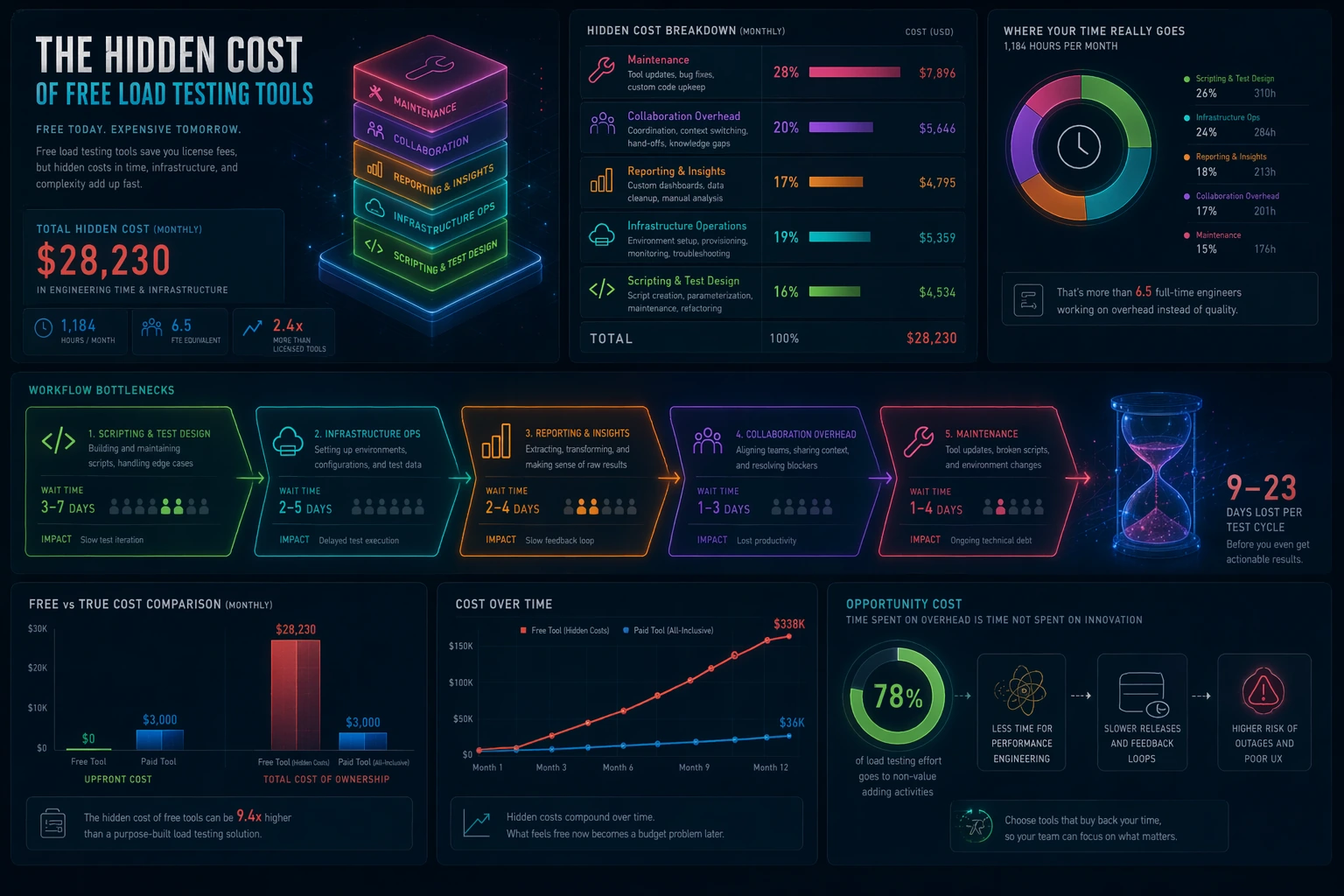
This is the part most “best free tools” pages avoid: the license is often the smallest cost. The expensive part is usually the work around the tool. Someone has to create the scenario. Someone has to prepare test data. Someone has to run the test in a repeatable environment. Someone has to turn output into a pass/fail decision or a meaningful discussion. Someone has to keep everything running after dependencies change. If none of that matters for your current use case, a very simple free tool may be perfect. If those things matter every week, then “free” deserves a harder look.
A useful way to think about this is to separate software cost from decision cost. Software cost is the obvious part: how much money changes hands for the tool. Decision cost is the effort required to produce a trustworthy result that someone can act on. If your team spends hours translating raw output into a conclusion, the tool is expensive even if the invoice is zero. If a managed workflow helps the team get to a trustworthy answer faster, it may be the cheaper option in practice.
This is also why free-tool evaluations need to consider the maturity of the team. A solo engineer exploring an endpoint can tolerate more manual work. A growing team preparing releases usually cannot. The larger the coordination surface, the more workflow matters. And once workflow matters, the “cheapest” tool on paper may not be the cheapest system in real use.
Common mistakes teams make with free tools
The first mistake is asking one tool to do every job. A command-line benchmark and a repeatable team workflow are not the same thing. The second mistake is ignoring who will maintain the system after the first proof of concept. The third mistake is treating result output as if it automatically creates insight. Raw numbers are not decisions; somebody still has to interpret them. The fourth mistake is assuming that a tool is “free” forever simply because the first few tests were convenient.
A healthier way to evaluate free tools is to ask four questions. How fast can we get to a meaningful run? How realistic can our scenarios become? How easily can another person rerun the test? And what extra infrastructure or coordination work are we taking on by choosing this path? Those questions reveal far more than a feature checklist.
How to pick by team type
Pick LoadTester if you want the fastest zero-budget start with a browser-based workflow, shareable runs, and a clear free-forever allowance. It is especially good when you want to avoid turning evaluation into an infrastructure exercise.
Pick k6 if your team prefers code-first work, wants tests in version control, and is comfortable owning scripts and pipeline wiring.
Pick Locust if Python already dominates your tooling and your team values flexibility over a prebuilt managed workflow.
Pick JMeter if you already have JMeter assets, team familiarity, or a good reason to inherit that ecosystem rather than start over.
Pick Gatling CE if you consciously want Gatling’s model and have the appetite to invest in it.
Pick Vegeta, hey, Siege, or ApacheBench if what you truly need is a quick HTTP check—not a full testing program.
Pick h2load if the central question is HTTP/2 behavior.
Recommended zero-budget starting paths
If you are a solo founder or indie builder, the easiest route is usually a low-friction managed start. You want confidence quickly, not a side quest in operating tooling. If you are a backend-heavy engineering team, k6 is often the most natural open-source option. If Python already powers your internal automation, Locust usually deserves an early trial. If you are inheriting an existing enterprise setup, JMeter can still be the most rational choice simply because it matches the skills and assets already present.
Teams that mainly want smoke-style checks from a terminal should keep expectations honest and stay in the CLI category on purpose. Use Vegeta, hey, Siege, or ApacheBench when the job is narrow and speed matters. Use h2load when protocol behavior is the whole point. The biggest source of pain is not choosing a limited tool; it is pretending a limited tool is a full program.
When free is enough—and when it stops being enough
Free tools are often more than enough at the start. They are enough when you are learning, when you are validating a narrow API path, when the scale is modest, or when the main goal is simply to introduce performance thinking into the team. In that phase, the biggest risk is doing nothing. A free tool that gets the practice started is already valuable.
Free tools stop being enough when the workflow around them starts overshadowing the value you get back. Typical warning signs are easy to spot. Performance checks only run when one specific engineer remembers. The scripts exist, but no one is confident changing them. Test results live in local files, screenshots, or ad hoc messages instead of a repeatable place. CI/CD integration exists but feels brittle. The team spends more energy maintaining the process than learning from the results. At that point the issue is no longer whether the tool is capable. The issue is whether the workflow is sustainable.
If that sounds familiar, continue with Release Regression Load Testing, Continuous Load Testing, and Load Testing in CI/CD. Those guides help connect a free starting point to a repeatable operating model.
Signals that your team has outgrown the free-only stage
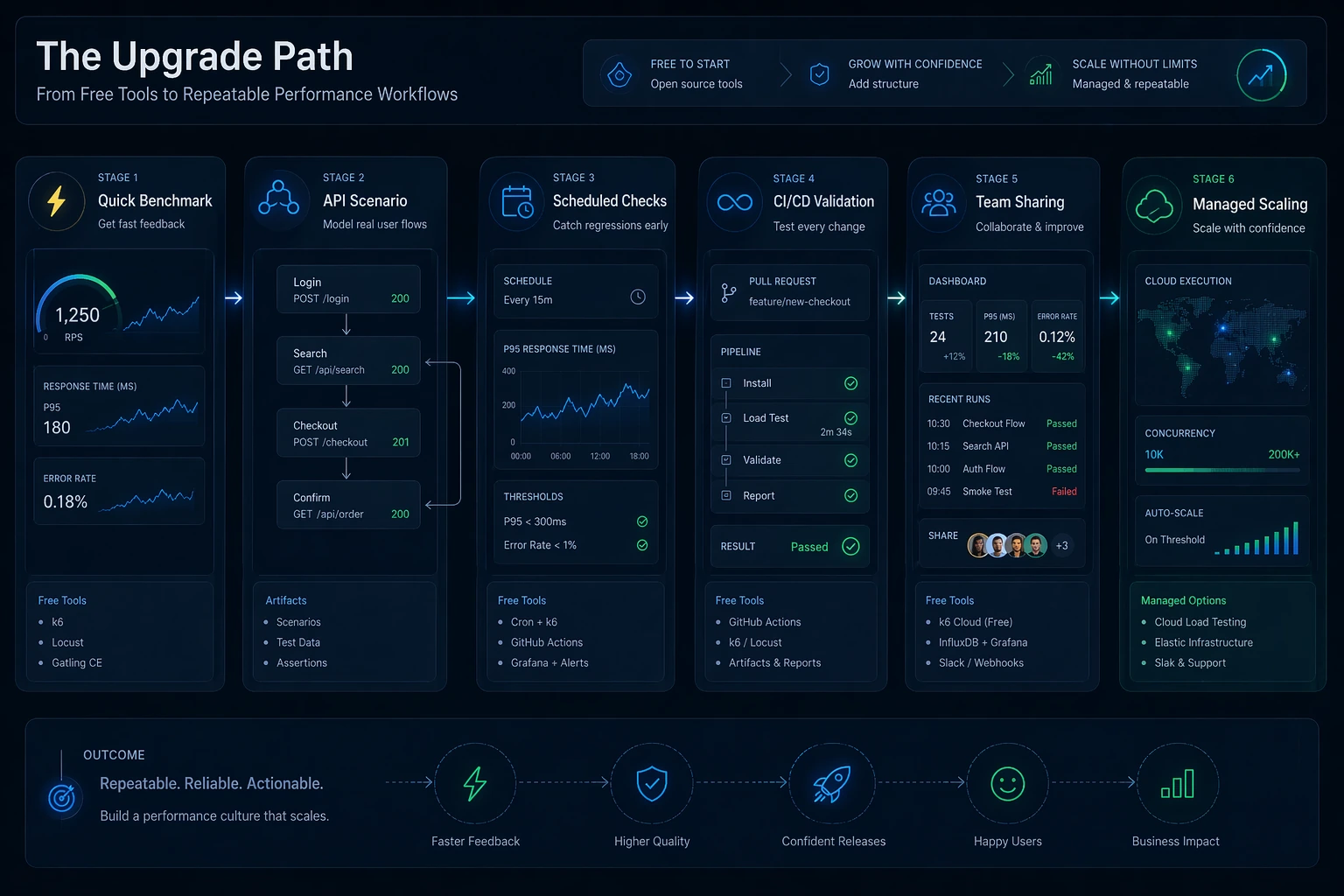
The first signal is that your tests have become part of release quality, not just exploratory work. The second is that the team needs more than one person to understand and use the workflow. The third is that the business impact of regressions has increased: outages, slow rollouts, or poor user experience now cost more than the tool savings. The fourth is that your “free” stack now depends on several moving parts—scripts, dashboards, cloud runners, artifacts, thresholds, notifications—and every change creates more operational work than anyone expected.
None of that means you failed by starting free. In fact, starting free was probably the right move. It means the practice matured. The next step is simply to choose whether you want to keep owning the full tooling stack yourself or switch to a system that buys back engineering time.
Questions people ask about free load testing tools
Is LoadTester free forever?
Yes. LoadTester includes a free forever plan for lightweight testing: up to 10 virtual users or 50 requests per second, with unlimited tests and unlimited runs. That makes it useful for ongoing smaller checks, evaluation, and early CI-style validation.
What is the best free load testing tool for APIs?
There is no universal winner, but k6 is a strong open-source choice for code-first API teams, Locust is excellent for Python-centric teams, and LoadTester is a strong managed option when you want low setup friction and sharing without owning infrastructure.
Are command-line tools enough for CI/CD?
They can be enough for narrow checks, especially if your pipeline only needs a simple benchmark. They become less comfortable when you need scenario realism, easier sharing, stable history, and clean regression decisions.
Why not just choose the most popular free tool?
Popularity tells you that a tool is known, not that it fits your workflow. The better question is which free model matches the work: managed low-friction start, script-first flexibility, legacy maturity, or narrow CLI speed.
Final verdict
The best free load testing tool is not the one with the loudest brand or the longest feature list. It is the one that helps your team answer the next performance question honestly, with the least wasted effort. For many code-first teams that will be k6. For Python-heavy groups it may be Locust. For teams with prior investment it may still be JMeter. For deliberate Gatling adopters it may be Gatling CE. For quick command-line checks it may be Vegeta, hey, Siege, or ApacheBench. For HTTP/2-specific work it may be h2load.
And for teams that want a practical zero-budget start without building extra workflow around the test, LoadTester’s free forever plan is one of the clearest options: 10 VUs or 50 RPS, unlimited tests, unlimited runs. That is a different kind of free than open-source self-operation, and for many teams it is the more useful kind.
These are the primary docs most useful if you want to go deeper into the tools mentioned here.
How this comparison was evaluated
For the free-tools page, we evaluated both price and total effort. The criteria included whether a tool is truly free to start, what teams must self-host, how reports are preserved, how CI checks are maintained, and when the free path starts creating hidden labor.
Free and open-source tools can be the best choice, especially for learning and full control. LoadTester is positioned as the option for teams that value lower setup effort and recurring evidence more than owning every component themselves.
When LoadTester is not the right option
LoadTester is intentionally focused on repeatable HTTP and API load testing workflows. For this page, the honest recommendation depends on whether your team needs free and open-source load testing tools for its native strengths or needs LoadTester for repeatable team execution.
- Use open source for strict zero-budget programs. If the long-term requirement is no subscription cost at all, free tooling is the honest recommendation.
- Use self-hosted tools for maximum control. Teams that need to inspect, patch, or run every component internally should prefer open-source runners.
- Use free CLIs for learning and experiments. When the goal is education, a small local tool may teach load-testing concepts better than a managed workflow.