
Best CLI HTTP Load Testing Tools in 2026
The fastest way to answer "what happens if I throw a thousand requests per second at this endpoint" is still a CLI tool. Install with one line, type one command, read the result. That workflow isn't going away in 2026.
The catch: the same speed that makes CLI tools great for one-off debugging makes them awkward for release pipelines. Tests live in someone's ~/scripts. Threshold logic lives in shell heredocs. Comparing today's run to last week's means manually diffing JSON files. None of that scales past one person.
This page covers Vegeta, hey, ApacheBench, h2load, oha, wrk/wrk2, and k6 in CLI mode — what each one is good at and where each one stops being enough. For the broader buyer's guide including managed platforms, see Best Load Testing Tools (2026).
Overview
Command-line tools stay relevant because they solve a real engineering problem. When you are iterating on an HTTP endpoint, validating a rate limit change, checking a proxy path, or pressure-testing an internal service, you often do not need a huge harness. You need speed. A shell command, a targets file, a simple concurrency setting, and a result you can interpret quickly.
That is where CLI tools shine. They also fit naturally into Linux-heavy environments and developer-owned pipelines. You can run them locally, from a container, or inside a CI job. You can parameterize them with environment variables. You can pipe results into logs or parse output for quick checks.
The downside is that this convenience often masks workflow debt. A CLI-driven test can tell you something useful in the moment, but that does not automatically make it a good release-quality system. Once you care about trend lines, shared baselines, alerting, scheduling, comparison across runs, live analytics, or broader team visibility, a pure CLI flow usually starts to creak. That tradeoff shows up repeatedly across the tools below.
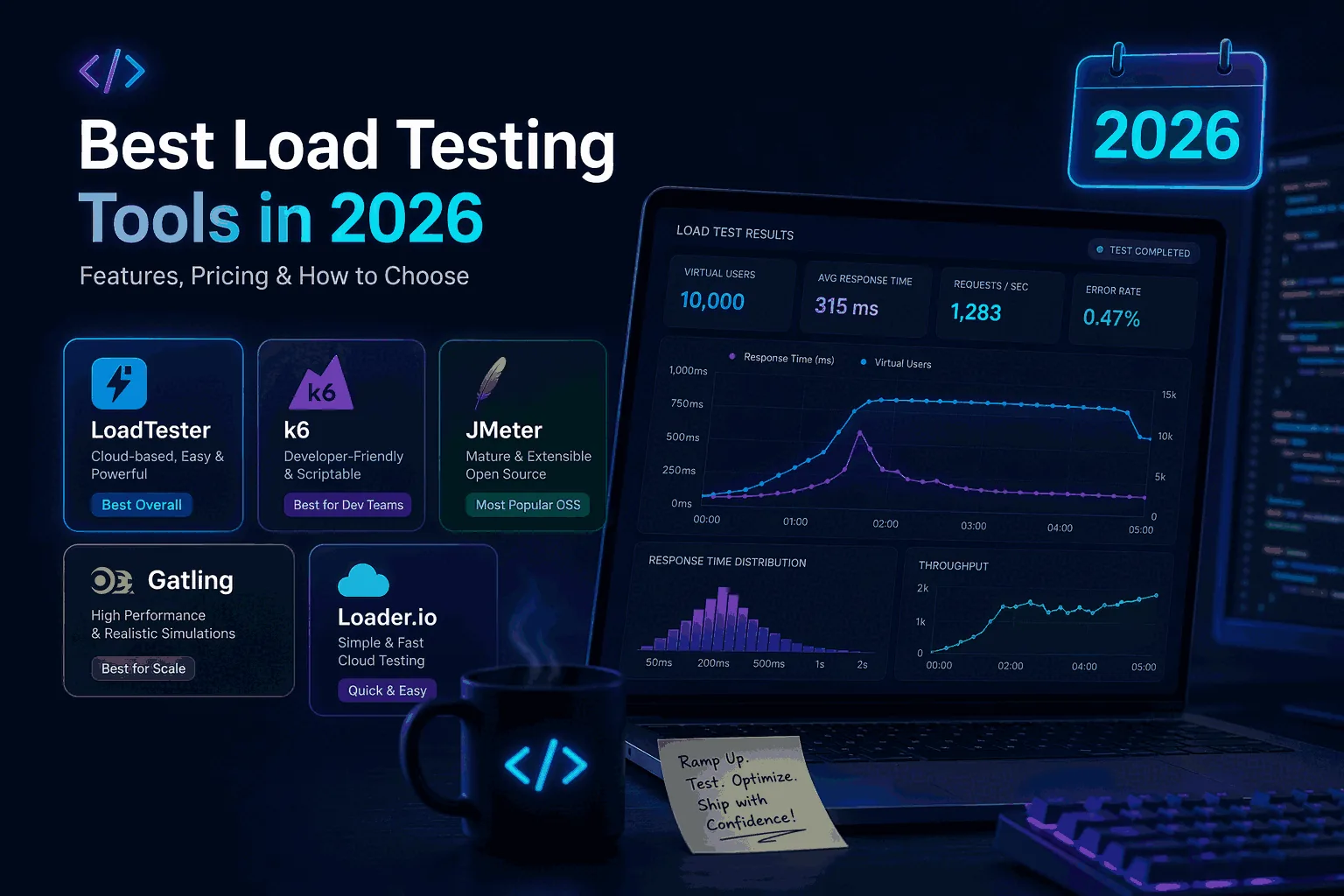
Quick verdict
Use this roundup to decide when a terminal tool is still enough and when the output has outgrown stdout. LoadTester becomes relevant once the same check needs owners, schedules, history, and a pass/fail policy that survives beyond one shell session.
Why engineers still like CLI tools
Three reasons CLI tools keep their place: velocity (one shell command beats opening a UI for a five-minute investigation), composability (they pipe, they redirect, they fit in Makefile and CI YAML), and isolation (when the question is "did this NGINX config change affect throughput at 300 RPS?", any larger harness adds noise).
The weakness isn't capability — every tool below can saturate a target. The weakness is that "easy to run" is not "easy to operate repeatedly." A `vegeta attack` one-liner is great in a terminal; the same one-liner inside a shell script that nobody else maintains is the start of an outage.
What a good CLI tool should do
Not every command-line HTTP load testing tool needs to do everything, but a useful one should be clear about what it is optimizing for. In 2026, the tools worth keeping on your shortlist usually do three things well: they let you express traffic cleanly, they produce output that is easy to interpret, and they stay predictable in automation.
Traffic expression matters because there is a difference between “blast this endpoint as hard as possible” and “send controlled, repeatable traffic that matches the question.” A good tool should make it easy to hold a rate, define duration, reuse targets, and work with headers, auth, or request bodies when needed.
Output matters because raw request counts are not enough. Engineers need latency percentiles, error counts, throughput, and sometimes histogram-like visibility to see whether the tail is bending or the system is saturating. A tool that hides too much forces extra work later.
Automation matters because CLI tools often end up inside CI, cron jobs, or release checklists. A good tool should have stable invocation patterns, sane exit behavior, and a clear story for thresholds or result parsing. Otherwise the team gets speed at the cost of repeatability.
Vegeta
Vegeta is still one of the most respected CLI HTTP load testing tools because it is fast, focused, and designed around a rate-based model that many engineers find intuitive. Instead of trying to be everything for everyone, it stays tight around the use case of generating controlled HTTP traffic and producing clear summaries and reports. For API-heavy teams that care about rate control and clean shell-driven workflows, that is a real advantage.
Where Vegeta shines is disciplined quick testing. You can define targets, hold a rate, capture results, and replay or inspect them later. That makes it stronger than one-shot utilities that only give you a quick wall of output and not much else. It is especially good when a single engineer wants to answer a precise question without adopting a larger platform.
Where teams outgrow Vegeta is collaboration and lifecycle. The moment you want shared results, easy comparisons across releases, team dashboards, scheduled checks, or a more productized view of regression detection, you start building around Vegeta rather than using Vegeta itself. That is often the turning point where teams begin comparing it with a managed workflow. If that is your situation, read Vegeta vs LoadTester after this page.
hey
hey remains attractive because it is extremely easy to reach for. If ApacheBench felt too old and heavier frameworks felt excessive, hey often became the middle ground: simple, modern enough, and perfectly fine for basic HTTP pressure checks. That still holds up.
Its strength is ergonomics. You can issue a quick test with a small number of flags, get a concise summary, and move on. For basic endpoint checks, internal services, or quick experiments during development, that is exactly what many teams want.
Its weakness is depth. hey is useful when the question is small. It becomes less attractive when the workflow needs structure: multiple scenarios, richer reporting, repeatability, or a clear step from ad hoc checks to release confidence. Teams often keep hey around as a knife in the drawer rather than making it the center of their performance practice.
ApacheBench (ab)
ApacheBench still exists in more workflows than people admit. It is old, blunt, and limited compared with newer tools, but its age is partly why people still have it. It is familiar, already installed in some environments, and good enough for a narrow class of quick checks.
That said, 2026 is not a good year to build a serious performance workflow around ApacheBench. Its output and invocation model feel dated, and many teams using it today are really using it out of habit. If your team only needs a primitive sanity check against a single HTTP route, it can still do that. But once the conversation turns to realistic traffic, better summaries, repeatability, or modern automation, it falls behind quickly.
ApacheBench is best thought of as legacy utility rather than a modern recommendation. It can still answer simple questions, but most teams starting fresh today should reach for a newer CLI tool or a managed platform.
h2load
h2load earns its place on this list because HTTP/2 changes the performance conversation. Connection reuse, multiplexing, and stream behavior can make old mental models misleading if you are only testing in HTTP/1.1 terms. When teams specifically care about HTTP/2, h2load is much more relevant than generic CLI tools that happen to send requests.
Its main value is specificity. If the protocol matters, the tool should reflect that. Teams working on edge services, CDNs, gateways, or APIs where HTTP/2 support is a real operational concern should keep h2load on the shortlist. It is not necessarily the most general-purpose choice, but it is useful when the test question is tied to protocol behavior rather than broad platform workflow.
For a wider protocol-specific comparison, continue with HTTP/2 Load Testing Tools.
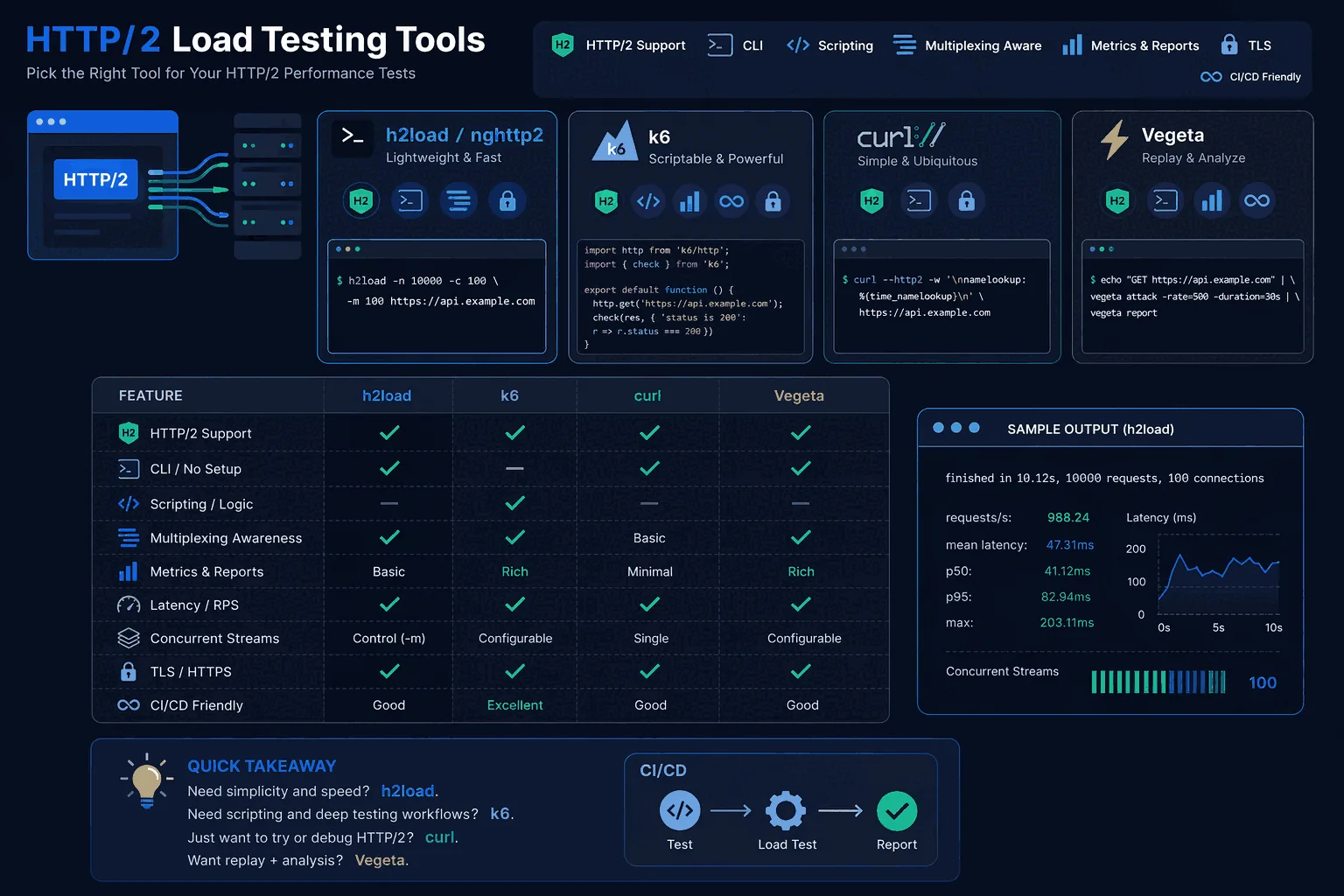
k6 in CLI-heavy workflows
k6 is not a pure CLI utility in the same sense as Vegeta or hey because it sits more clearly in the “tests as code” category. But it absolutely belongs in this guide because many developer-led teams use it in a CLI-shaped way: scripts are authored locally, invoked from shells and CI, and treated as engineering assets rather than shared platform objects.
That makes k6 a strong bridge between tiny utilities and larger workflow systems. If your team is comfortable maintaining code-defined tests and likes the flexibility of a JavaScript-centric model, k6 can be a very good fit. It is especially attractive for teams that already think of performance testing as part of their engineering codebase rather than as a lighter operational check.
The tradeoff is adoption friction. k6 is excellent for developers who want code. It is not always the easiest answer for mixed teams that want simpler repeatable checks, centralized visibility, or lower setup burden. That is why teams often evaluate it directly against managed tools such as LoadTester vs k6.
When managed tooling wins
There is a point where CLI strength becomes team weakness. You can feel it when performance checks exist, but only one person knows how to run them correctly. Or when results live in logs and screenshots instead of a shared history. Or when every release brings the same question — “did anything regress?” — and nobody has a clean way to answer without rerunning old commands manually.
That is where a managed platform wins. Not because CLI tools are bad, but because the problem changes. You no longer just need to send traffic. You need shared analytics, threshold-aware workflows, automation, scheduling, comparison across runs, and less operational burden around load generation. That is the gap a platform like LoadTester is built to close.
For teams that start with CLI tools and then want team-friendly reporting, repeatable release checks, and a simpler path to ongoing validation, the transition often makes sense sooner than expected.
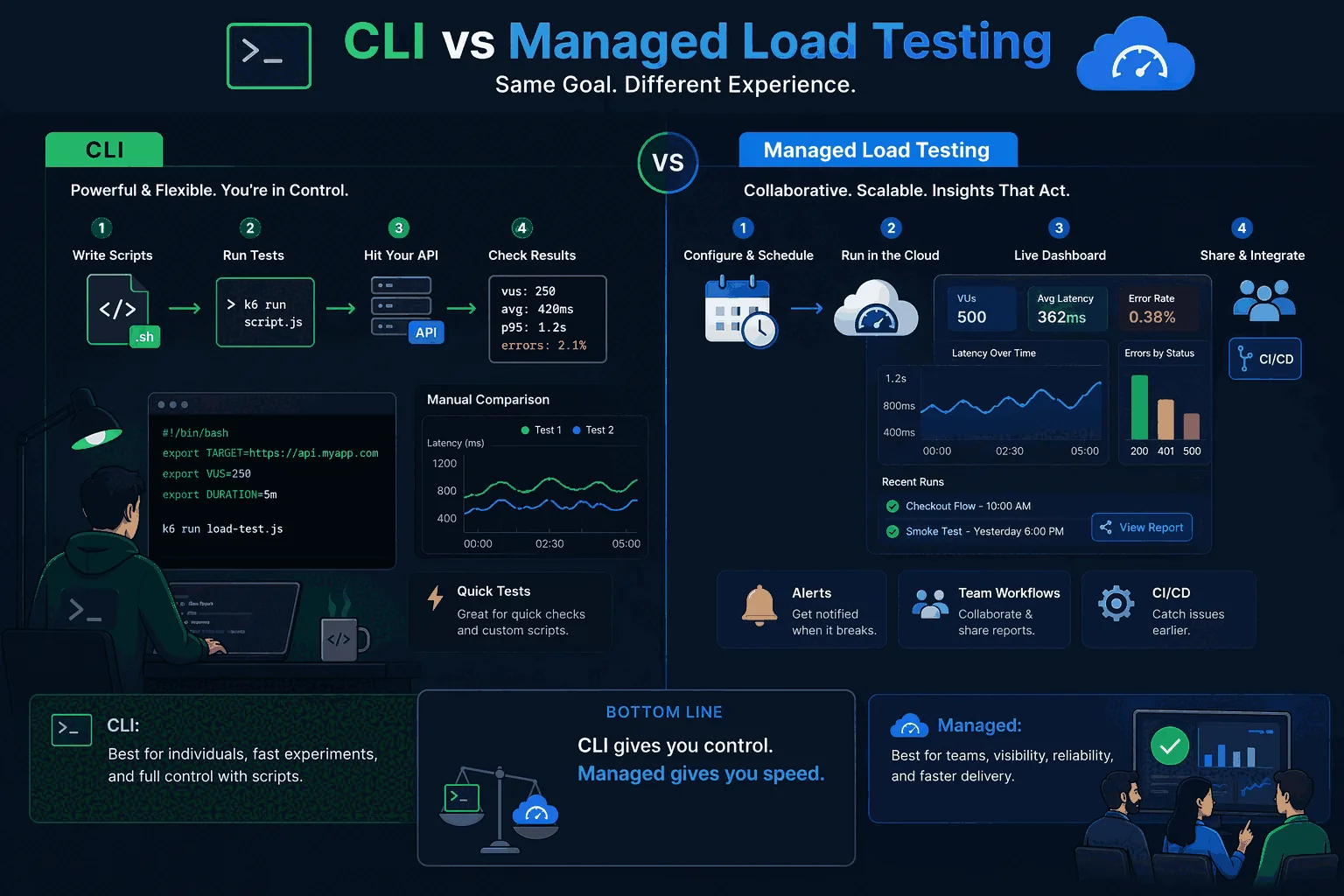
Which tool fits which team
If you want the shortest version, it looks like this. Vegeta is excellent for engineers who want disciplined rate-based HTTP testing without much ceremony. hey is strong for very fast lightweight checks. ApacheBench is mostly legacy utility. h2load matters when HTTP/2 specifically matters. k6 is stronger when your team wants test-as-code and is happy living in a developer-owned scripting model.
Where does that leave the rest of the market? It leaves a lot of teams in the middle. They want more than a shell command, but less than a heavy performance engineering project. They want to test APIs and web apps, compare releases, automate the basics, and avoid building a custom reporting layer around their CLI commands. That is exactly the niche where managed tooling becomes attractive.
Where LoadTester fits
LoadTester fits the teams that have outgrown single-user CLI workflows but do not want to jump straight into a more complex test-as-code practice. It is especially well suited to product teams that want practical HTTP load testing with live analytics, repeatable checks, managed scaling, and shared visibility. Why this matters for launches, CI/CD smoke checks, regression testing, and ongoing performance validation.
The easiest way to think about it is this: use CLI tools when speed and local experimentation are the priority. Use LoadTester when the goal becomes release confidence across a real team. If you want to pressure-test a route quickly, Vegeta or hey may be enough. If you want scheduled checks, alerts, live metrics, and a workflow that other people on the team can reuse without inheriting your shell scripts, try LoadTester and see whether the team gets more signal with less operational work.
Frequently asked questions
Which CLI HTTP load testing tool is fastest in 2026?
Raw request-rate ceiling on a single machine is highest for Rust-based tools like oha and Go-based tools like Vegeta and hey, which can saturate 10 Gbps NICs on commodity hardware. h2load wins for HTTP/2 throughput because it natively handles multiplexing. ApacheBench is the slowest of the popular options. For most teams, however, scripting model and threshold support matter more than peak RPS.
Should you pick Vegeta, hey, or wrk for a new project?
Pick Vegeta if you want target-rate scheduling (precise RPS) and structured JSON output for piping into other tooling. Pick hey if you want the simplest possible interface — concurrency and total requests — with minimal flags. Pick wrk if you need scriptable Lua scenarios and the highest single-binary throughput. wrk2 is preferable to wrk when accurate latency reporting matters.
Can a CLI tool handle a real release gate, or do you need a platform?
A CLI tool can power a release gate if your team is comfortable owning the orchestration: storing runs, comparing builds, parsing exit codes, posting thresholds to a Slack channel, and rerunning failed scenarios. That works for one well-scoped service with one knowledgeable maintainer. It usually breaks down across multiple services, multiple engineers, or anyone who wasn't there when it was set up.
These are the official docs, specs, or operational references most relevant to this topic.
How this comparison was evaluated
For the CLI tools roundup, we evaluated where terminal-first tools are excellent and where a managed workflow becomes more useful. The criteria included install friction, command reproducibility, CI behavior, result retention, threshold clarity, team access, and whether the output is understandable without reading raw console logs.
The recommendation is not anti-CLI. CLI tools are often the best starting point for quick experiments. LoadTester becomes more compelling when those experiments turn into recurring checks that multiple people must understand and trust.
When a CLI tool beats LoadTester
If you're an engineer narrowing down a single endpoint at 2am, install hey, point it at the URL, read the output, fix the bug. Don't sign up for anything. The same is true for one-off rate-limit checks, NGINX config validation, or any scenario where the only consumer of the result is the person running it. Managed tooling earns its place when the result has to outlive the terminal session.