
Website Load Testing vs API Load Testing
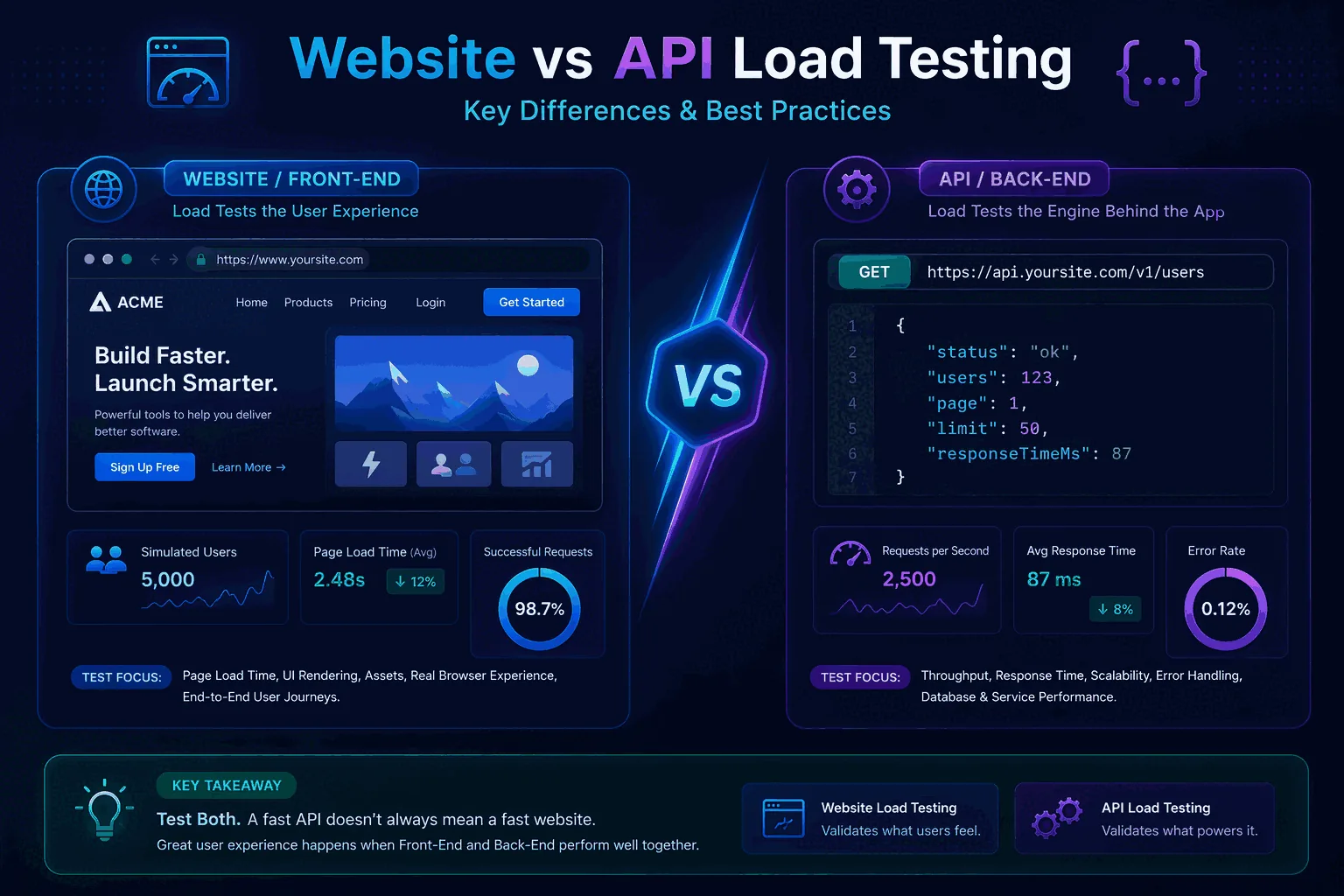
Website load testing vs API load testing is one of the most common points of confusion for teams that are new to performance work. People often use the terms interchangeably because both involve sending traffic and observing what happens. But they are not the same thing, and if you mix them up you can end up with misleading results, the wrong tooling choices, or the false belief that you have tested “the site” when you have only tested one layer of it.
The difference starts with what is actually under test. API load testing focuses on backend interfaces: endpoints, payloads, latency, error rates, throughput, and service behavior under concurrency. Website load testing is broader and more user-facing. It may include backend request handling, but it also connects to page delivery, caching, CDN behavior, frontend dependencies, browser rendering, asset loading, and the way user journeys behave as traffic grows.
This does not mean website testing is always more important or that API testing is only a technical subtask. In many modern products, the API layer is the system. For others, the website experience depends on a chain of components where the API is only one part of the user-visible performance story. The key is to understand which question you are trying to answer and choose the right type of test for that question.
This guide explains the difference between website and API load testing, what each one measures, where teams go wrong, and how to build a layered strategy that covers both without confusion. For foundational context, read What Is Load Testing?, How to Load Test an API, and Load Testing Strategy.
The simple definition
API load testing is the practice of sending controlled traffic to an application programming interface to measure how backend operations behave under load. The focus is usually on request handling, service latency, error rate, throughput, scaling behavior, and dependency bottlenecks.
Website load testing is the practice of evaluating how a website or web application behaves as traffic increases. That may include backend requests, but it also involves page routes, static asset delivery, caching layers, session flows, content rendering dependencies, edge behavior, and sometimes user-journey realism.
The easiest way to say it is:
- API load testing asks, “Can the backend handle this traffic?”
- Website load testing asks, “Can the user-facing experience and delivery path handle this traffic?”
Sometimes those questions overlap heavily. Sometimes they are quite different.
Why teams confuse the two
The confusion comes from architecture. Many websites are powered by APIs, so it feels natural to think that if you load test the API, you have load tested the website. In some limited cases, that is almost true. If the site is a thin frontend over a single backend service and your main concern is data-fetch latency, API testing may cover most of the meaningful risk.
But many websites involve more than API calls. They depend on CDNs, edge caches, HTML generation, image optimization, JavaScript bundles, personalization layers, third-party scripts, authentication flows, and client-side rendering. A backend API can perform well while the website still feels slow because of frontend weight or page composition issues. The reverse can also happen: the site may seem okay in a browser test while the underlying APIs are nearing saturation and about to fail under a traffic spike.
Another reason for confusion is tooling. Many load testing tools can hit both page routes and APIs, which creates the impression that the two kinds of testing are interchangeable. The tool may be the same, but the workload design and the interpretation are not.
What API load testing is really measuring
API load testing focuses on service behavior. It is usually about:
- request and response latency
- percentile behavior such as p95 and p99
- error rate
- throughput
- concurrency handling
- database and cache pressure
- downstream dependency behavior
- scalability under growing traffic
- stability under steady or bursty load
When you load test an API, you are often asking questions like:
- How many requests per second can this endpoint handle?
- What happens to p95 latency when concurrency doubles?
- Does authentication become a bottleneck?
- Does one expensive query shape dominate the tail?
- Do error rates rise before CPU saturates?
- What changed after this release?
This is why API load testing works so well in engineering workflows and CI/CD. It produces repeatable backend-oriented signals that are easier to compare across runs. If APIs are central to your product, How to Load Test an API and Load Testing in CI/CD should become core parts of your process.
What website load testing is really measuring
Website load testing is often about the whole delivery path rather than only the backend.
Depending on the site, that may include:
- how quickly routes respond under concurrent traffic
- whether cached and uncached pages behave differently
- whether the CDN or edge layer absorbs load as expected
- how session-heavy user journeys behave
- whether page composition or server-side rendering becomes slow
- whether static asset delivery becomes a bottleneck
- whether important user flows remain functional under peak demand
- whether the backend behind the website degrades in ways users actually feel
If you are testing an e-commerce site, for example, the meaningful user flow may include home page, category page, search, product detail, add to cart, and checkout. API health matters, but so do the page routes, caching behavior, personalization logic, and the interaction between frontend and backend layers.
This is why website load testing is not only “call the homepage a thousand times.” Good website testing maps to user journeys and delivery paths.
API load testing is usually easier to automate cleanly
One reason many teams start with API load testing is that it is easier to make repeatable and meaningful. API requests are usually more explicit. The payloads, headers, authentication flows, and success criteria can be defined clearly. You can version tests, measure percentiles, and compare runs with relatively high confidence.
Website load testing often includes more moving parts. Cached vs uncached paths, route variety, session state, client behavior, content distribution, and frontend architecture can all affect the result. That does not make it less valuable. It just means it often benefits from a layered strategy rather than a single benchmark.
A practical pattern is to use API load testing for repeatable backend protection and website-oriented testing for higher-level route and journey validation. That way you get clean engineering signals without pretending the whole website experience can be reduced to a single backend metric.
Different questions require different tests
Here are examples that show the difference clearly.
If your question is “Can our checkout service handle a Black Friday burst?” you probably need both API and website perspectives. The checkout API may need direct load testing, but the page flow, session behavior, and edge caching strategy also matter.
If your question is “Did the new search indexing logic increase backend latency?” API load testing is usually the direct and efficient answer.
If your question is “Will the marketing campaign break the site homepage?” website load testing becomes more relevant, especially if the homepage depends heavily on page composition, cache state, and personalized fragments.
If your question is “Why do some users report slow dashboards even though the site is up?” API testing might reveal backend latency problems, while frontend measurement may reveal rendering or payload issues. This is where layered diagnostics matter.
The right test is the one that matches the question.
Website load testing: page routes are not the same as user journeys
A common mistake in website testing is assuming that route coverage equals user realism. Hitting /, /pricing, and /checkout with a lot of requests is not the same as simulating how users move through the site.
User journeys involve sequence, state, authentication, cookies, search behavior, product selection, cache variation, and sometimes third-party integrations. A homepage route may be highly cacheable and easy to serve while a logged-in dashboard route triggers personalized backend work and very different performance risk.
This is why website tests should be organized around real journeys when possible:
- anonymous browsing
- search and filter flows
- content consumption
- account login and dashboard usage
- cart and checkout
- admin actions if they are operationally important
The more your site depends on personalized or dynamic content, the more valuable journey-aware testing becomes.
API load testing: endpoint realism matters too
Just because API load testing is more focused does not mean it is automatically realistic. Teams still make mistakes by hammering one endpoint with one tiny payload and treating the result as a capacity number.
Good API testing considers:
- representative request mix
- authentication paths
- realistic payload sizes
- query shape variation
- read/write balance
- cache state
- data volume
- concurrency profile
This is especially important for GraphQL or search-heavy systems where request cost can vary a lot. If your API layer includes GraphQL, read GraphQL Load Testing. If your team is learning how to design realistic backend tests, How to Load Test an API is the right companion.
Metrics that overlap and metrics that do not
Website and API load testing share some metrics:
- response times
- error rates
- throughput
- resource usage
- saturation points
- p95 and p99 latency
But website testing often needs additional context:
- route-level performance
- cache hit or miss behavior
- CDN impact
- session success across a journey
- page composition timing
- asset delivery characteristics
- browser-visible impact if paired with frontend monitoring
API testing tends to care more directly about:
- endpoint or operation latency
- database or dependency behavior
- request-level correctness
- throughput under controlled concurrency
- backend scaling characteristics
This is why one dashboard is rarely enough for both layers. The shared metrics are useful, but the meaning changes with the layer.
How p95 and p99 fit into both types of testing
Percentiles matter in both API and website testing, but the interpretation differs slightly.
In API load testing, p95 and p99 are direct indicators of backend consistency. If p99 grows sharply while p95 stays manageable, you may have tail instability due to a small subset of requests or a downstream dependency. Read p95 vs p99 latency explained for the deeper metric logic.
In website load testing, percentile latency can still be useful, but the value must be interpreted in the context of page type, cache state, and user journey. A cached page route with excellent p95 may tell you little about logged-in user experience. A slow p99 on a checkout route may matter much more than a similar p99 on a low-stakes informational page.
The main lesson is that percentiles are still essential, but layer-aware context matters.
Which one should you start with?
If you are early in your performance testing journey, start with API load testing unless your primary business risk is clearly website-route specific.
API load testing is usually easier to define, automate, repeat, and compare. It also maps well to engineering ownership and CI/CD. It gives you a stable foundation of backend understanding.
Then expand into website load testing for the user-facing routes and journeys that matter most, especially where caching, page composition, authentication, or route behavior are significant.
This staged approach works better than trying to model the whole website from day one. It gives the team useful signals quickly and reduces confusion.
How website and API load testing fit together in a real strategy
The best strategy is not to choose one forever. It is to layer them.
Start with API tests for the core services behind important user behavior. Use them to protect backend latency, error rates, and capacity.
Then add website-oriented tests for the public or logged-in flows where route behavior, cache interactions, or frontend-delivery patterns introduce additional risk.
You may also add synthetic browser-style tests or frontend performance tooling, but that is a separate conversation from backend load generation.
This layered strategy helps answer all the important questions:
- can the service layer handle the traffic?
- can the user-facing routes handle the traffic?
- where does degradation begin?
- which layer should be fixed first?
CI/CD implications
API load testing fits more naturally into CI/CD because it is easier to make deterministic and fast. You can run small performance smoke checks against critical endpoints in pull requests and baseline tests on merges or nightly schedules. See Load Testing in CI/CD.
Website load testing can also appear in CI/CD, but the best pattern is usually more selective. Focus on critical route-level checks or journey baselines rather than trying to reproduce full internet-scale behavior in every build.
The big mistake is to treat website performance as too fuzzy for automation or to treat backend checks as if they fully replace user-facing testing. Both extremes are wrong.
Common mistakes when comparing website and API load testing
The first mistake is assuming one makes the other unnecessary. They answer different questions.
The second mistake is using route load alone as a proxy for user experience. Route-level traffic is useful, but user journeys and cache behavior often matter more.
The third mistake is treating API throughput as if it guarantees website health. A healthy API can still sit behind a slow page-delivery stack.
The fourth mistake is skipping API tests because the team only cares about pages. Backend bottlenecks often reveal themselves more clearly and earlier at the API layer.
The fifth mistake is not defining success before testing. Every test should answer a concrete question tied to user or business risk.
Example: e-commerce site
Imagine an e-commerce website preparing for a seasonal sale.
API load testing should cover:
- search API
- product detail API
- pricing and inventory lookups
- cart operations
- checkout and payment initiation
Website load testing should cover:
- homepage surge behavior
- category browsing
- search results route
- product detail page traffic
- cart and checkout flow
- cache behavior between anonymous and logged-in sessions
Both are necessary. The APIs may hold up under backend testing, but if page fragments, personalization, or route rendering create extra overhead, the website can still degrade. Conversely, a route-level test may reveal slowness without clearly showing which backend service is responsible. The two layers complement each other.
Example: SaaS dashboard
Now imagine a B2B SaaS app with a logged-in dashboard.
API load testing is often the best first layer because the dashboard likely depends on several backend endpoints or GraphQL operations. You can model those calls more directly, set p95 and p99 thresholds, and run them in CI/CD.
Website testing still matters for logged-in flows, but the key risks may be personalized data queries, cache misses, and route composition rather than static page load. A combination of API mixed workloads and selected route or journey tests usually works better than only hitting page URLs.
Tooling decisions: do you need different tools?
Not always. Many platforms can be used for both route-level and API-level load generation. But the decision should not be driven only by technical capability. It should be driven by how well the tool supports the workflow you need.
For API testing, you want strong repeatability, parameterization, thresholding, and CI/CD friendliness.
For website testing, you want route and journey modeling that reflects real user behavior without turning the suite into an overly fragile browser simulation unless that level is truly needed.
The right platform is often the one that lets you layer both types of tests while keeping the results understandable.
A phased plan for most teams
For most products, the right order is simple. Start with API load testing to establish baseline service behavior, error rates, and percentile performance on the endpoints that drive real business actions. Then add website-level testing where rendering, asset delivery, authentication, or multi-step journeys are likely to affect user experience.
This phased approach gives you a clean foundation first and a richer user-behavior layer second. It prevents a common mistake where teams jump straight into browser-heavy testing before they understand whether the API itself is already the main bottleneck.
Once both layers exist, use them differently. Let API tests run frequently in CI/CD and let broader website journey tests run on a schedule or before major releases. That balance usually gives the best signal-to-effort ratio.
Final thoughts
Website load testing and API load testing are related, but they are not interchangeable. API testing focuses on backend service behavior under load. Website testing focuses on the user-facing delivery path and the routes or journeys that define real product experience.
If you treat them as the same thing, you risk measuring the wrong layer and drawing the wrong conclusion. If you treat them as complementary layers of one performance strategy, you get much better answers.
For most teams, the smartest path is to start with API load testing for repeatable backend confidence and then add website-oriented route or journey testing where user-facing risk justifies it. That layered approach is easier to automate, easier to explain, and much more useful than trying to force one test type to answer every question.
Frequently asked questions
Is a website load test the same as testing all of its API endpoints?
No. A website load test models the user journey through the rendered front end — page navigation, third-party scripts, image and font fetches, and JavaScript-driven follow-up requests. An API load test bypasses all of that and hits the backend endpoints directly. Each test isolates a different failure mode: rendering and front-end CDN behavior versus backend service capacity.
Which one should you run for an ecommerce site preparing for a peak event?
Both, layered. Start with API load testing on the critical revenue path — search, product detail, cart, checkout, payment — because those are the endpoints that fail first under load. Then run a website-level test on the same journeys to surface front-end issues like uncached static assets, third-party widget timeouts, and JavaScript bundle size that a pure API test will miss entirely.
Can a single tool do both?
Modern managed platforms can run scenario-based API tests and a separate browser-driven test for front-end behavior, but the two test types use different traffic models and produce different metrics. Treat them as complementary checks with separate thresholds, not as one combined test. Mixing them tends to produce results where neither failure mode is clearly diagnosable.