
Best HTTP Load Testing Tools for Linux
Linux is still where a lot of serious HTTP load testing work starts. Not because Linux magically makes tools better, but because it remains the default environment for developer shells, CI runners, containers, edge infrastructure, and a huge amount of backend work. If your team is evaluating HTTP load testing tools and spends most of its time on Linux, the criteria are slightly different from a generic tool roundup.
You care about installation friction, package availability, container friendliness, scripting ergonomics, behavior inside CI, and whether the tool fits the Linux-first workflows your team already has. You probably care less about glossy UI and more about whether the tool can move from a laptop to a runner to a release check without becoming fragile.
This guide focuses on the best HTTP load testing tools for Linux in 2026 and, just as importantly, when a Linux-heavy team should still choose a managed platform like LoadTester instead of a purely local CLI workflow. For the broader market view, read Best Load Testing Tools (2026). For a CLI-specific comparison, continue with Best CLI HTTP Load Testing Tools in 2026.
Why Linux teams care about different things
Linux teams usually want tools that respect automation. That means easy install paths, simple invocation, clean exit behavior, and the ability to run the same load checks locally or in containers without rewriting everything. A fancy experience does not help much if the tool becomes awkward the moment you try to place it in a runner, ephemeral environment, or scripted release process.
Another Linux-specific concern is observability adjacency. Engineers working in Linux-first stacks often already use shell tools, logs, and cloud observability heavily. A load testing tool that integrates naturally into those patterns tends to get adopted faster than one that expects a more manual, UI-led flow.
At the same time, Linux teams are not immune to workflow debt. In fact, they sometimes create more of it because shell and container automation make it easy to keep adding glue. The right tool is not always the one that maximizes shell cleverness. Sometimes it is the one that lets the team stop building around the generator.
Quick verdict
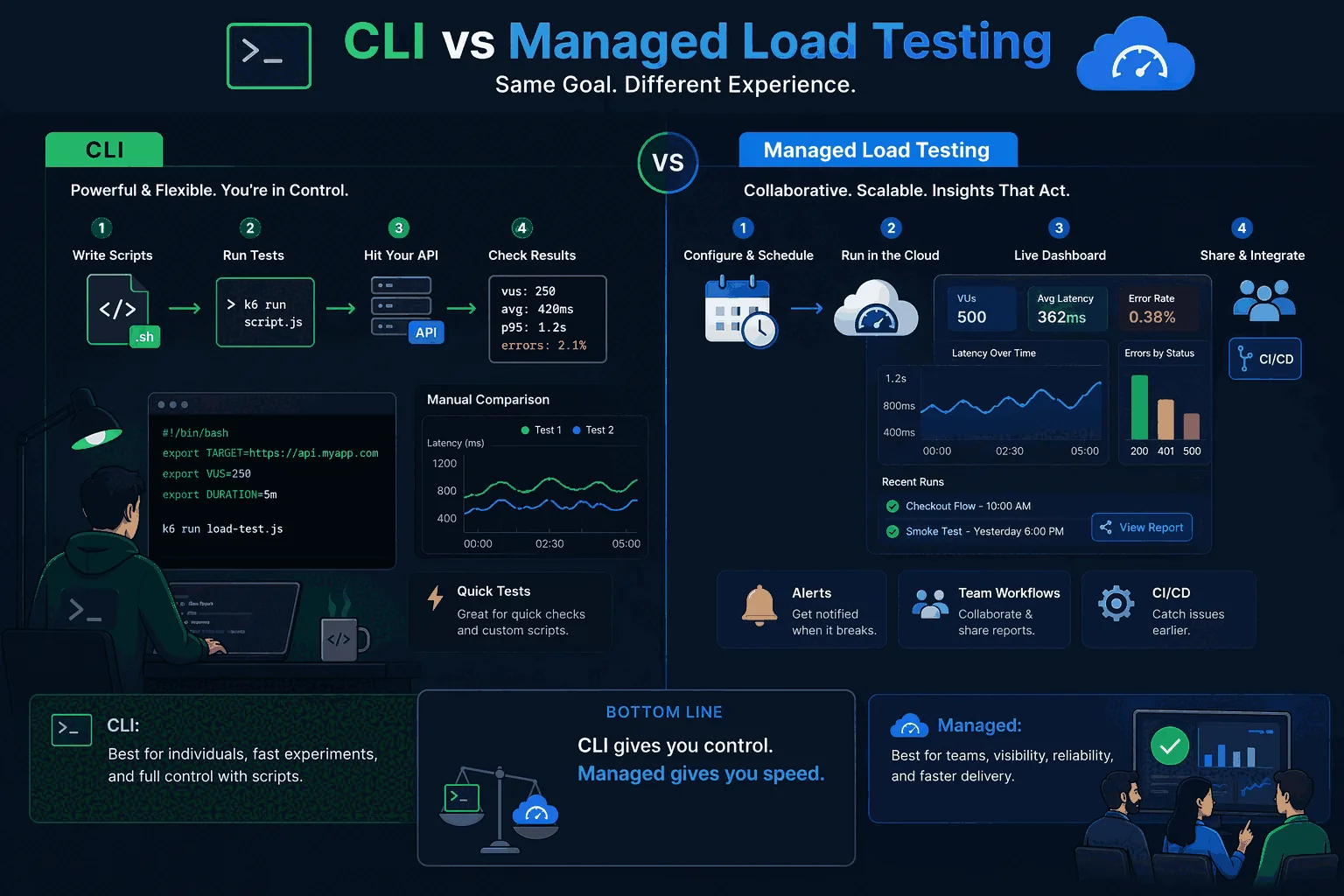
For Linux-heavy teams, the question is not whether command-line tools are powerful. They are. The practical question is whether your organization also needs saved scenarios, report links, shared access, and recurring baselines around those checks.
What to look for in a Linux HTTP load testing tool
First, installation should be boring. Whether the team uses native packages, binaries, containers, or Go/Rust-based distribution paths, the tool should not turn setup into a problem. Second, invocation should be stable. Flags, targets, environment variables, auth, request bodies, and output behavior should all be predictable enough to survive scripting.
Third, output should be structured enough to interpret or export. Linux-heavy teams can absolutely work with text output, but plain walls of numbers become a problem once checks turn into release gates. Finally, the tool should have a clear story around repeatability. A one-off load generator can be useful. A repeatable Linux workflow is much more valuable.
Vegeta on Linux
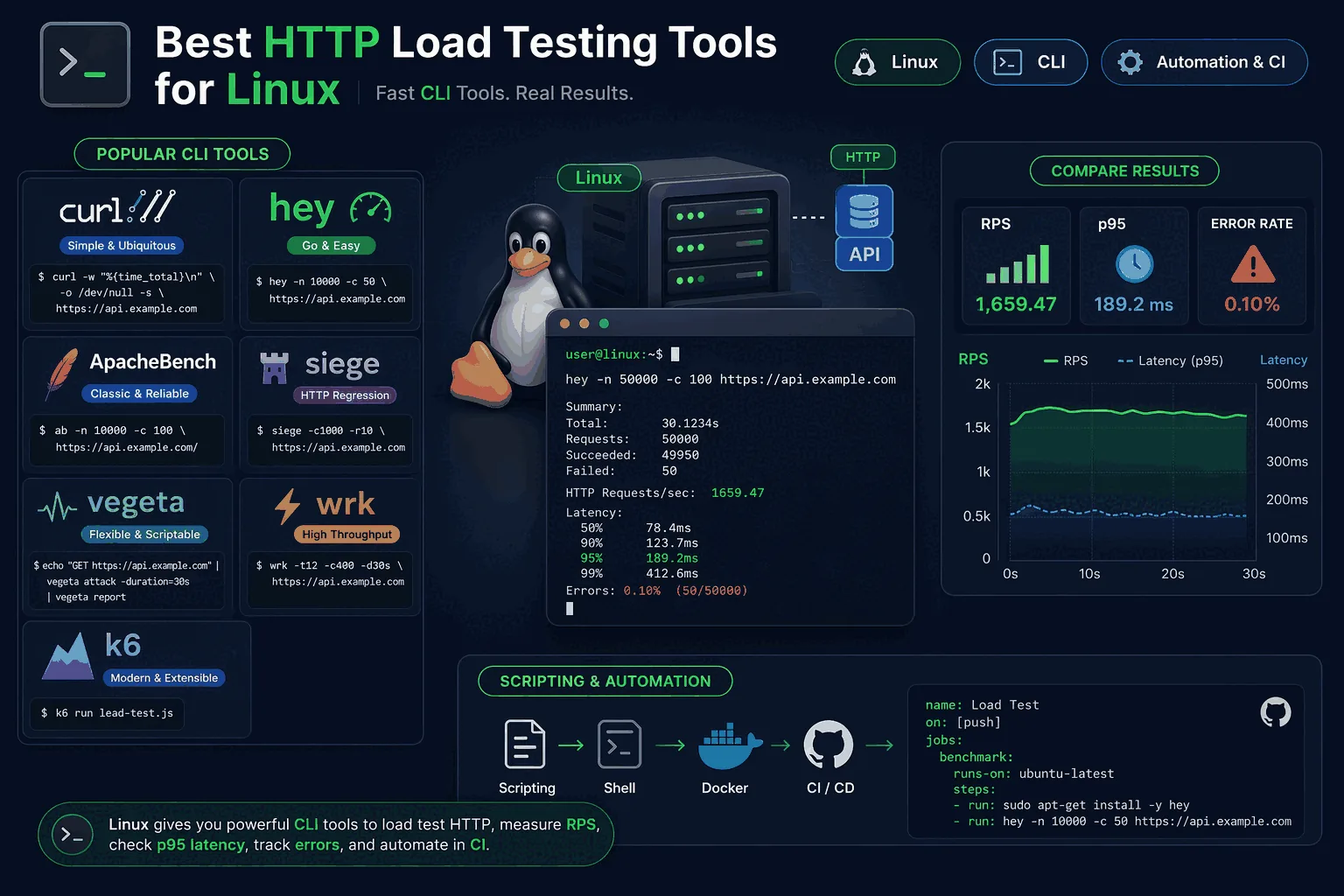
Vegeta remains one of the best fits for Linux-centric teams because it feels native to the environment. Its rate-based model, clean CLI usage, and script-friendly behavior make it a natural choice for engineers who want disciplined HTTP testing without heavier scaffolding.
It works especially well for backend services, API routes, and controlled checks inside shell-driven workflows. If your team wants a sharp CLI tool and already has strong surrounding observability, Vegeta is hard to argue against as a first stop.
The caution is familiar: Vegeta itself is not the whole workflow. Linux teams often underestimate how quickly a good binary turns into an ecosystem of scripts, targets files, ad hoc thresholds, and shared tribal knowledge. That is not Vegeta’s fault. It is simply the natural limit of using a small tool to solve a broader process problem.
hey on Linux
hey is attractive on Linux for the same reason it is attractive anywhere: it is fast, small, and easy to use. It is a particularly good fit for quick checks during development or debugging when you want almost zero ceremony. For Linux engineers who value minimalism, that is a feature.
The downside is that the same minimalism becomes a ceiling earlier than it does with Vegeta. hey is best understood as a lightweight pressure-check tool, not the center of a mature performance workflow.
h2load on Linux
h2load matters when the Linux team’s question is specifically about HTTP/2. Because Linux-heavy teams are often working close to infrastructure, proxies, or edge behavior, that happens more often than casual roundups suggest. If protocol fidelity matters, h2load deserves a place in the toolchain.
It is not the broadest recommendation in this article, but it is the most important protocol-specific one. When you care about stream behavior, connection reuse, and HTTP/2 semantics, it is a better answer than trying to force a generic tool into the role.
k6 on Linux
k6 is strong on Linux because it blends nicely into developer-centric automation. Teams that like tests as code, already use CI heavily, and are comfortable maintaining scripts often find k6 to be the most attractive middle ground between tiny binaries and managed platforms.
That makes it especially relevant for engineering-driven organizations. If you want version-controlled load tests and do not mind a more code-first ownership model, k6 is a serious Linux answer.
The question is whether the whole team wants that model. Linux compatibility is not the same as team adoption. Many organizations can run k6 very effectively on Linux and still find that reporting, visibility, or handoff remain awkward for broader release workflows. That is where the decision starts to resemble LoadTester vs k6 rather than “what runs best on Linux?”
When Linux teams still choose managed tooling
Linux-first teams sometimes assume that because they can automate everything, they should. That is not always true. Managed tooling becomes valuable the moment the team wants broader visibility, easier comparison across runs, live analytics, alerts, or less time spent maintaining the machinery around the tests.
LoadTester is relevant here because it does not ask Linux teams to stop being Linux teams. It simply removes some of the recurring coordination cost around scaling, result sharing, and repeatable release workflows. You can still think like an engineer. You just do not have to build the whole process from shell pieces yourself.
For many product teams, that tradeoff is worth it sooner than expected. Once a test matters to release quality instead of only to local debugging, the workflow around the test becomes just as important as the binary that generated the load.
Best fit by team
If your Linux team wants a sharp, disciplined CLI tool for HTTP testing, start with Vegeta. If you want the smallest quick-check utility, hey is still fine. If HTTP/2 matters, keep h2load close. If your team wants tests as code and developer-owned automation, k6 is a strong option.
If your real pain is not binary choice but process sprawl — scripts everywhere, output scattered, repeatability weak, release checks still ad hoc — then LoadTester is likely the better answer. It is especially strong when Linux proficiency is high but engineering time is still too valuable to spend on workflow glue.
Frequently asked questions
Which load testing tools are available in standard Linux package repos?
ApacheBench (apache2-utils), Siege (siege), and wrk are in most Debian/Ubuntu and Fedora repos. Vegeta, hey, h2load (nghttp2), and oha are commonly packaged but may need a backports repo or a recent distro release. JMeter and k6 are best installed from their own repositories or download pages because distro packages tend to lag releases. Check the version actually installed before benchmarking.
Are CLI tools container-friendly for CI runners?
Yes. ApacheBench, hey, Vegeta, wrk, oha, and h2load all ship as small static or near-static binaries that drop cleanly into Alpine or distroless images. Container size is usually under 20 MB. JMeter is heavier because of the JVM. For CI runners with cached layers, the lightweight CLI tools start in well under a second, which matters when a smoke test runs on every pull request.
Do you need root or special kernel tuning to drive serious load from Linux?
For request rates under a few thousand RPS, default kernel settings work fine. Above that, you usually need to raise file descriptor limits (ulimit -n), expand the ephemeral port range (net.ipv4.ip_local_port_range), and consider tcp_tw_reuse. Generating very high RPS from a single host also benefits from disabling NIC offloading and pinning the load generator to specific cores. None of this requires root if your runner already has the limits configured.
These are the official docs, specs, or operational references most relevant to this topic.
How this comparison was evaluated
For the Linux tools page, we evaluated CLI fit from the perspective of teams that already like Linux automation. We looked at package availability, local reproducibility, CI use, private-network access, report retention, comparison across releases, and how much glue is needed around the load generator.
The page favors Linux CLIs for local experiments and locked-down environments. It favors LoadTester when the same HTTP/API check must become a shared, repeatable, and auditable part of the delivery process.
When LoadTester is not the right option
LoadTester is intentionally focused on repeatable HTTP and API load testing workflows. For this page, the honest recommendation depends on whether your team needs Linux HTTP load testing tools for its native strengths or needs LoadTester for repeatable team execution.
- Use Linux CLIs for fully local tests. If tests must run from a bastion, VPN-only machine, or isolated build agent, local tooling is the natural choice.
- Use package-manager simplicity for smoke checks. For a quick apt/brew-installed probe against one endpoint, a managed product may add unnecessary process.
- Use custom shell pipelines when output is already solved. Teams with mature log collection, dashboards, and retention around CLI tools may not need another reporting layer.