
Google Cloud Load Testing: Options and How LoadTester Fits
Google Cloud is a very good place to run applications, scale services, observe latency, and automate delivery. It is not, however, a single ready-to-go managed load testing product in the same way that some engineers expect when they search for “cloud load testing.” That distinction matters. When people say they want to do load testing on Google Cloud, they usually mean one of two things.
First, they may want to run the target system on Google Cloud and validate how it behaves under traffic. That is a normal and healthy performance engineering need. Second, they may want to run the testing system itself on Google Cloud—using services such as Cloud Run, Google Kubernetes Engine, Compute Engine, Cloud Monitoring, Pub/Sub, Cloud Storage, IAM, and open-source generators such as k6, Locust, JMeter, or similar tools. That is also valid, but it is not the same as buying one managed product with a simple workflow.
This guide is written for teams that want a clear answer to a practical question: what are your real options for Google Cloud load testing, and where does LoadTester fit? The answer is not that one approach is universally better. The answer depends on whether you want to operate a testing stack, or whether you mainly want quick API and HTTP performance validation with thresholds, assertions, auto-stop rules, and clear release reports.
Below, we will look at how load testing on Google Cloud typically works, what Google Cloud is good at, what operational friction teams often feel, and when a purpose-built workflow such as LoadTester is the simpler choice.
Why GCP does not have one default native load testing service
Google Cloud focuses heavily on infrastructure primitives, platform services, scaling, monitoring, networking, and developer tooling. That means it offers strong components for performance testing, but not always one opinionated end-to-end product flow for mainstream API and HTTP load testing. In practice, teams assemble their own solution from building blocks or use third-party services.
From an engineering perspective, that is not automatically a weakness. In fact, many platform teams prefer cloud building blocks because they want control over where generators run, how credentials are handled, how private services are reached, how traffic is orchestrated, and how metrics are collected. If your team is already comfortable running workloads on GCP, this flexibility can be an advantage.
But flexibility creates ownership. Someone still has to decide which load engine to use, where tests execute, how to store scenarios, how to pass secrets, how to watch costs, how to collect results, and how to turn raw observations into pass/fail release decisions. That ownership is often the hidden difference between “we can do load testing on GCP” and “we have a sustainable load testing workflow.”
What Google Cloud gives you
- Flexible infrastructure such as Cloud Run, GKE, and Compute Engine
- Strong observability with Cloud Monitoring and Cloud Logging
- Global regions and networking primitives
- Autoscaling and platform-level control
What Google Cloud does not automatically give you
- A single default managed load testing workflow for common API use cases
- Out-of-the-box thresholds, assertions, and release gating in one focused product experience
- A simple team-wide reporting workflow without extra assembly
- Low-ownership testing unless you deliberately keep the stack simple
Your load testing options on GCP
Most teams evaluating GCP load testing end up in one of four buckets.
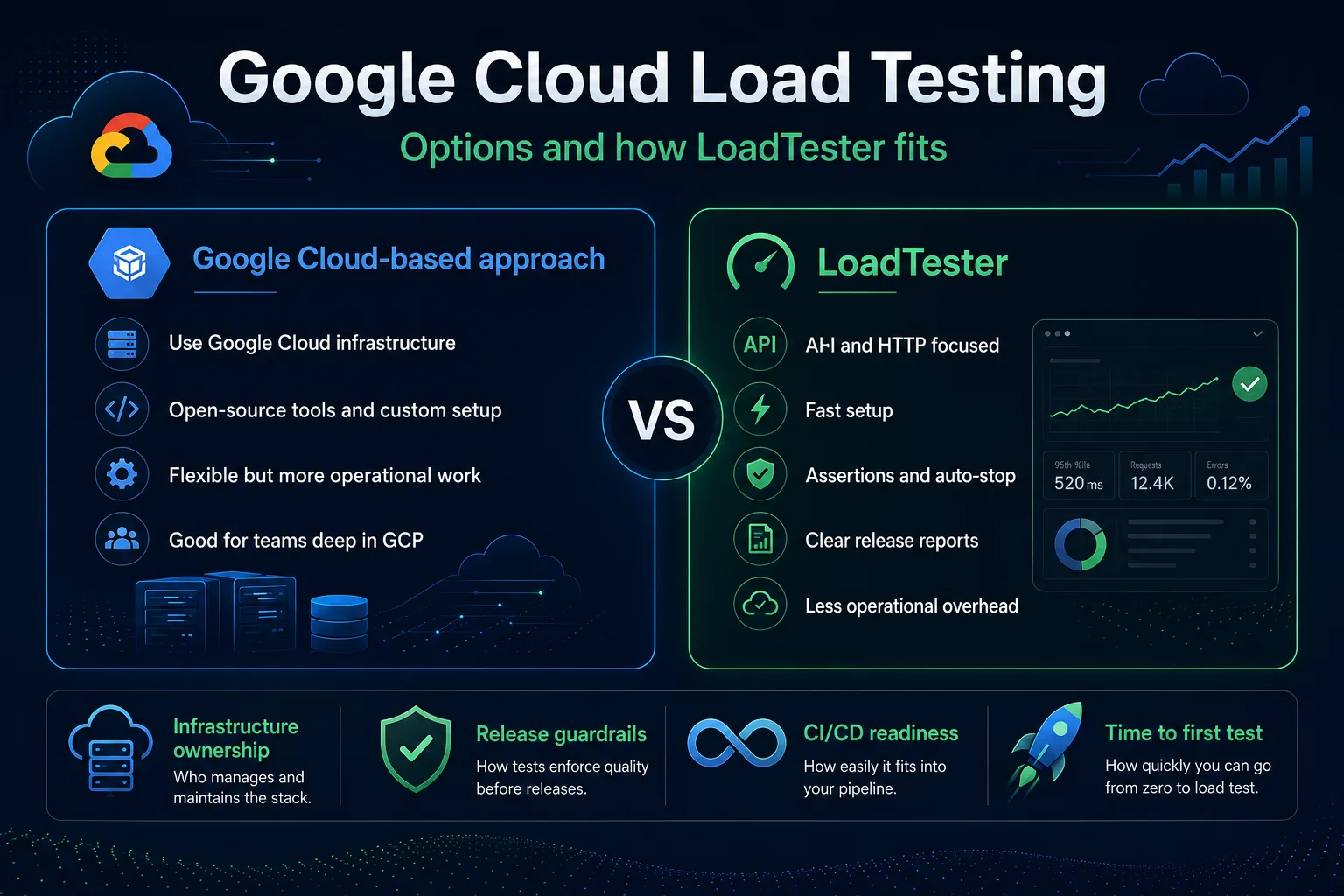
Option 1: use open-source tools on GCP infrastructure. This is the most common pattern. Teams run k6, Locust, or JMeter on Compute Engine, Kubernetes, Cloud Run, or containers they manage themselves. This gives control, but it also means the team owns deployment, scaling, runtime configuration, and much of the result workflow.
Option 2: build a deeper custom performance platform. Platform teams sometimes create a more complete internal setup with orchestration, dashboards, automation, IAM, cost controls, result storage, and service-specific test templates. This can work well for mature organizations, but it is rarely the fastest path for product teams that just want repeatable release checks.
Option 3: use a marketplace or third-party tool. Many teams decide that building the test stack is not where they want to spend time. Instead, they use a purpose-built platform that handles the load testing workflow more directly.
Option 4: use LoadTester for API and HTTP workflows. This option is often the most practical when the real job is to validate APIs, web services, or websites quickly, enforce thresholds, stop runs when latency or bad status codes cross limits, and generate clear pass/fail signals for release decisions.
How load testing on Google Cloud typically works
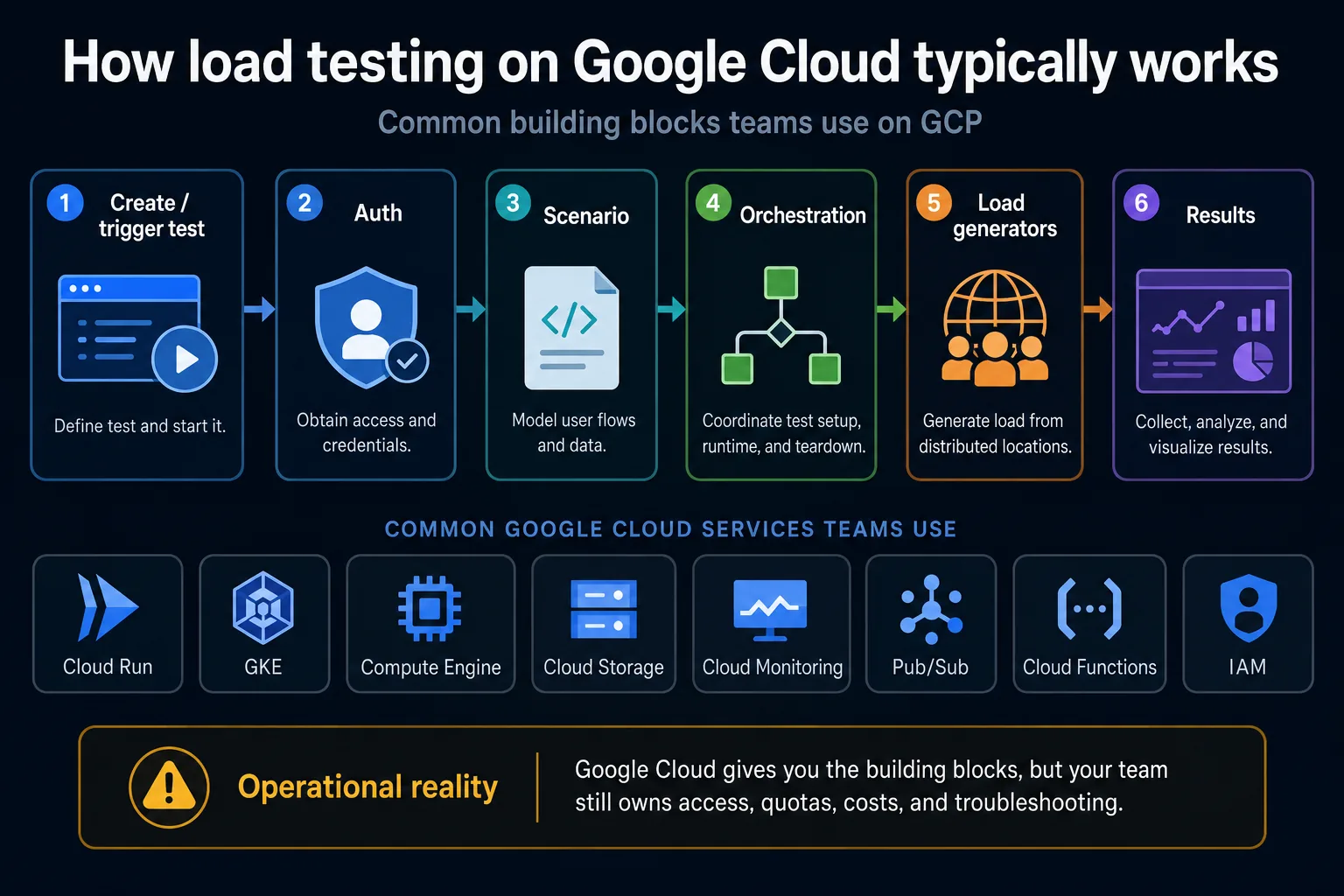
A typical Google Cloud load testing workflow starts with defining the test target and the scenario: what endpoints are exercised, what user flows are represented, what authentication is required, and what traffic pattern should be applied. The team then chooses where the load generators run, how they are triggered, how credentials are passed securely, and how results are collected.
In a GCP-native implementation, you might trigger the test from Cloud Build or an internal service, authenticate using a service account or secret manager workflow, prepare the scenario payload, orchestrate the run, execute load generators across one or more regions, and ship metrics into Cloud Monitoring, Cloud Logging, or a custom result store. The mechanics are perfectly achievable. The question is how much of that machinery your team wants to own.
That operational detail is the main reason many teams underestimate the cost of a cloud-native testing approach. The cloud resources themselves are only one part of the story. The other part is engineering ownership: access, quotas, network boundaries, image maintenance, CI wiring, failure handling, dashboard readability, and troubleshooting when a test fails for tooling reasons instead of real system reasons.
Where Google Cloud is strong
Google Cloud is a strong choice when cloud-native control is the point. If you want fine-grained control over where generators run, how they reach internal services, what service accounts they use, how they scale, and how you correlate the results with platform metrics, GCP can be an excellent environment.
It is also strong when the system under test already lives on Google Cloud and the team wants visibility that matches the rest of the operations model. If you are load testing Cloud Run, GKE, a backend behind a Google Cloud load balancer, or an internal platform component, then Cloud Monitoring and related services can help you inspect the system response while traffic increases. For platform engineers, this can be very valuable.
Another strength is composability. Teams can combine Compute Engine, GKE, Cloud Run, Pub/Sub, Cloud Storage, Cloud Functions, IAM, and monitoring services in ways that fit internal standards. That is useful in large organizations where governance and consistency matter more than having the lightest possible testing workflow.
Where teams usually feel friction
The friction appears when the testing problem is smaller than the platform you are building around it. Many product teams do not need a generalized cloud performance platform. They need to answer a narrower question: can we ship this API change, login flow, checkout step, search endpoint, or webhook pipeline without hurting latency or reliability?
At that point, cloud flexibility can feel like overhead. There is more setup, more places to debug, more responsibility for scripts and runtime behavior, and more manual interpretation of results. Even if the infrastructure is inexpensive, the workflow cost can still be high if only one or two engineers truly understand how the testing system works.
This is why load testing maturity is not just a tooling question. It is a workflow question. The best tool is not the one that can theoretically do the most. It is the one that your team can use consistently to create clear decisions.
Using LoadTester with Google Cloud workloads
LoadTester fits well when your workloads are on Google Cloud, but your team does not want to operate the testing stack itself. You can still test APIs and websites that run on GCP. The difference is that you are not assembling the test runner platform out of cloud primitives. Instead, you are using a workflow focused on requests, traffic shape, thresholds, assertions, and reporting.
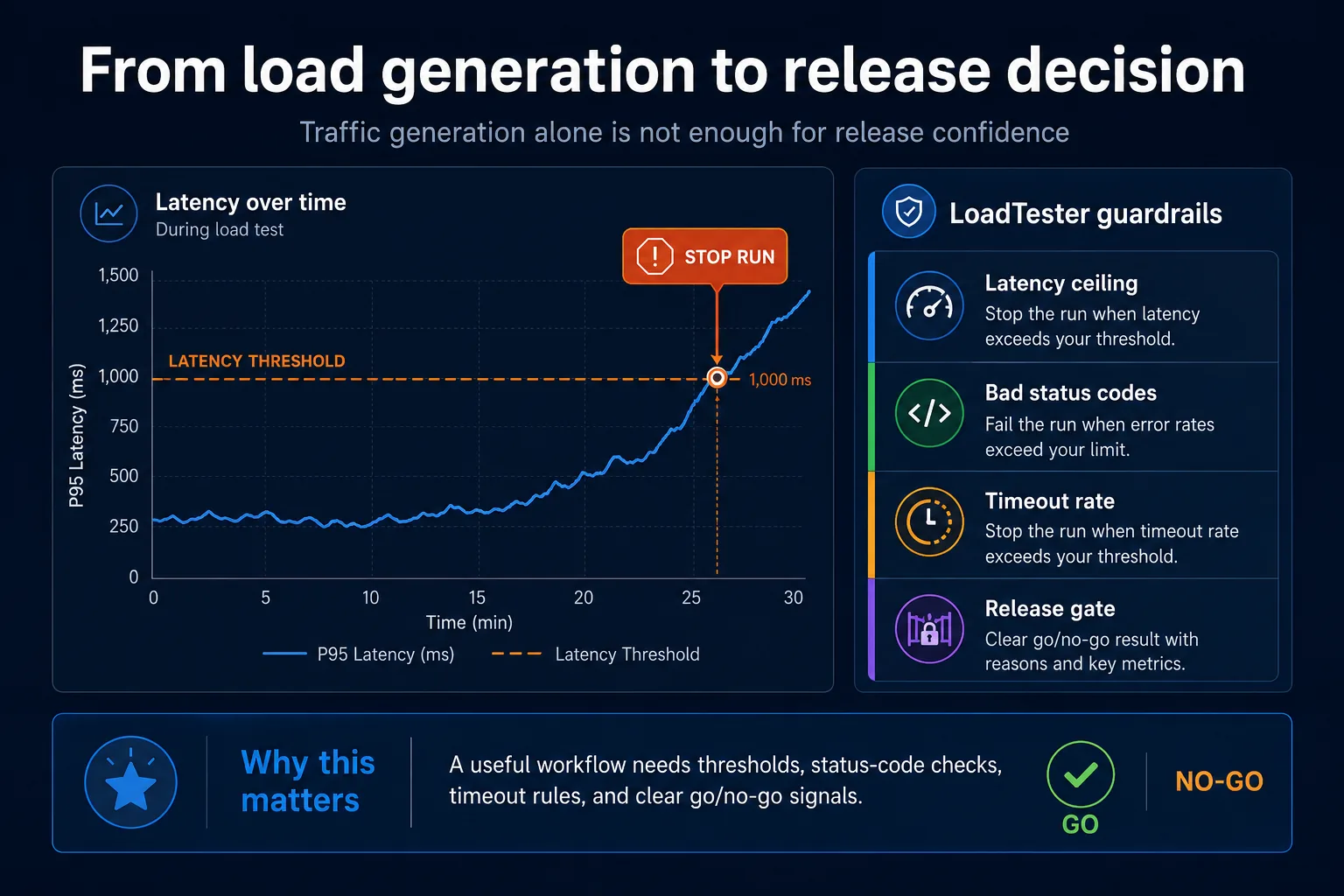
That matters because most release workflows need clear rules. For example: stop the test if p95 latency goes above the agreed threshold; stop if a certain level of 5xx or other bad status codes appears; stop if timeout rate spikes; make the result readable for engineering and product stakeholders; and preserve a clear record for release review. These are release and quality questions, not infrastructure questions.
LoadTester is also a better fit when the team wants faster onboarding and less specialist ownership. If the workflow is simpler, more people can use it. If more people can use it, performance validation is more likely to happen before launches, after high-risk API changes, and during scheduled release checks rather than only when a platform expert has time.
Comparing your options
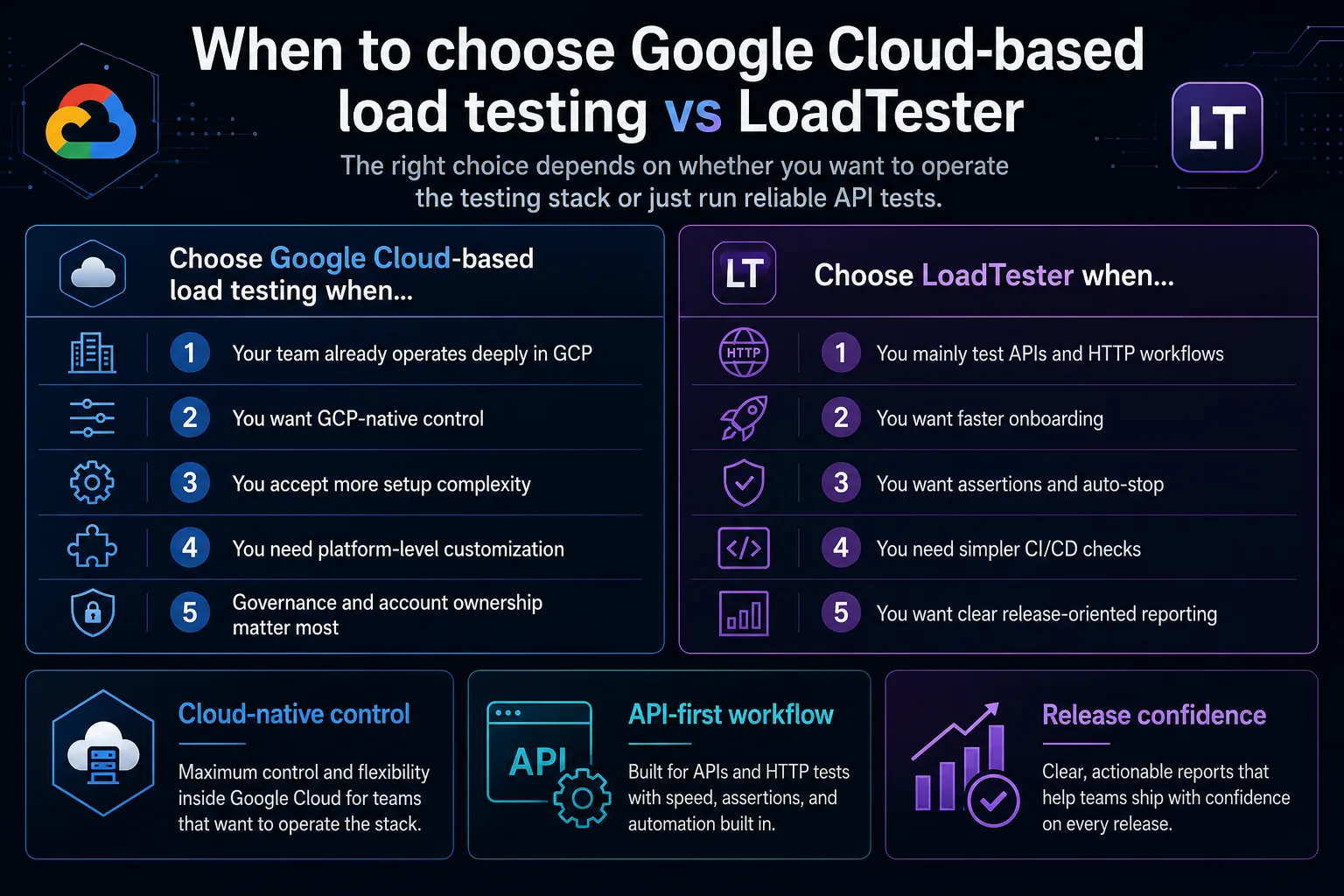
If your team already runs deeply on GCP and wants full control over the testing environment, a cloud-based stack can be the right answer. If, on the other hand, you mainly want API and HTTP performance checks without building and operating a mini platform around them, LoadTester will often be the more efficient choice.
The key comparison points are usually:
- Infrastructure ownership: who operates the stack?
- Time to first useful test: how fast can the team go from zero to a meaningful scenario?
- Guardrails: can you enforce thresholds, assertions, and stop conditions easily?
- CI/CD readiness: how naturally does the workflow fit into release pipelines?
- Reporting clarity: do results help a team make decisions quickly?
Those are not abstract concerns. In practice, they determine whether performance validation becomes routine or remains occasional.
Pricing and cost considerations
Cost on GCP is not only about the compute bill for a test run. It also includes engineering time, operations time, dashboard and storage choices, and the cost of complexity. A self-assembled workflow can look cheap on paper while still being expensive in practice if it demands ongoing maintenance.
Likewise, a productized workflow may look more obvious as a line item, but it can reduce hidden operational cost significantly. This is especially true for teams that care about velocity and repeatability more than complete cloud customization. The responsible way to evaluate cost is to count both infrastructure usage and human workflow cost.
Best practices for load testing on Google Cloud
Whether you build on GCP or use a simpler product workflow, a few principles remain the same.
- Start with a realistic target. Do not benchmark only a toy endpoint if your real risk is an authenticated, stateful, or write-heavy workflow.
- Define thresholds before you run. Know what p95, p99, error rate, and timeout rate would block a release.
- Ramp traffic gradually. Sudden spikes are not always the best first test. Stepwise increases help isolate the point where behavior changes.
- Correlate client and server behavior. If your service runs on GCP, watch Cloud Monitoring or your observability stack while the test runs.
- Protect shared dependencies. Email, payment, webhook, and third-party integrations should not be stressed accidentally.
- Keep release tests separate from rare, heavyweight experiments. Not every test belongs in every pipeline.
Real-world use cases
Cloud Run teams often want to understand scaling, concurrency, cold-start behavior, and tail latency. They may use GCP guidance and infrastructure metrics to observe service behavior while driving realistic traffic.
GKE or internal platform teams may use GCP-native load testing when internal networking, service identity, or custom orchestration are critical.
SaaS product teams often care more about whether an API, checkout, or login path stays healthy through releases. For them, a focused product workflow with assertions and auto-stop usually creates faster operational value.
FAQ
Does Google Cloud have a single managed load testing service?
Not in the same sense as a one-size-fits-most product workflow for mainstream API and HTTP load testing. In practice, teams usually use Google Cloud building blocks together with open-source tools or third-party services.
Can I load test applications hosted on GCP with LoadTester?
Yes. If the target API or website is reachable and you have permission to test it, LoadTester can be used regardless of where the application is hosted.
When should we choose a GCP-based stack instead of LoadTester?
Choose a GCP-based stack when deep platform control, private networking, cloud-native customization, or internal standardization are more important than workflow simplicity.
References
Official Google Cloud resources and documentation related to load testing, performance validation, and monitoring: