
Azure Load Testing Alternative: A Practical Guide for API and HTTP Load Testing Teams
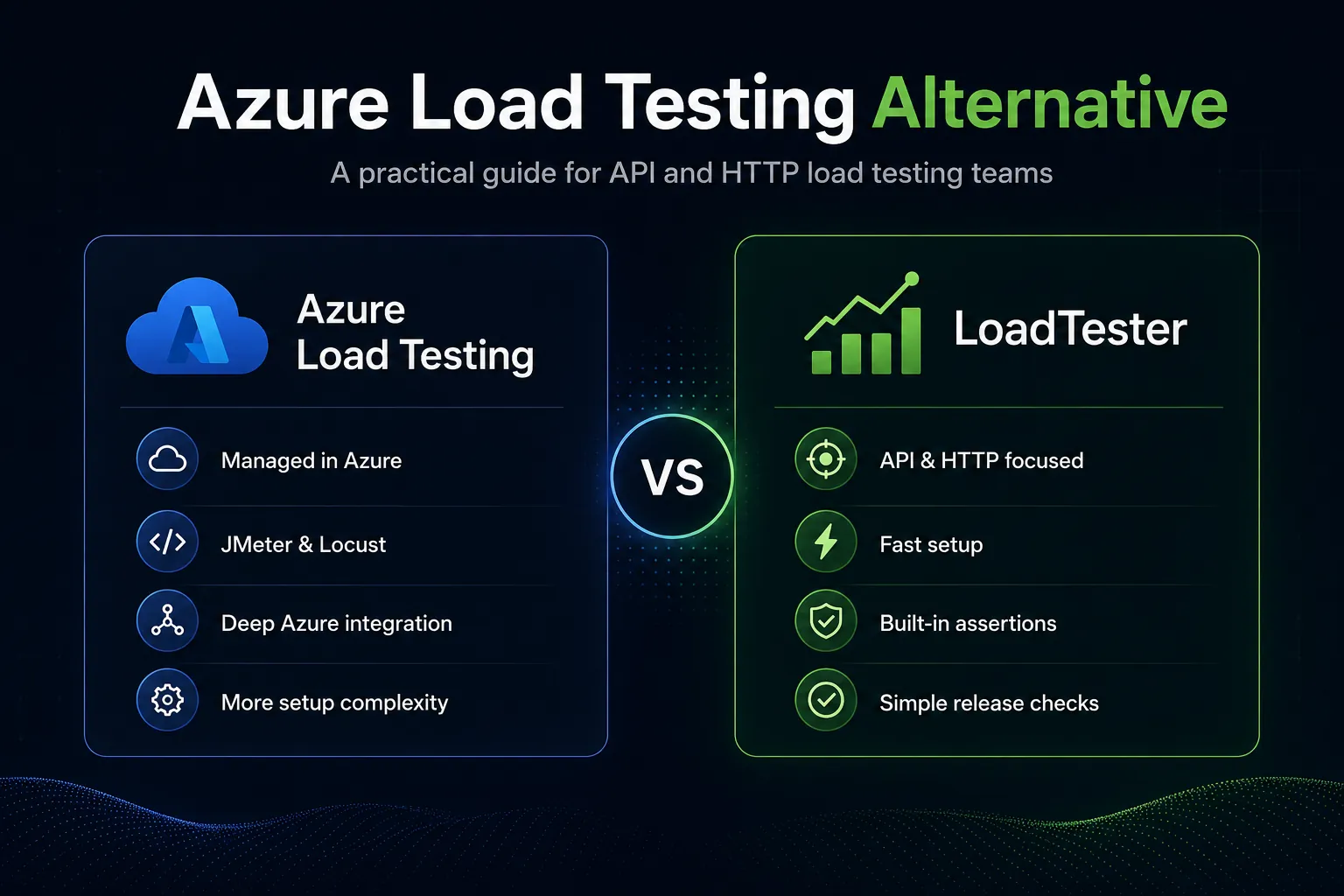
Azure Load Testing is a legitimate tool, not a straw-man competitor. It is a fully managed service from Microsoft designed to generate large-scale traffic and help teams test application performance, scalability, and capacity. It can start from a simple URL-based test, and for advanced scenarios it supports Apache JMeter and Locust scripts. If your stack already lives in Azure and your team wants Azure Monitor visibility, private endpoint support, and a service that sits naturally inside the Azure ecosystem, Azure Load Testing can make sense.
But a lot of teams evaluating Azure Load Testing are not really asking, “Can this service generate load?” They are asking a different question: is this the simplest, clearest, and most practical way for my team to run repeatable HTTP and API load tests? That is where the conversation changes. Many product teams do not need broad protocol support, deep Azure integration, or a script-heavy workflow. They need something they can set up fast, hand to the team, run in CI, guard with assertions and thresholds, and use as part of a release decision without a lot of tooling overhead.
This article is written from that practical point of view. It compares where Azure Load Testing is genuinely strong, where teams often feel friction, and when a simpler alternative such as LoadTester is the better operational fit. The goal is not to claim that one tool wins every time. The goal is to help you make a better decision for your stack, your team, and your release workflow.
What Azure Load Testing actually is
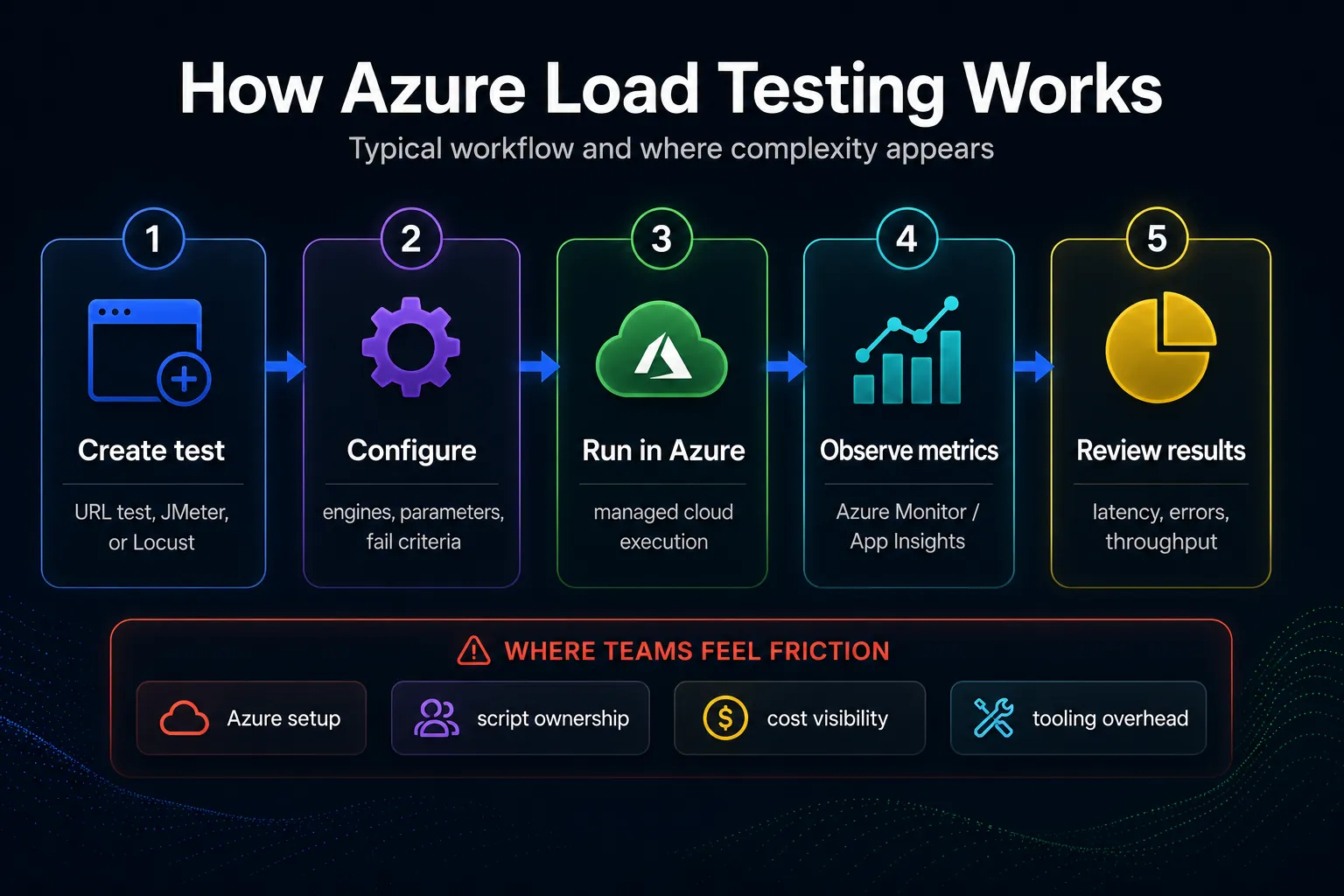
Azure Load Testing is a cloud service that lets teams create and run load tests without manually managing the underlying load generator infrastructure. Microsoft positions it as a fully managed service that supports quick URL-based tests and more advanced script-based tests. For advanced cases, teams can upload JMeter tests or Locust tests and execute them in the managed service. The platform also supports fail criteria, CI/CD integration, virtual network scenarios, and dashboards that combine client-side metrics with Azure resource metrics.
That means Azure Load Testing is broader than a simple single-purpose HTTP checker. It is built to fit organizations that may already be invested in Azure governance, Azure networking, and Azure observability. If your team is standardizing on Azure for infrastructure, monitoring, and deployment workflows, the service can feel like a natural extension of that platform strategy.
At the same time, this breadth is also where complexity begins. A broad cloud service is rarely optimized for the fastest path to a single job. Teams that mainly need API and HTTP load testing often discover that the operational problem is not “how do I generate load in the cloud?” It is “how do I create useful tests quickly, set guardrails, interpret results clearly, and make release decisions without too much ceremony?” That is the angle where alternatives deserve a serious look.
Where Azure Load Testing is strong
A fair alternatives article has to begin with the real strengths. Azure Load Testing earns attention for several reasons.
1. Managed scale without building your own load infrastructure
For many organizations, infrastructure management is one of the least enjoyable parts of performance testing. Provisioning load generators, coordinating regions, scaling workers, and keeping tooling current all take time. Azure Load Testing removes a large part of that burden. That is especially useful for organizations that already trust Azure as the place where operational tooling belongs.
2. Support for JMeter and Locust
This is one of the service’s biggest practical advantages. If your team already owns JMeter assets or Locust assets, Azure Load Testing provides a managed place to run them. That can reduce migration friction, preserve existing test investments, and make it easier to keep a familiar test model while moving execution into a managed environment.
3. Good alignment with Azure-native observability
One reason enterprises choose Azure Load Testing is that it connects naturally with Azure metrics and Azure-hosted application components. If bottleneck investigation already happens through Azure Monitor, Application Insights, and related services, having the load test in the same ecosystem simplifies handoffs. It also helps teams correlate load with resource behavior more quickly.
4. Private endpoint and enterprise networking scenarios
Not every team tests only public endpoints. Some need to reach internal services, private APIs, or workloads behind enterprise network controls. Azure Load Testing supports virtual network deployment patterns for such scenarios. This matters more in large internal platforms and less in smaller SaaS teams, but when you need it, it matters a lot.
5. Governance and procurement comfort
In some organizations, the winning tool is not the one with the prettiest UX. It is the one that satisfies procurement, governance, and platform standardization requirements. If the company already buys Azure broadly, security reviews are aligned with Microsoft tooling, and there is an internal preference for central platform services, Azure Load Testing can have an organizational advantage even before feature comparisons begin.
Where teams tend to feel friction
Most teams looking for an alternative are not leaving because Azure Load Testing is incapable. They are leaving because the workflow feels heavy relative to the job they actually need to do. These are the pain points that come up most often in real evaluation conversations.
Setup and cognitive overhead
A managed service still requires configuration. You need to think about how the test is created, how it is parameterized, how identities and access work, where metrics will be viewed, how fail criteria are defined, and which team owns the test assets. For organizations deep in Azure, that overhead can feel acceptable. For teams that just want to validate an API release candidate or run repeatable HTTP checks on every release, it can feel like too much platform ceremony.
Script ownership does not disappear
Support for JMeter and Locust is a strength, but it also means script ownership can remain a long-term cost. Someone still has to understand the test asset, maintain parameters, evolve the scenarios, debug failures, and keep the tests representative. That is a good trade when your team already believes in a script-first model. It is less attractive when you want a product workflow that reduces the amount of specialist scripting knowledge required.
Cost visibility can be less intuitive than teams expect
Cloud-managed load testing sounds simple until a team starts asking operational questions. How often are we running tests? How many engines are we using? Are we over-testing? What does a repeated release-gate workflow look like over time? Even when pricing is reasonable for the value delivered, teams often want a clearer, more predictable sense of what routine use looks like. Simpler tools tend to be easier to reason about operationally, especially for small and medium product teams.
The workflow may feel broader than an API-first team needs
A team focused almost entirely on HTTP APIs often wants speed and clarity more than flexibility. They want to define thresholds, target realistic traffic, run a test, inspect p95 and p99 latency, catch bad status codes, and stop automatically when conditions are breached. If the product experience feels more like cloud orchestration plus script execution plus dashboard interpretation, the workflow can be technically correct while still being heavier than necessary.
CI/CD integration is possible, but not always the simplest path
Azure Load Testing supports CI/CD workflows and fail criteria. That is good. The practical question is whether your team can wire that process into everyday release engineering without creating a lot of friction. Many teams are not asking for maximal flexibility; they are asking for the shortest path from “we changed the API” to “we have confidence that latency and error rates stayed inside the release threshold.” When that is the job to be done, simplicity matters.
When LoadTester is the more practical fit
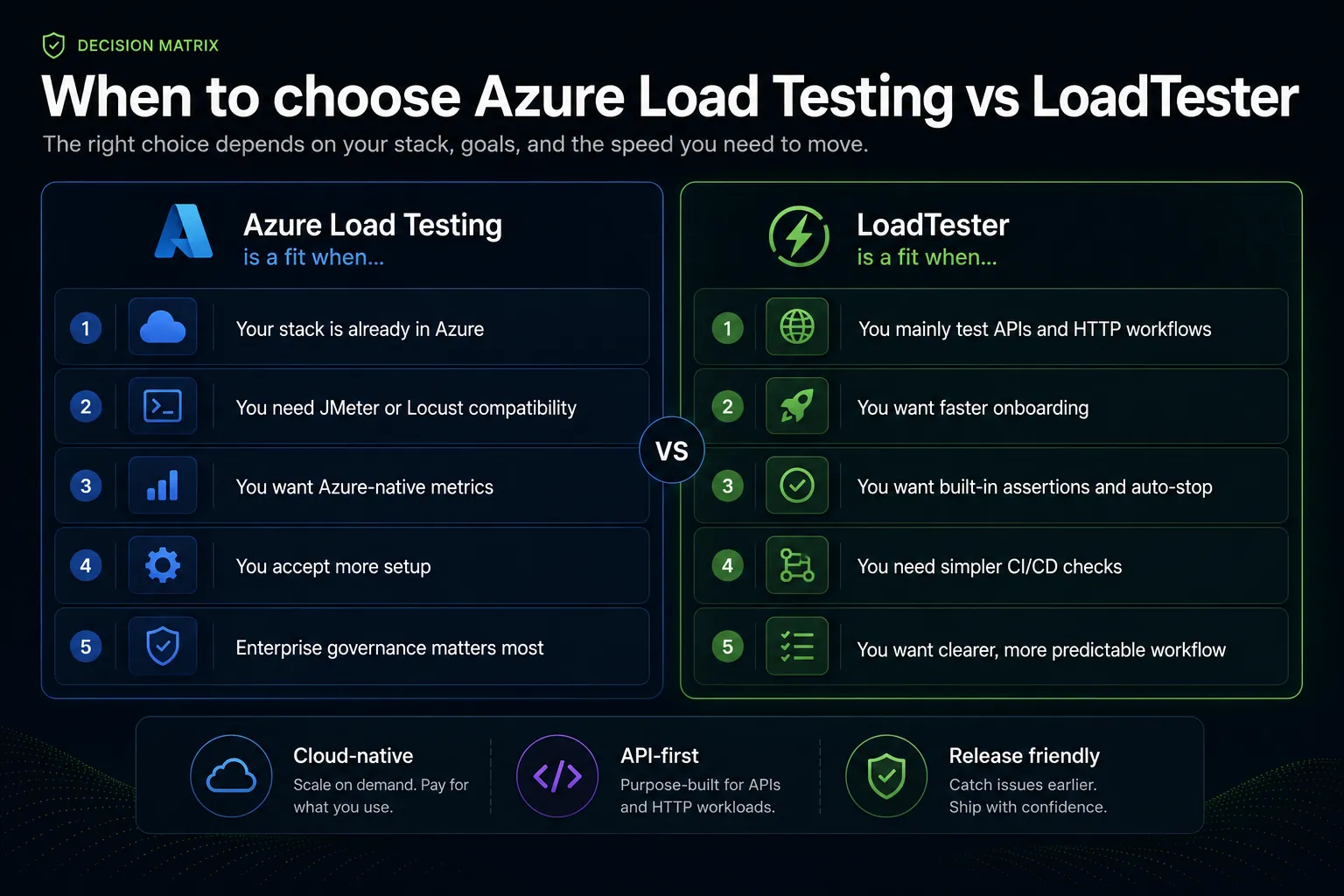
LoadTester is usually the better fit when the main workload under test is HTTP and APIs, when the team values fast setup, and when release-oriented workflows matter more than ecosystem breadth. This is not a claim that “simpler” means “less serious.” In practice, simpler often means the team runs performance checks more consistently, understands the results faster, and turns performance expectations into an actual release discipline instead of an occasional expert-only exercise.
You mainly test APIs and HTTP workflows
If your core use case is REST APIs, HTTP endpoints, authenticated flows, or customer-facing application traffic over HTTP, purpose-built focus becomes an advantage. Instead of optimizing for the broadest protocol surface, the workflow can optimize for the most common and important decisions: request design, concurrency or request-rate control, thresholds, assertions, and result interpretation.
You want a faster onboarding curve
Many engineering teams never fail because they chose a weak tool. They fail because the intended testing workflow is too cumbersome to become routine. A tool that the team can adopt quickly often creates more real performance discipline than a theoretically broader tool that only a couple of people know how to operate confidently.
You want built-in assertions and auto-stop guardrails
One of the most useful operational differences in a simpler workflow is that assertions and stop conditions feel like first-class release guardrails, not afterthoughts. If latency crosses a ceiling, if bad status codes appear, if timeouts spike, or if error ratios climb beyond the agreed limit, the test should not merely produce an interesting report. It should actively help the team fail fast and stop spending time or traffic on a run that has already proved the release is not healthy enough.
You want easier CI and release checks
Release engineering is about repeatability. Teams want performance checks that can be repeated before launches, after major API changes, after database changes, or on scheduled baselines. The lower the tooling overhead, the easier it is to treat load testing as a living quality practice rather than a one-off special event.
You want a clearer operational workflow
When teams evaluate alternatives, “simple” often means “clear.” Clear setup. Clear ownership. Clear test configuration. Clear thresholds. Clear reporting. Clear go/no-go signals. In real engineering organizations, that clarity is not cosmetic. It is what helps product, engineering, and platform stakeholders agree on what the test means and what action should follow.
Feature-by-feature comparison
Test creation
Azure Load Testing: strong when you want either a quick URL-based start or to execute existing JMeter or Locust assets in a managed environment. The tradeoff is that advanced usage still inherits some of the complexity of those models.
LoadTester: stronger when the team wants a shorter path to API and HTTP test creation, especially when the goal is repeatable release checks rather than preservation of script-heavy testing estates.
Scale and infrastructure
Azure Load Testing: managed scale is a core benefit. You do not need to assemble the cloud execution infrastructure yourself.
LoadTester: also removes infrastructure burden for common API and HTTP test workflows, but the emphasis is less on broad ecosystem integration and more on making the most common performance-validation path easy to operate.
Observability
Azure Load Testing: especially attractive if the application already lives in Azure and the team wants Azure Monitor correlation. This is one of the strongest reasons to stay with the service.
LoadTester: more attractive when the team wants concise performance reporting, quick drill-down on latency and status signals, and simpler release-facing interpretation without requiring deep Azure coupling.
Assertions, thresholds, and auto-stop
Azure Load Testing: supports fail criteria and can automatically stop a run in response to certain error conditions.
LoadTester: shines when assertions and stop conditions are treated as an everyday part of the workflow. A team can make rules such as “stop if p95 exceeds X,” “stop if 5xx rises above Y,” or “stop if timeout rate crosses Z” part of the standard release discipline.
Required team skill profile
Azure Load Testing: often fits teams that already understand Azure operational patterns and are comfortable with JMeter or Locust where needed.
LoadTester: often fits product engineering teams that want to reduce specialist ownership and enable a wider group to participate in test design, execution, and review.
CI/CD and release validation
Azure Load Testing: integrates into CI/CD and can be part of enterprise pipelines.
LoadTester: is usually a better fit when you want performance checks to become a simple, repeatable part of everyday release validation rather than a separate cloud-service workflow that needs more orchestration.
Pricing and cost: how to think about it
Pricing changes, so the most responsible comparison is conceptual rather than pretending a static price chart will stay accurate. The right question is not simply “which one is cheaper?” The right questions are:
- How often will we run tests?
- How large are those tests?
- How much team time is spent on setup, maintenance, and interpretation?
- What is the cost of the workflow being heavy enough that teams run fewer performance checks than they should?
Azure Load Testing may be perfectly reasonable in organizations that already budget for Azure platform services and value Azure governance more than minimalist UX. But for teams whose main goal is frequent, practical API performance checks, the total workflow cost includes not only service usage, but also the cognitive and operational overhead required to keep the process alive.
This is where a simpler alternative can produce surprising value. If the workflow is easier, more engineers can use it. If more engineers can use it, load testing happens earlier and more consistently. If it happens earlier and more consistently, you reduce the chance that performance validation becomes an infrequent, high-friction event that only happens right before a risky launch.
Which tool should you choose?
Choose Azure Load Testing if most of the following are true:
- Your application stack is already heavily invested in Azure.
- You care about tight alignment with Azure Monitor and Azure-native observability.
- You want to keep using JMeter or Locust assets in a managed service.
- You need private endpoint, enterprise network, or broader governance alignment.
- You are comfortable with a somewhat heavier workflow in exchange for Azure ecosystem fit.
Choose LoadTester if most of the following are true:
- Your primary use case is API and HTTP load testing.
- You want faster onboarding and less workflow complexity.
- You care a lot about assertions, thresholds, and stop conditions as release guardrails.
- You want a clearer path to routine CI and release checks.
- You prefer a tool that is easier for product engineering teams to own directly.
If you are still unsure, run a practical evaluation instead of a feature spreadsheet exercise. Pick one representative API workflow. Define the threshold that would actually block a release. Build that test in both products. Measure how long it takes to create, run, review, share, and repeat the workflow. The winner is the one that makes your real engineering process easier, not the one that looks more impressive in a broad capabilities list.
Migration checklist: moving from Azure Load Testing to a simpler workflow
If your team is considering moving away from Azure Load Testing for day-to-day API performance checks, use this checklist:
- Inventory the tests you actually run. Separate essential release checks from nice-to-have experimental scenarios.
- Identify script debt. Determine which JMeter or Locust assets are still valuable and which ones survive only because nobody wants to clean them up.
- Define guardrails first. Agree on p95, p99, error-rate, and timeout thresholds before migrating the workflow.
- Start with one representative service. Do not migrate everything at once. Prove the new workflow on a real API with a real release gate.
- Validate reporting needs. Make sure product, platform, and engineering stakeholders can read and act on the results.
- Automate only after the workflow is clear. The fastest way to automate a bad process is still the fastest way to preserve a bad process.
- Keep one or two deep tests separate from routine release checks. Not every performance scenario belongs in every deployment pipeline.
A good migration does not mean throwing away serious performance engineering. It means separating the checks that must happen frequently from the heavyweight tests that only need to happen occasionally. Many teams benefit from making that distinction explicit.
Real-world evaluation patterns we see often
Pattern 1: the Azure-native enterprise team. These teams usually keep Azure Load Testing because the ecosystem fit is real. Their evaluation is less about feature gaps and more about procurement, governance, and standardization. If that is your team, Azure Load Testing is often the right choice.
Pattern 2: the API-centric SaaS team. These teams often move toward a simpler workflow. They care about fast setup, practical thresholds, easy result sharing, and repeatable release checks more than they care about maintaining JMeter or Locust compatibility as a long-term strategic goal.
Pattern 3: the mixed team with old scripts and new delivery pressure. This is the most interesting group. They have legacy script assets, but new expectations for faster delivery. In these cases, the best answer is often hybrid: keep the heavyweight scripted assets where they still provide value, and adopt a simpler, clearer workflow for the release-facing API checks that happen frequently.
Final verdict
Azure Load Testing is a credible managed load testing service and a sensible option for teams that are already deep in Azure or need JMeter and Locust support in a managed environment. It becomes less compelling when the team’s real job is narrower and more operational: create API load tests quickly, run them repeatedly, enforce thresholds, stop on failure conditions, and make release decisions with less friction.
That is why LoadTester is not just a name on a comparison list. It is a practical alternative in the workflow sense. If your team wants an API-first experience, clearer guardrails, faster onboarding, and simpler release checks, it is often the better fit. And in performance engineering, the tool that the team can actually use consistently is usually the one that creates the most value.