
Load Testing FAQ: 60+ Questions Developers Ask Before Testing APIs, Websites, and Production Systems
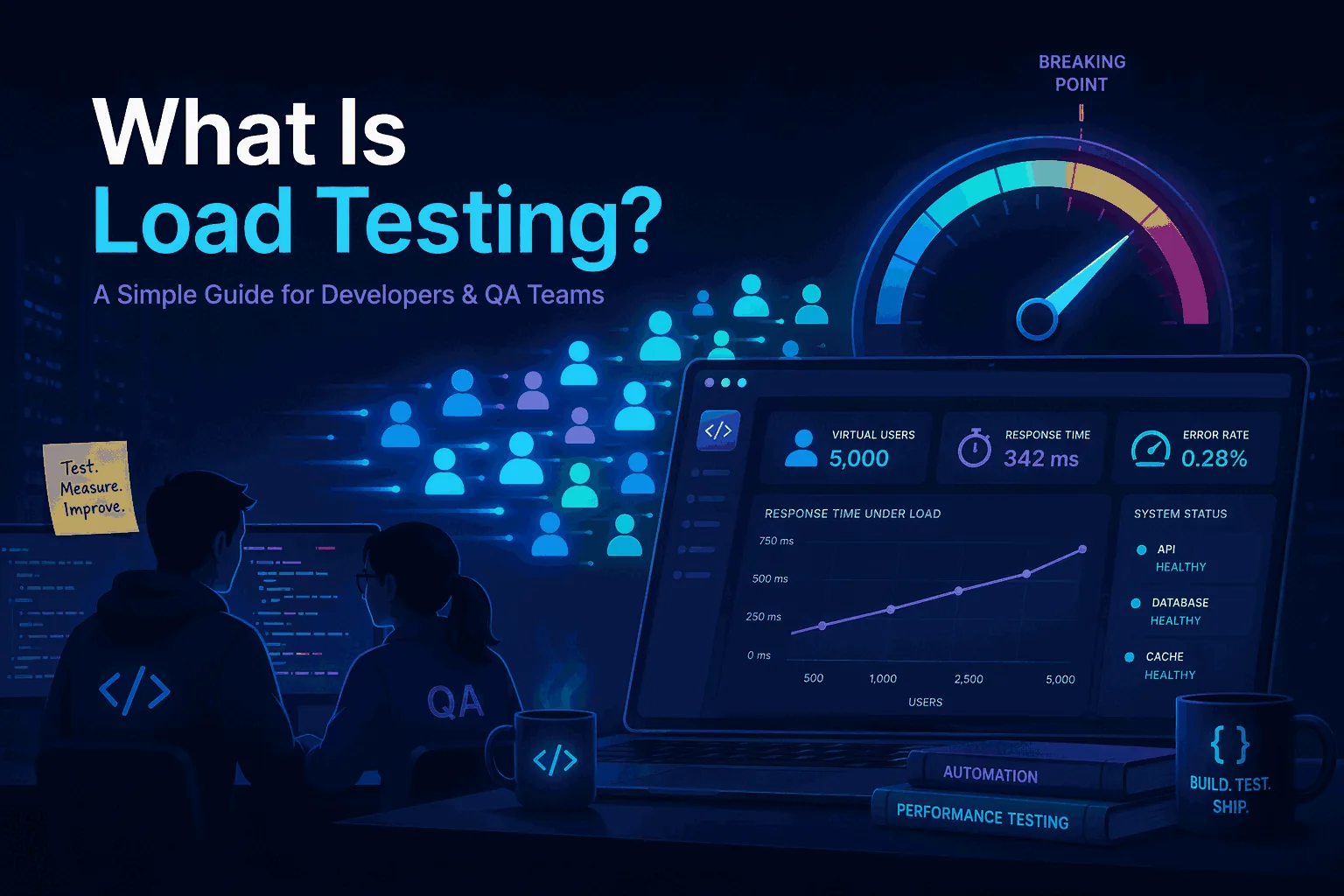
This load testing FAQ answers the practical questions teams ask before they run a test: how virtual users relate to RPS, why p95 matters more than average latency, whether 429 responses should fail a run, how to handle auth tokens, what to do with caching, how to make CI/CD tests useful, and how to avoid damaging production data.
The page is intentionally structured as a hub. Each answer is short enough to scan, but specific enough to stand alone. When a question deserves a deeper guide, the answer links to the relevant LoadTester article.
86 practical answers
Short answers to the questions developers ask before running API, website, CI/CD, or production load tests.
Built for quick answers
Each question starts with the practical answer first, then adds context, examples, and links to deeper guides when useful.
Connected guidance
Use this FAQ as a starting point for deeper guides on APIs, p95/p99, CI/CD, production safety, GraphQL, and WebSockets.
Quick map
Use this map to jump to the area that matches the test you are planning.
Load testing basics
Start here if you are trying to understand what load testing is supposed to prove and when it is worth running.
What is load testing?
Load testing is the practice of sending controlled traffic to an application, API, or website to see how it behaves under expected demand. A useful load test measures latency, throughput, error rate, and stability while traffic is high enough to resemble real usage. The goal is not to create impressive numbers. The goal is to answer a release or capacity question: can this system handle the traffic we expect without breaking our latency and reliability targets? For a fuller definition, see What is load testing?.
What is the goal of a load test?
The goal of a load test is to produce evidence for a decision. That decision might be whether a release is safe, whether an API can handle a campaign, whether a database change created a regression, or whether the current infrastructure has enough capacity. A good test has one primary question, a realistic traffic model, clear pass/fail thresholds, and enough monitoring to explain the result. If the only output is “the server survived,” the test is usually too vague.
What is the difference between load testing, stress testing, and performance testing?
Performance testing is the broad category. Load testing checks behavior under expected or planned traffic. Stress testing intentionally pushes past the expected range to find the breaking point and recovery behavior. Teams often mix the terms, but the difference matters because each test needs a different traffic profile and a different success condition. For the detailed comparison, read Performance vs Load vs Stress Testing.
When should you run a load test?
Run a load test before events that can change traffic or performance: a product launch, checkout campaign, major release, infrastructure migration, database change, caching change, or API integration rollout. You do not need a massive test for every pull request. A small CI smoke load test can catch obvious regressions, while larger scheduled or pre-launch tests can validate capacity. The important part is to run the test before the risk reaches users.
Do small teams need load testing?
Yes, but small teams should keep the scope practical. You do not need enterprise-scale test suites to get value. A small team can start with one or two critical flows: login, search, checkout, API read path, webhook receiver, or the endpoint that powers the main product experience. The first win is not perfect realism. The first win is having a repeatable baseline so you can see when a release makes performance worse.
What should I test first: API, website, or database?
Start with the path that carries the highest business risk and is easiest to exercise safely. For most modern teams, that means API load testing before full browser-based website testing because API tests are faster, cheaper, easier to repeat, and easier to run in CI/CD. Database behavior still matters, but you usually observe it through application metrics during the API test rather than attacking the database directly. See Website vs API Load Testing for the trade-offs.
Can load testing find bugs?
Yes. Load testing often reveals bugs that do not appear during single-user testing: race conditions, duplicate writes, slow database queries, queue buildup, connection pool exhaustion, cache stampedes, rate-limit surprises, and timeout handling problems. It is not a replacement for unit or integration tests, but it is excellent at finding problems that only happen when multiple users or requests interact with the system at the same time.
Is load testing only for big websites?
No. Load testing is useful whenever the cost of a performance failure is higher than the cost of testing. That includes small SaaS apps, internal APIs, ecommerce stores, mobile backends, webhook receivers, and partner integrations. A site does not need millions of users before performance matters. A single campaign, customer onboarding wave, or slow checkout page can justify a focused load test.
Virtual users, RPS, and concurrency
These questions cause the most confusion because virtual users, real users, concurrency, throughput, and latency are related but not interchangeable.
What is a virtual user in load testing?
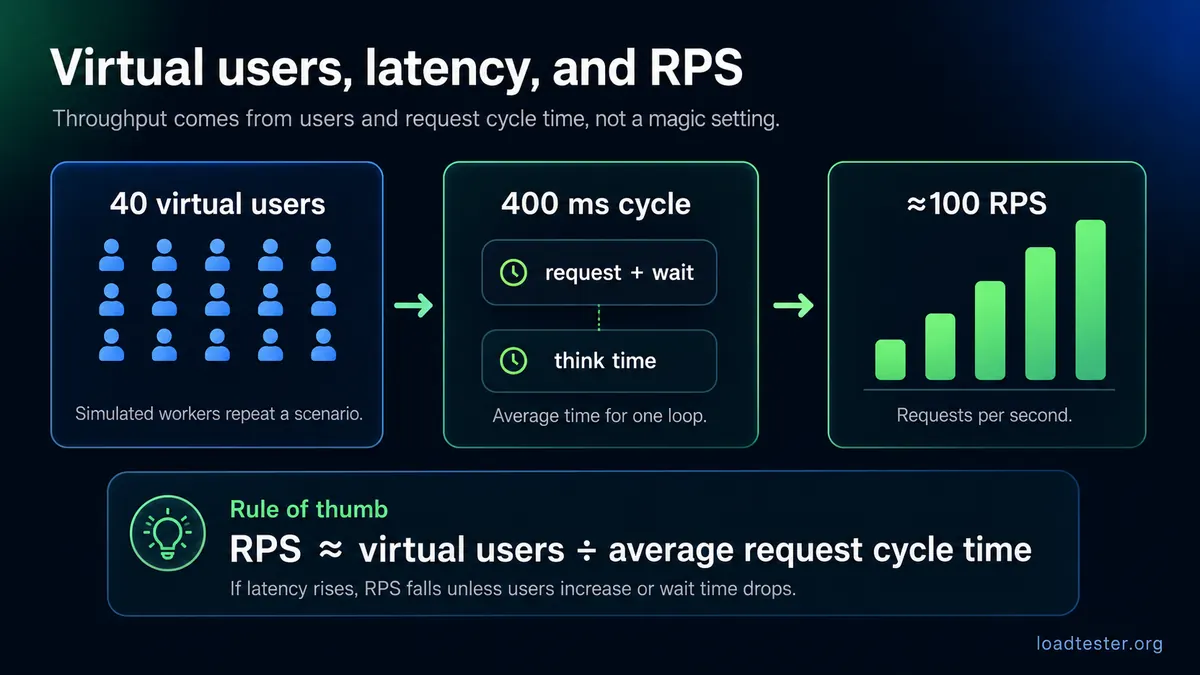
A virtual user is a simulated user or worker that repeatedly performs actions during a test. One virtual user might call a login endpoint, wait for a moment, request a product page, and then submit an order. In API tests, a virtual user may simply loop over HTTP requests. Virtual users are useful because they model concurrency, but they are not the same as real humans. Their behavior depends on the script, think time, request latency, and how the load generator schedules work.
Is one virtual user the same as one real user?
No. One virtual user is not automatically one real user. A real user reads, clicks, waits, abandons flows, and has unpredictable timing. A virtual user follows a scripted pattern. If the script has no think time, one virtual user can generate far more traffic than one real person. If each request is slow, one virtual user may generate very little throughput. Treat virtual users as a load modeling unit, not a literal headcount.
What is RPS in load testing?
RPS means requests per second. It measures throughput: how many HTTP requests your system handles every second during the test. RPS is useful when the target is an API, webhook receiver, backend service, or endpoint where each request has clear meaning. It is less useful by itself when the user journey contains multiple steps, long think time, background polling, or mixed request types. Always interpret RPS together with latency and error rate.
What is the difference between RPS and concurrent users?
Concurrent users describe how many simulated users are active at the same time. RPS describes how many requests the system receives per second. They are connected by latency and pacing. If each user waits between actions, concurrency may be high while RPS is modest. If requests are fast and the script loops aggressively, a small number of virtual users can generate high RPS. This is why a good test states both the user model and the throughput target.
How many virtual users do I need for 100 RPS?
There is no universal number because it depends on response time and pacing. As a rough model, if each virtual user sends one request, waits for the response, and immediately sends the next request, then required virtual users are approximately target RPS × average request duration in seconds. At 100 RPS with 200 ms responses, you might need about 20 busy virtual users. At 2 second responses, you might need about 200. Add think time and the number changes again.
Why does RPS stop increasing when I add more virtual users?
RPS usually stops increasing because something has saturated. The bottleneck might be the application, database, upstream dependency, network, connection pool, rate limiter, or the load generator itself. When more virtual users create longer queues instead of more completed requests, throughput flattens and latency rises. That plateau is useful information. It tells you the system has reached a capacity boundary under that workload.
Can 10 virtual users generate 1,000 RPS?
Yes, but only if the requests are very fast and the script loops aggressively. Ten virtual users generating 1,000 RPS means each virtual user completes about 100 requests per second. That is possible for very fast endpoints with little or no think time, but it is not a realistic model for human website behavior. It may be valid for a machine-to-machine API. Always choose the model that matches the risk you are testing.
Why does latency affect RPS?
Latency affects RPS because a virtual user that is waiting for a response usually cannot complete the next iteration yet. When response time rises, each virtual user completes fewer requests per second unless the tool uses an open arrival-rate model. This is why systems often show a pattern during overload: latency climbs first, then throughput flattens, then errors increase. If you only watch RPS, you may miss the degradation that started earlier.
How many load generators do I need?
You need enough load generators to create the target traffic without the generators becoming the bottleneck. Watch generator CPU, memory, network throughput, open connections, DNS behavior, and client-side errors. If the target system looks healthy but the generator is maxed out, the test result is not trustworthy. Distributed load generation becomes important when you need high RPS, many connections, large payloads, or traffic from multiple regions.
How do I know if the load generator is the bottleneck?
The load generator may be the bottleneck if its CPU is high, network is saturated, connection errors happen before traffic reaches the target, DNS resolution is slow, or RPS does not increase even though the application metrics look healthy. Another clue is that multiple independent generators produce more throughput than one generator with the same script. A trustworthy test measures both sides: the target system and the traffic source.
Latency, p95, p99, and pass/fail thresholds
Averages make overloaded systems look better than they feel. These questions help teams choose thresholds that reflect real user experience.
What latency metric should I use in a load test?
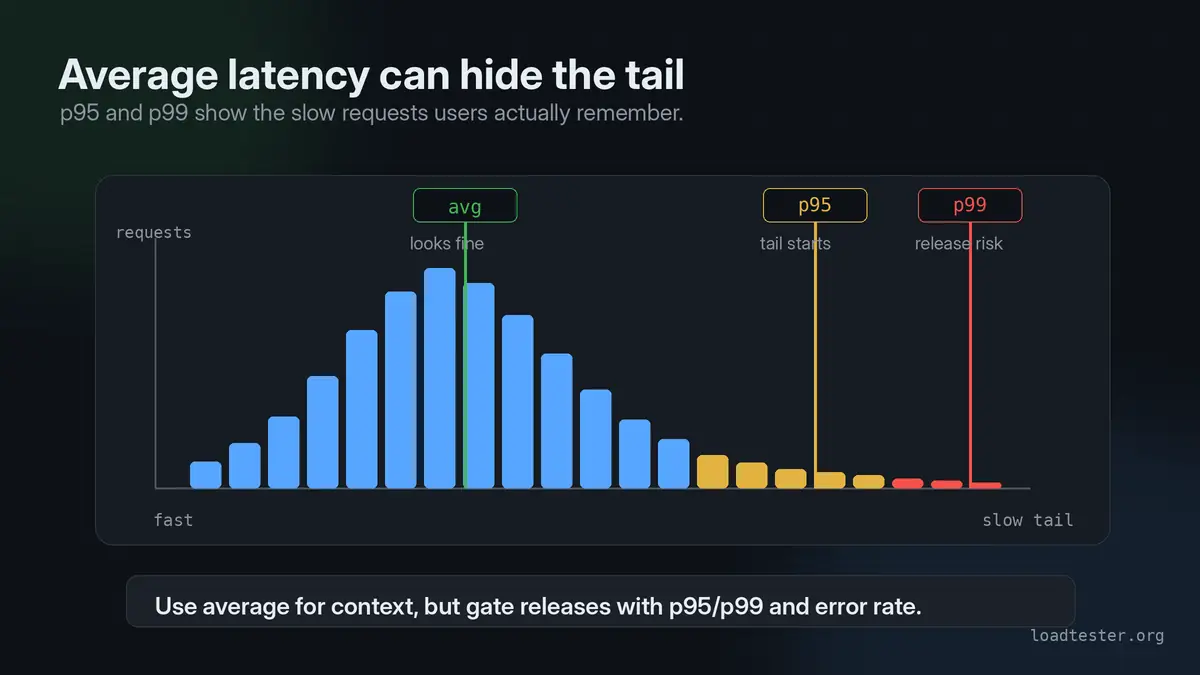
Use percentile latency rather than only average latency. p50 tells you the median experience, p95 shows the slow experience most users can still encounter regularly, and p99 highlights tail risk. For release gates, p95 is often the most practical default because it is sensitive to degradation without being as noisy as p99. For capacity planning and incident risk, p99 is still important.
Why is average response time misleading?
Average response time hides uneven user experience. A system can have a good average while a meaningful percentage of requests are painfully slow. For example, if most requests take 100 ms but a small group takes 5 seconds, the average may look acceptable even though real users are waiting. Percentiles make that tail visible. This is why load test reports should include p95 and p99, not just averages.
Should I use p95 or p99 for load test thresholds?
Use p95 for most release thresholds and p99 for tail-risk analysis. p95 is usually stable enough to use as a pass/fail gate and still catches performance issues that the average hides. p99 is valuable when rare slow requests are expensive, such as checkout, payment, search, or internal APIs with strict SLOs. The best answer is not p95 versus p99 forever. It is p95 for routine gates and p99 for deeper capacity review. See p95 vs p99 Latency.
Why is average response time good but p95 is bad?
This usually means most requests are fast but a significant minority are slow. Common causes include database query variance, cache misses, cold starts, lock contention, slow downstream APIs, queue buildup, garbage collection, or connection pool waits. The average stays low because the fast requests dominate the calculation. p95 exposes the slow tail that users actually notice.
What is a good p95 latency?
A good p95 latency depends on the user journey and business expectation. A simple internal API might need p95 under 200 ms. A complex search endpoint might tolerate more. A checkout or login path should usually be stricter than a background report. The practical rule is to set thresholds based on the experience users expect and the baseline your system already achieves, then treat large regressions as release blockers.
What error rate is acceptable in a load test?
The acceptable error rate depends on the scenario, but unexpected errors should be treated seriously. For a normal release validation test, many teams expect near-zero server errors on critical paths. For a stress test, errors may be expected after the system passes its safe operating limit. Do not use one universal percentage for every test. Define which errors are acceptable for the scenario and which ones fail the run.
How do I set pass/fail criteria for a load test?
Set pass/fail criteria before running the test. A useful gate combines traffic target, latency threshold, error threshold, and sometimes resource limits. For example: sustain 300 RPS for 10 minutes, p95 below 500 ms, p99 below 1.5 seconds, and error rate below 0.1 percent. The key is to make the criteria tied to the workload. A latency threshold without a traffic level is incomplete.
Should a load test fail if one request is slow?
Usually no. One slow request can happen because of noise, cold caches, DNS, garbage collection, or external dependencies. A load test should fail on patterns, not one isolated outlier, unless the endpoint is safety-critical and every request has a hard deadline. Use p95, p99, error rate, and repeated runs to decide whether the slowness is meaningful.
What is a performance regression in load testing?
A performance regression is when the same workload performs worse after a change. It might appear as higher p95 latency, higher p99 latency, lower throughput, increased errors, higher CPU, more database load, or slower recovery. Regression testing works best when the test is repeatable and the comparison is against a recent baseline, not a random historical benchmark. Read Release Regression Load Testing for a release-focused workflow.
API load testing
API tests are usually the easiest way to build repeatable performance checks because they avoid browser noise and focus on backend behavior.
How do I load test an API?
Choose the endpoints that represent the real workload, define traffic volume, prepare safe test data, add authentication if required, set latency and error thresholds, run the test, and review both test metrics and backend telemetry. Do not start with every endpoint. Start with the endpoint or flow that creates the most business risk. For a practical walkthrough, read How to Load Test an API.
Should I load test GET and POST requests differently?
Yes. GET requests are usually easier because they do not change data and can often be repeated safely. POST, PUT, PATCH, and DELETE requests require more planning because they may create orders, send emails, mutate inventory, trigger payments, or change user state. For write-heavy tests, use test accounts, idempotency keys, isolated environments, cleanup jobs, and monitoring that can detect duplicate or corrupted data.
How do I load test POST requests without creating duplicate data?
Use unique test data per virtual user, idempotency keys, dedicated test tenants, and cleanup routines. Avoid replaying the exact same production-like request if the backend treats it as a new action every time. For ecommerce, never point the test at real payment or fulfillment flows unless those integrations are safely mocked or in sandbox mode. A good POST load test validates both performance and data correctness.
How do I avoid corrupting production data during a load test?
Use a staging environment when possible. If production testing is necessary, isolate the test through test accounts, test tenants, feature flags, allowlisted targets, sandbox integrations, reversible operations, and explicit cleanup. Disable or redirect side effects such as emails, SMS, shipments, invoices, and payment captures. The production test plan should include an owner, stop conditions, dashboards, and a rollback path.
How do I clean up test data after a load test?
Design cleanup before the test starts. Tag every test-created record with a run ID, tenant ID, user prefix, metadata field, or timestamp range. Then delete or archive those records after the test. For systems with strict audit requirements, you may need soft deletion or a test namespace instead of physical deletion. Cleanup is not an afterthought; it is part of safe load test design.
Should I use real user data in a load test?
Avoid real personal data unless you have a strong legal and operational reason. Synthetic data is usually safer and easier to control. If production-like data distribution matters, generate anonymized or tokenized datasets that preserve shape without exposing sensitive information. The goal is realism in size, frequency, and relationships, not copying actual customer records into a test script.
How do I load test API pagination?
Test pagination with realistic page sizes, sort orders, filters, and deep-page behavior. Many APIs perform well on page one but slow down on page 1000, especially with offset pagination. Include common filters and sorting combinations because they may use different indexes. Measure not only latency but database CPU, read volume, cache behavior, and error rate.
How do I load test file uploads?
Use realistic file sizes, content types, upload concurrency, and network conditions. Measure application latency, storage throughput, memory usage, temporary disk usage, antivirus or scanning queues, and downstream processing time. Avoid testing only tiny files if users upload large images, PDFs, videos, or CSVs. Also verify cleanup of partial uploads and failed multipart sessions.
How do I load test a webhook receiver?
Replay realistic webhook payloads at expected burst rates and verify that the receiver acknowledges quickly, validates signatures, deduplicates events, and queues work instead of doing everything synchronously. Webhooks often fail under burst traffic because retries amplify load. Test idempotency and duplicate delivery, not just happy-path throughput.
How do I load test GraphQL APIs?
GraphQL load testing should model query shape, resolver cost, and field selection, not just endpoint RPS. One GraphQL endpoint can contain cheap queries and extremely expensive queries. Build a query mix that represents real clients, include variables, watch resolver-level telemetry, and set thresholds per operation type. See GraphQL Load Testing for a deeper guide.
How do I load test WebSocket APIs?
WebSocket load testing focuses on connection count, message rate, subscription patterns, reconnect behavior, server memory, and backpressure. Unlike short HTTP requests, WebSocket sessions can stay open for a long time. Test connection ramp-up, steady-state message traffic, fan-out, disconnects, and recovery. See WebSocket Load Testing if that is your architecture.
Authentication, tokens, and rate limits
Auth and rate limits can completely change a test result. Decide whether they are part of the scenario or noise you must control.
How do I load test an authenticated API?
Create dedicated test users or service accounts, generate tokens safely, avoid hardcoding production secrets, and decide whether token acquisition is inside or outside the measured flow. If the test measures the API itself, pre-generate tokens. If the test measures login capacity, include authentication as part of the scenario and set separate thresholds for login and downstream calls.
Should every virtual user use a different auth token?
Usually yes for user-like scenarios. Different tokens help avoid unrealistic cache hits, per-token rate limits, session contention, and shared state bugs. Reusing one token can be valid for service-to-service API testing, but it should be an intentional model. If real traffic comes from many users, many tokens usually produce a more trustworthy result.
Can I reuse the same bearer token in a load test?
You can, but it may distort the result. A shared bearer token may hit a per-user rate limit, bypass realistic authorization checks, reuse server-side session cache, or create lock contention that normal traffic would not create. If you reuse a token, document why it matches the production pattern. For most user simulations, rotate through a pool of tokens.
How do I load test OAuth-protected APIs?
Separate the OAuth flow from the protected API flow unless login capacity is the thing you are testing. Pre-create test clients and users, generate tokens before the run, refresh tokens safely, and avoid hammering the identity provider accidentally. If you do include token acquisition, monitor the identity provider separately so you know whether slow responses come from auth or the API under test.
Should I create test users for load testing?
Yes. Dedicated test users make results cleaner and safer. They let you isolate data, avoid affecting real customers, control permissions, rotate credentials, and clean up after the run. Create enough users to match the concurrency model. If 1,000 virtual users all share one account, the result may say more about that account’s locks and limits than about normal system behavior.
What does 429 Too Many Requests mean during a load test?
HTTP 429 means the target or an intermediate system is rate limiting the client. During a load test, that could be expected or unexpected. It is expected if you are intentionally validating rate-limit behavior. It is unexpected if you are trying to measure backend capacity and a CDN, WAF, API gateway, or application limiter blocks the traffic first.
Should 429 responses fail a load test?
A 429 should fail a load test when it is unexpected for the scenario. It should not automatically fail a test when the goal is to verify rate limiting behavior. The distinction is intent. If you are testing normal capacity, 429s probably mean the test hit a guardrail before the backend was measured. If you are testing protection rules, 429s may be the desired result.
How do I avoid hitting API rate limits during a load test?
Coordinate the test with the systems that enforce limits. Use dedicated test keys, allowlisted source IPs, higher temporary limits, or a staging environment. Also verify whether the rate limit is per IP, per account, per token, per route, or global. If you do not understand the limit, you may accidentally test the limiter instead of the application.
Should I disable rate limiting during load testing?
Disable or relax rate limiting only when it is not part of the question. If you want to measure raw backend capacity, rate limiting may need to be bypassed in a controlled way. If you want to validate production protection, leave it enabled. The safest approach is to run two tests: one that validates application capacity behind controlled guardrails and one that validates the guardrails themselves.
How do I test rate limiting behavior intentionally?
Define the expected limit, generate traffic that crosses it, and verify the response code, headers, retry behavior, logging, and recovery. A good rate-limit test confirms that legitimate traffic stays healthy while excessive traffic is rejected consistently. Also test the reset window and what happens when multiple clients, tokens, or IPs approach the limit together.
Caching, CDNs, WAFs, and bot protection
Caching and edge protection can make load tests look better or worse than reality. Treat them as part of the system model.
Should I load test with cache enabled or disabled?
Test both when the distinction matters. Cache-enabled tests show the user-visible performance of the normal production path. Cache-disabled or cache-bypassed tests show backend capacity and worst-case behavior. A cache-only test can hide backend problems. A no-cache-only test can be unrealistically harsh. The best plan is to define whether you are measuring edge experience, origin capacity, or cache warmup behavior.
Should I use cache busting during a load test?
Use cache busting only when you intentionally want every request to miss cache or exercise unique data. Do not add random query strings blindly. Cache busting can turn a realistic production test into an artificial origin attack. For most website tests, run one scenario with normal caching and another controlled scenario that measures origin behavior. Label them clearly so the results are not confused.
Why is the second load test faster than the first?
The second run may be faster because caches are warm, database pages are in memory, JIT compilation has happened, connection pools are established, DNS is cached, or autoscaling already reacted. This is not automatically bad. It just means first-run and warm-run performance are different. If cold-start behavior matters, reset or isolate the state before each run.
How do I test cache warmup?
Start from a known cold or partially cold cache state, ramp traffic gradually, and measure when latency stabilizes. Track cache hit rate, backend latency, origin CPU, database reads, and error rate. Cache warmup tests are useful before sale events, product launches, homepage campaigns, and API endpoints with expensive first reads. The main question is whether the system survives the warmup period, not only the steady state after everything is cached.
Should I bypass the CDN during load testing?
Only bypass the CDN if you are specifically measuring origin capacity or debugging backend bottlenecks. If real users go through the CDN, a production-like test should usually include it. A CDN can absorb static traffic, terminate TLS, enforce rate limits, and cache responses, so bypassing it changes the system. Many teams run both: through-CDN for user experience and origin-focused for backend capacity.
Should I load test through Cloudflare?
If production users go through Cloudflare, at least one test should go through Cloudflare too. But coordinate rate limits, bot protection, WAF rules, and source IP behavior first. Otherwise you may only prove that Cloudflare blocked your test. For backend capacity work, you may also need a controlled origin test that bypasses edge protections without exposing the origin publicly.
Will load testing trigger bot protection?
It can. Load tests often look like bot traffic because they generate repeated requests, consistent headers, predictable paths, and high request rates from a small number of IPs. If bot protection is not the thing you are testing, coordinate allowlisting or test-specific rules. If bot protection is part of the risk, keep it enabled and define expected behavior.
How do I load test an API behind a WAF?
Document which WAF rules apply, whether the test source IPs are allowlisted, and which status codes indicate blocking. Run a small dry run first to confirm the WAF is not rejecting the script because of headers, payload shape, or request rate. During the full test, monitor WAF events alongside API latency and errors so you can distinguish application failures from security-layer blocks.
Should I whitelist load testing IPs?
Whitelisting can be useful when you are measuring application capacity and do not want WAF, CDN, or bot rules to distort the result. But it should be scoped, temporary, documented, and removed after the test. Do not whitelist blindly if the test is supposed to validate production protection behavior. For mature workflows, use dedicated test rules rather than broad permanent bypasses.
Can a CDN hide backend performance problems?
Yes. A high cache hit rate can make user-facing latency look excellent while the origin is still slow for cache misses, personalized pages, writes, API calls, or first requests after invalidation. That is why CDN-backed systems need separate visibility for edge response time, origin response time, cache hit ratio, and backend resource usage.
CI/CD and release testing
The best load tests are repeatable enough to run near the release process, not only during rare performance projects.
Should I run load tests in CI/CD?
Yes, but keep CI load tests small and targeted. CI is a good place for smoke load tests, regression checks, and threshold validation on critical endpoints. It is usually not the right place for huge capacity tests that run for an hour. Use CI to catch obvious performance regressions early, then use scheduled or pre-launch tests for larger workloads. See Load Testing in CI/CD.
How long should a CI load test run?
A CI load test should usually be short enough that developers will tolerate it and long enough to catch basic regressions. For many teams, that means one to five minutes for a smoke-style test. Longer tests can run nightly, before major releases, or on demand. The point of CI is fast feedback, not full capacity certification on every commit.
Should every pull request run a load test?
Not every pull request needs a full load test. Run lightweight checks on important changes and keep heavier tests for merges, release candidates, scheduled baselines, or risky changes. A frontend text change probably does not need a backend load test. A database query change, caching change, API change, or infrastructure change often does.
What is a smoke load test?
A smoke load test is a short, low-to-moderate traffic test that confirms a critical path still behaves reasonably under concurrency. It is not meant to prove maximum capacity. It is meant to catch obvious regressions, broken endpoints, bad timeouts, authentication problems, or severe latency spikes before a release continues.
What is a regression load test?
A regression load test compares current performance against a previous baseline under the same workload. It asks whether the system got slower, less stable, or less efficient after a change. Regression tests are more useful than isolated one-off results because they turn performance into a trend. The key requirement is repeatability: same scenario, similar environment, and clear comparison metrics.
How do I compare load test results before and after a deployment?
Compare the same scenario at the same traffic level. Look at p50, p95, p99, throughput, error rate, resource usage, and backend dependency metrics. Avoid comparing a cold run to a warm run unless cold-start behavior is the question. A useful comparison highlights the percentage change and whether that change crosses a threshold that matters to users or infrastructure.
Should load tests block deployments?
They should block deployments only when the thresholds are trustworthy and tied to business risk. A flaky or unrealistic test should not stop releases. A stable test on a critical API with agreed thresholds absolutely can be a release gate. Start by making the result visible, then move toward blocking once the team trusts the signal.
How do I avoid flaky load tests in CI?
Keep the scenario small, isolate test data, avoid unstable third-party dependencies, control environment noise, set realistic thresholds, and compare against a recent baseline. Do not use p99 alone as a hard CI gate if the sample size is small. Flaky load tests usually come from uncontrolled dependencies, tiny samples, shared environments, or thresholds copied from wishful thinking.
What thresholds should I use in CI?
Use thresholds that catch meaningful regressions without failing on noise. A CI smoke test might gate on availability, error rate, and p95 latency for a few critical endpoints. A release candidate test can include stricter p95, p99, throughput, and resource thresholds. Avoid setting thresholds so tight that every minor variance breaks the build.
How often should I run full load tests?
Run full load tests before major launches, major infrastructure changes, expected traffic events, pricing or checkout changes, and periodically enough to keep baselines fresh. For many teams, weekly or nightly smaller tests plus on-demand larger tests is a practical rhythm. The right frequency depends on how often your system and traffic patterns change.
Production load testing safety
Production can be the most realistic place to test, but only when the blast radius is controlled and the team agrees on stop conditions.
Is it safe to load test production?
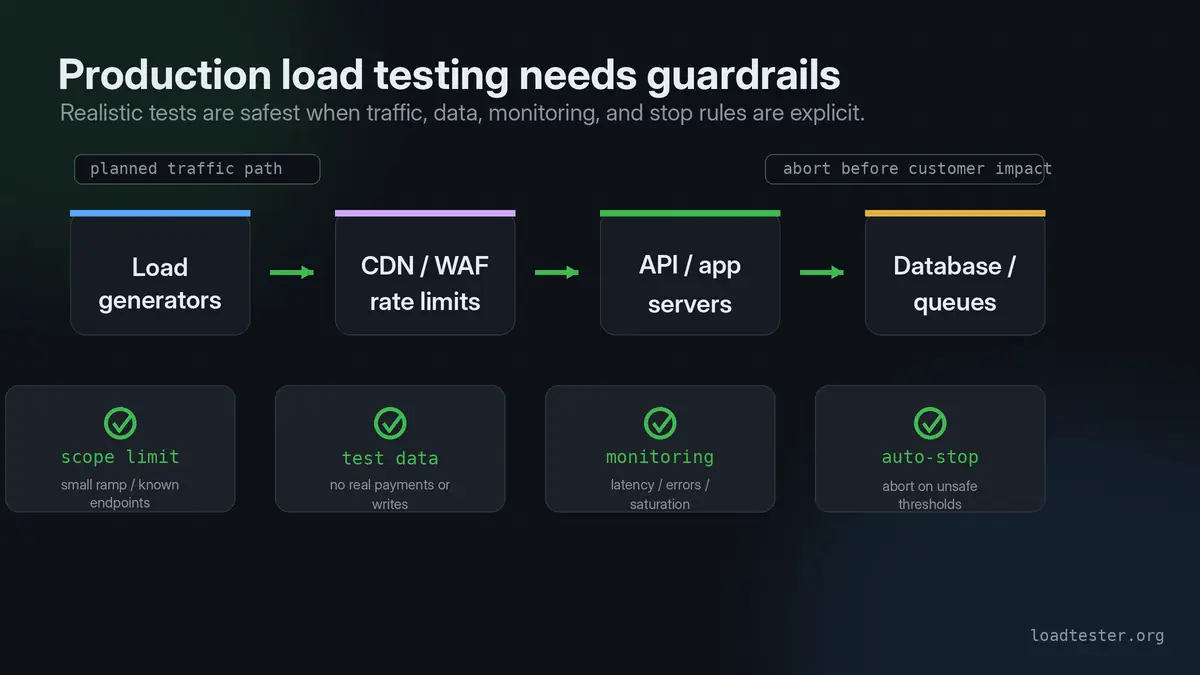
It can be safe if the test is planned, scoped, monitored, and reversible. It is unsafe when the team points a high-volume script at production without owners, limits, test data controls, alerting, or stop conditions. Production tests are valuable because they include real infrastructure and traffic paths, but the plan must protect users and data. Use Production Load Testing Checklist before running one.
When should I avoid production load testing?
Avoid production testing when you cannot isolate test data, cannot stop the test quickly, lack monitoring, have fragile downstream dependencies, operate under strict compliance constraints, or are unsure what the traffic will trigger. Also avoid it during peak business hours unless the business explicitly accepts that risk. If the goal can be answered in staging, start there.
How do I reduce blast radius during a production load test?
Use a small starting load, gradual ramp-up, strict auto-stop conditions, dedicated test users, limited routes, allowlisted source IPs, monitoring dashboards, and clear communication. Avoid testing every feature at once. Start with one flow, one region, one tenant, or one endpoint. Increase scope only after the previous step stays healthy.
Should I tell my hosting provider before a load test?
For large tests, yes. Some providers, CDNs, WAFs, and managed platforms may interpret high-volume traffic as abuse. Notification can prevent blocking, throttling, or account issues. Even when notification is not required, check acceptable use policies and rate limits. The same applies to payment providers, email providers, SMS providers, and other downstream services that may see test traffic.
Can load testing take down my website?
Yes. That is exactly why load tests need limits and monitoring. A poorly designed test can saturate CPU, database connections, queues, caches, network, third-party APIs, or autoscaling limits. A well-designed test starts small, ramps gradually, and stops automatically when latency, errors, or resource usage cross the agreed line.
Can load testing damage production data?
Yes, especially if the test writes data, triggers payments, sends messages, modifies inventory, or calls destructive endpoints. Use test accounts, sandbox integrations, idempotency keys, dry-run modes, feature flags, and cleanup jobs. For production tests, data safety matters as much as performance safety.
Should I test during business hours or off-hours?
Off-hours reduce user risk but may produce less realistic background traffic. Business-hour tests are more realistic but riskier. A common approach is to test in off-hours first, then run a smaller controlled production test during a representative period once the team trusts the scenario. The right choice depends on business impact, monitoring maturity, and how realistic the test needs to be.
What monitoring should I enable before a load test?
At minimum, watch latency percentiles, throughput, error rate, application logs, CPU, memory, database metrics, connection pools, queues, cache hit rate, downstream dependency latency, CDN/WAF events, and autoscaling. Test-side metrics tell you what happened. Backend telemetry tells you why it happened. Without both, the report is incomplete.
When should a load test auto-stop?
Auto-stop the test when error rate spikes, p95 or p99 latency crosses a dangerous threshold, backend resources saturate, a critical dependency degrades, or business-impacting alerts fire. Auto-stop rules are especially important in production because humans may not react quickly enough. The threshold should be defined before the run starts.
Who should be on-call during a production load test?
Have someone who owns the application, someone who understands infrastructure, and someone who can make the business decision to stop or continue. For critical systems, include database, SRE, security, and support owners. A production load test is an operational event, not just a developer script.
Tooling and workflow questions
Tool choice matters less than repeatability, but the wrong workflow can make load testing too hard to run regularly.
Can I run a load test from my laptop?
Yes, for small experiments and early smoke tests. A laptop can help validate a script, test a single endpoint, or reproduce a small issue. It is not reliable for high RPS, many concurrent connections, long tests, or team-visible release gates. Local network conditions, CPU limits, Wi-Fi, background processes, and operating system limits can distort results.
Are CLI load testing tools enough?
CLI tools are enough when the team is comfortable scripting, storing results, comparing runs, and maintaining the workflow. They are less ideal when non-specialists need visibility, scheduled tests, alerts, shared dashboards, or CI/CD gates without custom glue. The core question is not whether a CLI can generate traffic. It is whether the workflow will be repeated correctly. See Is CLI Load Testing Enough for CI/CD?.
When should I use a managed load testing tool?
Use a managed tool when you want distributed traffic, shared results, dashboards, thresholds, scheduled tests, CI/CD integration, alerts, or less infrastructure ownership. Use a local or open-source tool when you need maximum script control or are experimenting cheaply. Managed tools are most valuable when load testing needs to become a repeatable team habit instead of a one-person script.
What is the difference between JMeter, k6, Gatling, Locust, and LoadTester?
JMeter is mature and GUI-heavy, k6 is script-first and developer-friendly, Gatling is code-oriented and strong for complex simulations, Locust uses Python for user behavior, and LoadTester focuses on managed HTTP/API testing with browser and CI-friendly workflows. The right tool depends on who owns tests, how often they run, and how much infrastructure and scripting the team wants to maintain. See Gatling vs k6 vs JMeter and the comparison pages for deeper trade-offs.
Should I use browser-based or protocol-level load testing?
Use protocol-level testing for most API and backend capacity questions because it is cheaper, faster, and easier to scale. Use browser-based testing when frontend rendering, JavaScript behavior, third-party tags, or real user journeys are the target. Many teams need both, but they answer different questions. Do not use expensive browser users when an HTTP-level test would answer the capacity question cleanly.
What should I look for in an HTTP load testing tool?
Look for realistic traffic modeling, clear thresholds, percentile latency, error breakdowns, result comparison, CI/CD integration, distributed execution, authentication support, exports, team visibility, and safe stopping behavior. Raw RPS is only one feature. A tool that makes tests repeatable and understandable is usually more valuable than a tool that only produces high traffic once. See HTTP Load Testing Tool Checklist.
Do I need distributed load testing?
You need distributed load testing when one generator cannot produce the target load reliably, when source geography matters, when connection counts are high, or when you need to avoid a single client-side bottleneck. You may not need it for small API checks or CI smoke tests. Start with the simplest setup that produces trustworthy traffic, then distribute when the generator becomes the constraint.