
ApacheBench vs Modern HTTP Load Testing Tools
Quick verdict
Read this page as a choice between a fast benchmark command and a repeatable testing workflow. ApacheBench is convenient for a quick probe; LoadTester is stronger when the run needs thresholds, history, and a report another teammate can trust later.
Why LoadTester is different
Apachebench is best understood as a classic single-command benchmark utility for quick HTTP checks and simple capacity probes. LoadTester is best understood as a modern managed workflow for realistic HTTP/API scenarios, thresholds, team sharing, historical comparison, and CI/CD-ready regression checks.
That means the comparison is not only about raw request generation. The harder part of load testing is the operating model around the run: storing the scenario, protecting secrets, deciding pass/fail thresholds, comparing results over time, sharing the report, and repeating the same check before the next release. LoadTester moves more of that workflow into the product; ApacheBench keeps more control close to the engineer or existing toolchain.
What LoadTester does better
- Scenario realism beyond one URL. LoadTester is stronger when the question is not just how many requests one endpoint can accept, but whether a real API flow still meets latency and error-rate targets under sustained load.
- Persistent evidence. Each run produces a saved result with thresholds, charts, and comparison context instead of a terminal-only snapshot that has to be copied somewhere else.
- Release workflow fit. Saved tests can be reused from CI and by teammates, which is more practical than retyping an ab command or maintaining ad hoc shell wrappers for every release.
- Stakeholder readability. The output is easier for QA, product, and support leads to review because it answers whether the test passed, where latency moved, and what changed from the previous baseline.
What is ApacheBench?
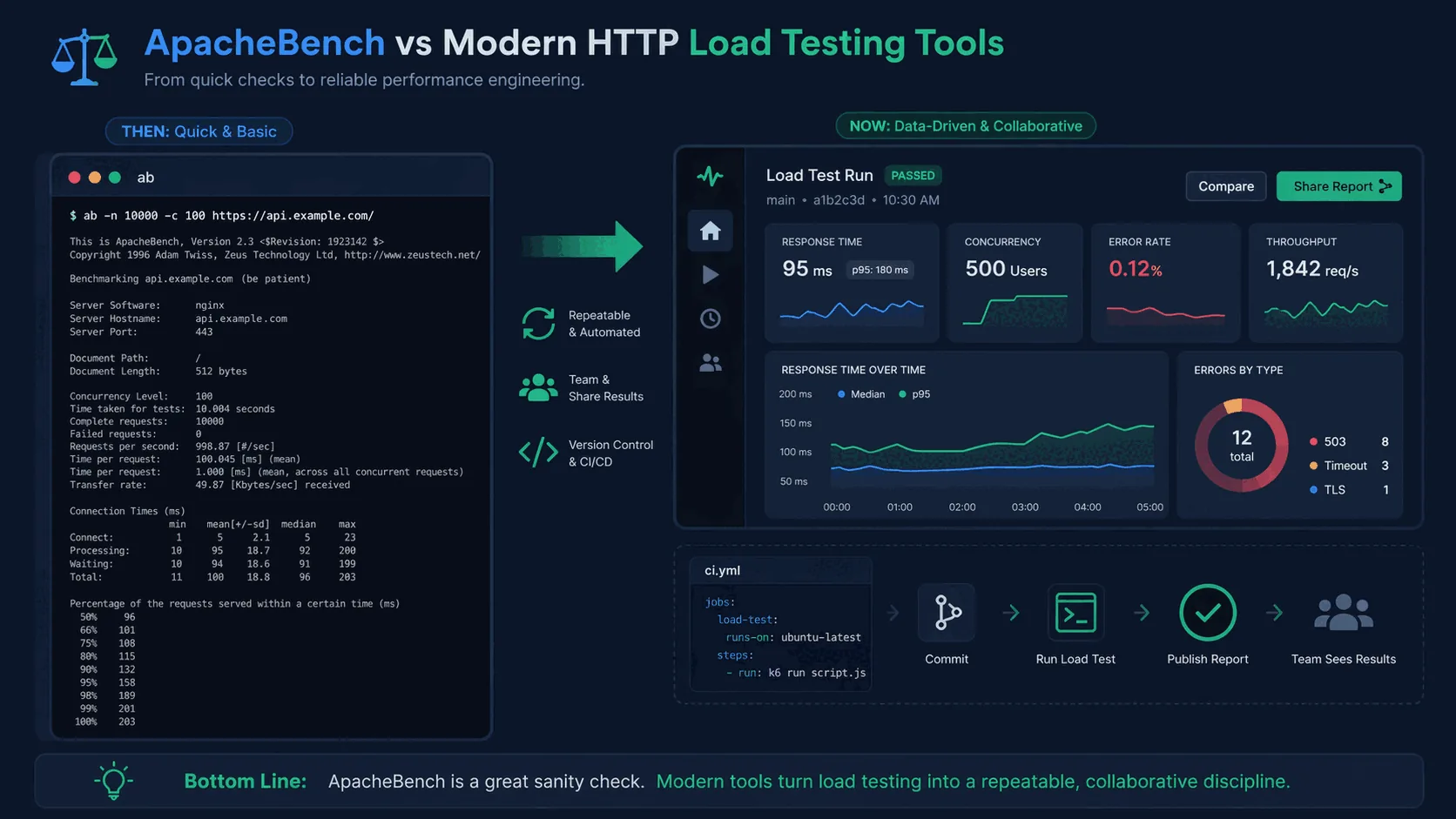
ApacheBench ships with Apache HTTP Server but is commonly available as a separate package on Linux distributions as well. The interface is famously simple: specify a total request count and concurrency level, point it at a URL, and it issues requests as fast as possible. At the end it prints throughput, latency, connection times, and some percentile-like summaries.
ab -n 10000 -c 100 https://api.example.com/health
That is enough to see whether a server responds under load and to get a rough feel for latency. Because it is so easy to run, ApacheBench became a popular utility for developers and system administrators who wanted a quick answer with minimal setup.
The problem is not that ApacheBench is broken. The problem is that modern performance work involves more than issuing repeated requests to a single URL and reading terminal output.
Why teams used ApacheBench for so long
ApacheBench succeeded because it solved a narrow problem extremely well. If all you need is a burst of concurrent requests against a simple endpoint, a small command-line tool is appropriate. There is no heavy GUI, no complex scripting language, and no need to build out a whole performance environment. It feels right at home in Linux shells and on staging servers.
There is also a familiarity effect. Many engineers learned ApacheBench early in their careers. They still remember the flags and know what the output looks like. When a tool is already installed and understood, it tends to remain in use even when better options exist.
But modern applications are more complicated than many of the environments in which ApacheBench first became popular. APIs depend on multiple services, caches, authentication, request bodies, distributed datastores, and traffic mixes that are more complex than a single repeated GET request. Teams also want to run tests in CI/CD, compare releases, and share results across the team.
Where ApacheBench still helps
It is important to be fair: ApacheBench is not useless. It still has a place when the question is small and the test is simple. For example, you may want to confirm that a new NGINX configuration did not obviously hurt throughput, or you may want a quick benchmark on a health endpoint after a change to caching or TLS.
ApacheBench also appeals to engineers who want something available on many Linux boxes. If you are troubleshooting a single service and need a quick spot check, a tiny CLI utility is entirely reasonable.
The problem begins when a team tries to stretch ApacheBench into a full performance workflow. It does not give you historical comparison, dashboards, shared results, threshold-driven alerts, or realistic scenarios. Those needs are exactly what separate quick command-line checks from repeatable release validation.
Key limitations of ApacheBench
Limited realism. ApacheBench primarily sends repeated requests to a single URL. That is fine for a quick sanity check, but real applications involve multiple endpoints, headers, authentication tokens, JSON payloads, different request mixes, and warm-up behavior.
Thin reporting. The terminal output is useful but not team-friendly. It does not provide historical comparison, shared dashboards, or easy visualizations of p95 and p99 latency over time. If you want to compare one run with another or explain a regression to teammates, the output becomes awkward.
Poor collaboration. ApacheBench workflows often live in individual shell history or ad hoc scripts. When the original author changes teams or the test assumptions shift, nobody is quite sure how to reproduce the result.
No release-pipeline support. ApacheBench gives you a number; it does not give you scheduling, reusable scenarios, threshold gates, or anything CI/CD-shaped. None of that was the goal in 1996, and none of it has been added since.
What modern HTTP load testing tools do better
Modern tools do more than generate traffic. They help teams make sense of traffic. That usually means better scenario control, richer metrics, easier automation, and more usable reporting.
For example, Vegeta gives engineers a rate-based model and the ability to save and compare results. k6 supports test-as-code workflows. Protocol-specific tools such as h2load are better when HTTP/2 behavior matters. And managed platforms such as LoadTester add live dashboards, historical comparisons, team sharing, and CI/CD-friendly reporting.
The difference is not just feature count. It is the difference between “I ran a command” and “the team understands whether the application is regressing.”
When modern tools clearly win
Modern tools win whenever the team needs more than a one-off terminal summary.
You care about percentiles and error budgets. Mean latency rarely tells the whole story. Teams want p95 and p99 behavior because averages can hide the slow experiences that users actually feel. If you need a refresher, read p95 vs p99 Latency Explained.
You want tests in CI/CD. A command that runs in isolation is not the same thing as a release-quality pipeline that shows pass/fail thresholds and preserves results. See Load Testing in CI/CD.
You need realistic scenarios. The moment you want headers, JSON bodies, multiple endpoints, or a traffic model that resembles production behavior, ApacheBench becomes too limited.
You need to compare releases. One run by itself is less useful than a trend line across builds. When teams are trying to spot regressions, history matters.
You need results that others can read. Product managers, QA leads, and other engineers do not want to parse raw terminal output. They want dashboards, thresholds, and clear conclusions.
Where LoadTester fits
LoadTester fits teams that have moved beyond one-off CLI checks but do not want to build their own performance tooling stack. It helps teams run application and HTTP load tests, inspect live metrics, compare runs over time, and share results without provisioning infrastructure.
Instead of running ab and pasting the output into Slack, a team can run a named test, watch latency and error rates live, compare the run with previous baselines, and see immediately whether a change introduced a regression. That is much closer to a real release-validation workflow.
It is especially useful when performance checks are recurring rather than incidental — for example, before deployments, during scheduled regression checks, or as part of a CI/CD gate. In those scenarios, a team-friendly workflow makes a big difference.
Comparison summary
ApacheBench remains useful as a minimal tool for simple concurrency checks. It is lightweight, familiar, and convenient for quick experiments.
But a quick experiment is not the same thing as a performance practice. Modern HTTP load testing tools provide better scenario control, richer metrics, easier automation, and workflows that support collaboration and release decisions.
That is why many teams keep ApacheBench around for occasional troubleshooting but use more capable CLI tools or a managed platform like LoadTester for real validation.
When ApacheBench (ab) is still the right choice
ApacheBench is 20+ years old and missing a lot. It is still the right choice in a few narrow cases.
- You want a zero-install, one-line sanity check.
ab -n 1000 -c 10 http://host/pathis ubiquitous, pre-installed on many Linux systems, and answers a simple question in seconds. - Your target is one endpoint and you need a ballpark number. "Is this endpoint roughly fast or roughly slow under concurrency X?" is exactly the question ab was built for.
- You're teaching fundamentals. For a demo of concurrency, RPS, and latency percentiles, ab's minimalism is a teaching asset.
Where ab breaks down: HTTPS/TLS quirks, HTTP/2, keep-alive nuances, multi-step flows, anything stateful, and reporting beyond a terminal dump. If your test needs any of that, one of the modern tools below will serve you better. But writing ab off entirely ignores that a lot of real "quick load checks" are still well-served by a 20-year-old binary.
Frequently asked questions
Is ApacheBench (ab) still useful in 2026?
ApacheBench is still useful for fast, single-URL sanity checks where you want a quick request-rate number from a terminal. It is not a good fit for scenario-based testing, modern protocols like HTTP/2 multiplexing, scripted multi-step flows, or CI/CD release gates. For those, a modern tool with thresholds and run history is the safer choice.
What does ApacheBench miss that modern tools provide?
ApacheBench gives you a single snapshot — total requests, mean latency, and one or two percentile buckets — and that is all. It does not record run history, support scenarios with auth or chained requests, expose threshold-based pass/fail, integrate with CI/CD, or produce comparable runs over time. Modern tools treat each test as a saved, repeatable artifact rather than a one-shot console output.
When is moving off ApacheBench worth the effort?
Move off ApacheBench when performance checks stop being one engineer's local exercise and start affecting release decisions. The trigger is usually one of three things: someone asks 'is this build slower than last week?', a reviewer wants the test rerun without help, or an outage post-mortem needs a baseline that nobody saved. ApacheBench cannot answer any of those without external scripting.
These are the official docs, specs, or operational references most relevant to this topic.
How this comparison was evaluated
For this ApacheBench comparison, we treated ab as a fast diagnostic benchmark and LoadTester as a repeatable release workflow. The review focused on single-endpoint smoke checks, multi-step API scenarios, reproducibility, result storage, threshold decisions, and how easily another teammate can rerun the same test later.
ApacheBench is still useful when a tiny command-line probe is the goal. LoadTester scores better when the load test needs to become durable evidence for a release, incident review, or recurring capacity baseline rather than a one-off measurement.
When LoadTester is not the right option
LoadTester is intentionally focused on repeatable HTTP and API load testing workflows. For this page, the honest recommendation depends on whether your team needs ApacheBench for its native strengths or needs LoadTester for repeatable team execution.
- Keep ApacheBench for tiny probes. If you only need a quick local sanity check against one URL, ab is simpler and has almost no workflow overhead.
- Use a lower-level benchmark for web-server tuning. When you are tuning a server module, TLS setting, or reverse-proxy path in a controlled lab, a narrow benchmark can be the cleaner instrument.
- Avoid managed execution for isolated networks. If the target can only be reached from a locked-down private machine, a local CLI may be mandatory.