
Release Regression Load Testing
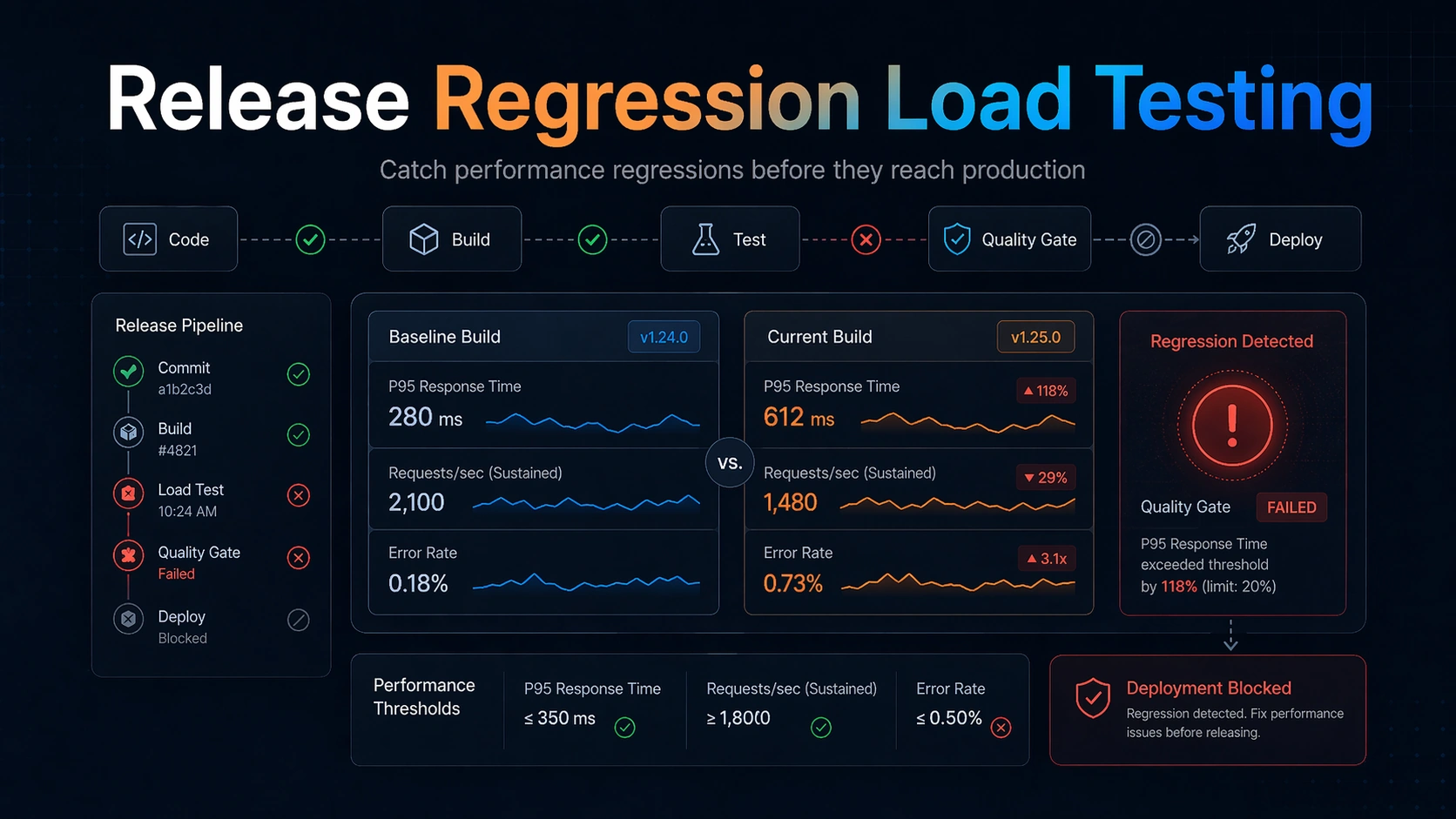
Release regression load testing is the discipline of asking a brutally practical question before deployment: did this build get slower, less stable, or more failure-prone in a way that matters under load? Developers often think of performance testing as a one-off exercise done before big launches. SRE and DevOps teams know the more dangerous problem is incremental drift. A single code change may add only a little latency, a bit more CPU pressure, a few extra database calls, or a slightly worse retry pattern. But those small regressions compound release after release until the system has far less headroom than anyone realizes.
That is why regression-oriented load testing deserves its own workflow. The job is not simply to generate traffic. The job is to compare the current candidate against a known-good baseline, under a stable and meaningful workload, with thresholds that reflect user pain and operational risk. In other words, the most important output is not a chart. It is a decision: can we safely ship this build?
This guide is written for engineers who live in deployment pipelines and reliability reviews: backend developers, platform engineers, SREs, and DevOps teams. It explains how to design release regression load testing so it is actually useful in CI/CD, what to compare, how to choose thresholds, where teams go wrong, and why a workflow-first tool like LoadTester is often the most practical way to operationalize it.
Why release regression load testing matters
Outages caused by dramatic capacity limits are easy to understand. More common in healthy engineering organizations is the slower failure mode: release-by-release performance decay. The system still passes functional tests, still serves production traffic, and may even look healthy at average load. But the safety margin is shrinking. Tail latency gets worse. Background jobs take longer. CPU spikes become sharper. One dependency call was added to the request path. A cache behavior changed. A retry loop became slightly more aggressive. Eventually a routine traffic burst or provider slowdown reveals that the headroom is gone.
Functional CI does not catch this well because most functional tests are optimized for correctness, not resource behavior under concurrency. Unit tests and integration tests tell you whether the service works. They do not tell you whether it still works fast enough, consistently enough, and with the same resilience envelope as the prior release.
Release regression load testing fills that gap. It is less about peak exploration and more about drift detection. The best time to find a performance regression is not during a quarterly load test and definitely not during a production incident. It is at release time, when the suspect changeset is still fresh, the rollback path is simple, and the responsible engineers can still reason clearly about what changed.
For SREs this practice also improves operational predictability. A deployment pipeline that knows how to reject materially worse builds is one that preserves capacity planning assumptions, protects SLOs, and reduces the chance that the next moderate traffic event becomes an avoidable incident.
What to compare in a release regression test
The baseline question is simple: compared to what? The answer should not be “whatever we remember being good.” A regression test needs an explicit comparison target. Usually that target is a recent healthy release, a known-good benchmark build, or a rolling baseline created from recent successful runs.
Compare latency percentiles first, especially p95 and p99, because user pain and queueing behavior typically emerge in the tail. Compare error rate next, including meaningful timeouts and overload-induced failures. Compare throughput only alongside success quality and route mix. A build that maintains request volume by failing faster is not a win.
Beyond the top-line metrics, compare dependency signals that frequently reveal hidden regressions: database query counts or latency, cache hit rate, outbound request latency, queue lag, worker saturation, CPU per request, memory footprint, and retry volume. Many regressions do not show up as immediate 5xx responses. They appear as reduced efficiency, increased tail variance, or weaker tolerance to bursty load.
It also helps to compare shape, not just endpoints. A p95 that rose from 240 ms to 320 ms may be acceptable in one service and alarming in another. What matters is whether the change exceeds your allowed regression budget and whether it threatens user-facing or operational targets.
The key is consistency. The same workload, same environment discipline, same warm-up behavior, and same reporting format should apply across builds. Otherwise you are comparing noise rather than software.
Designing a good regression workload
A regression workload is not the same as a maximal stress test. Its job is to be stable, representative, and sensitive enough to expose meaningful drift. That usually means moderate but production-relevant concurrency, a realistic route mix, and a duration long enough to reveal tail behavior without turning every deployment into a giant benchmark exercise.
Choose the routes or journeys that best represent recurring production risk. For an API service, that might mean the hot read path, one or two write paths, and any dependency-heavy endpoint. For a web application, it may mean login, search, checkout, or dashboard rendering calls. For background systems, it may mean ingestion, queue drain rate, or webhook processing.
Keep the scenario small enough to run regularly but rich enough to matter. A good heuristic is to include the critical path plus the most common supporting path. The goal is not total workload coverage. It is to detect build-to-build regressions on the behavior you most care about protecting.
Warm-up matters. So does dataset consistency. So does environmental noise. If your tests randomly hit cold caches, stale fixtures, or uneven dependency states, your pipeline will oscillate between false confidence and false alarms. Regression testing works only when the team trusts that changes in the result are mostly changes in the software.
Think of the workload as an instrument. Precision matters more than spectacle.
Thresholds and quality gates that actually work
Threshold design is where many regression initiatives fail. Teams either choose thresholds so strict that every run is noisy or so loose that the gate never catches anything useful. The best thresholds reflect both user expectations and service-specific operational budgets.
Start with a small number of load-bearing conditions. Example: p95 latency must not worsen by more than 15 percent relative to baseline under the regression workload; p99 must stay below an absolute ceiling; error rate must remain below 0.5 percent; and sustained throughput must not drop below a minimum threshold. You may add CPU or queue-lag conditions for systems where efficiency regressions are especially important.
Relative thresholds are often better for drift detection than pure absolutes because they capture change, not just badness. Absolute ceilings still matter, especially for user-facing SLAs or SLO-derived limits. Many teams use both: do not exceed a percentage regression and do not exceed an absolute maximum.
Quality gates should be readable. When a build fails, the output should say exactly what regressed, by how much, and against which baseline. That clarity turns a failed performance check from an annoyance into a debugging aid.
Introduce gates gradually. First collect data. Then warn. Then block for the metrics that prove reliable. A gate earns trust when it is specific, stable, and clearly tied to real operational pain.
How release regression load testing fits into CI/CD
The healthiest integration pattern is layered. Not every pull request needs a long-running performance benchmark, but every release train should have some regression protection. Many teams run lighter smoke-like performance checks on key branches, then run fuller regression workloads before staging promotion or production deployment.
The placement depends on your delivery model. If you deploy continuously, you may need a fast recurring regression suite that runs many times per day and a deeper suite on a scheduled cadence. If you deploy in batches, it may fit naturally before release candidate promotion.
What matters is that the result is close enough to the deployment decision to influence it. A weekly performance report is useful for observability. It is not the same as a release gate.
Artifact quality matters in CI/CD. The job output should include scenario identity, build identity, environment, thresholds, comparison target, and a readable summary of pass/fail results. Pipeline consumers should not need to inspect raw logs unless they want deeper diagnosis.
This is where workflow-first tooling wins. A platform like LoadTester helps teams move from “we ran something” to “we have a consistent release-quality signal.” That difference is what makes the practice sustainable under real delivery pressure.
A practical developer and SRE workflow for regression detection
A useful workflow starts in development, not only in the release branch. Developers should know which endpoints or journeys are performance-sensitive and what the regression budget is for each one. That makes the eventual gate feel predictable rather than arbitrary.
At release time, the system should run the defined workload, compare against baseline, evaluate thresholds, and produce a concise result. If the build passes, the result becomes part of the deployment record. If it fails, the output should guide the next step: inspect the changed route, check dependency deltas, look for query explosions, cache changes, concurrency inefficiency, or retry amplification.
SREs and platform engineers often add one more layer: a periodic audit of the baselines themselves. Baselines should remain recent enough to be meaningful. A team that compares everything to a benchmark from six months ago may miss the fact that slow deterioration already became normal.
It is also healthy to review false positives explicitly. If the gate misfires, fix the test design, the environment discipline, or the thresholds. Do not train the team to click past performance failures. Regression testing only works when both passes and failures feel credible.
Common sources of release performance regressions
Some regressions are obvious: an endpoint does more work than before. Others are subtle. Added logging on a hot path, new serialization overhead, inefficient object allocation, worse database plans, higher cardinality cache keys, feature-flag branches that add outbound calls, and more aggressive retry logic can all degrade performance without changing functional behavior.
Dependency shifts are especially dangerous. A service may look unchanged internally but now depends on a slower auth check, a more expensive recommendation call, or a heavier configuration lookup. Tail latency often worsens before developers notice anything in local testing.
Concurrency-sensitive changes are another common culprit. Thread-pool sizing, lock scope, queue consumer settings, connection pool changes, and async behavior can reduce effective headroom even when single-request latency remains acceptable.
Release regression load testing is good at catching these cases because it asks the same question in a controlled way over and over again: is this build materially worse under the workload that matters?
Common mistakes teams make with regression load testing
The first mistake is trying to make the suite too large. A regression suite should be small, stable, and high-signal. If it becomes a giant benchmark matrix, it will run too slowly, fail too noisily, or be skipped when delivery pressure rises.
The second mistake is comparing apples to oranges. If the environment, dataset, warm-up, or dependency state changes unpredictably, the gate becomes untrustworthy.
The third mistake is using averages as the main decision metric. Averages can hide queueing pain and tail regressions that users absolutely feel.
The fourth mistake is lacking an explicit baseline policy. Decide what counts as baseline, how often it refreshes, and who owns that policy.
The fifth mistake is hiding the results in logs. A release-quality signal should be readable without log archaeology.
The sixth mistake is building the whole workflow out of custom glue and then assuming it will remain healthy forever. The more bespoke the system, the more maintenance debt you have attached to every deployment.
What release-regression workflows need from tooling
Release regression load testing is a workflow problem as much as an execution problem. The core needs are repeatability, comparison across runs, threshold evaluation, and readable outcomes — and those deserve first-class support from whichever tool you choose. Managed platforms like LoadTester bundle those features; teams running k6, Gatling, or JMeter typically assemble the same capabilities from a scheduler, a reporting layer, and some CI glue.
For developers, that means a clearer connection between code changes and performance consequences. For DevOps, it means cleaner CI/CD semantics and less homegrown glue. For SREs, it means stronger historical context and better protection against slow drift.
Most importantly, it helps teams preserve confidence in the gate. A gate that is easy to understand and easy to operate is one that will actually be used.
Final recommendation
Treat release regression load testing as a standard part of software delivery, not a special event. Keep the suite focused, the workload stable, the thresholds explicit, and the outputs readable.
If your current approach depends on script sprawl, manual comparison, or fragile CI parsing, move toward a workflow that turns performance results into reliable release decisions. That is the real value of the practice, and it is where LoadTester provides the most practical advantage.
How to choose and refresh your baseline
Baseline selection is one of the highest leverage design choices in a regression program. If the baseline is too old, you may normalize drift that should have been challenged earlier. If the baseline changes too often or too casually, you can erase the very regression history the program is supposed to preserve.
A practical approach is to anchor comparisons to a recent healthy release and also maintain a rolling history of recent successful runs. The recent healthy release gives teams a concrete point of reference. The rolling history protects against one unusually good or unusually bad comparison target. When both are visible, engineers can answer two useful questions at once: did this build regress against the last known-good release, and does it also look weak relative to normal recent behavior?
Refresh policy should be explicit. Decide who is allowed to bless a new baseline, under what conditions, and how that decision is recorded. Otherwise teams will be tempted to update baselines whenever a gate becomes inconvenient, which defeats the purpose of the practice.
How to debug a failed regression gate quickly
When a build fails the regression gate, the team needs a disciplined debug path rather than a blame ritual. Start by checking whether the failure is broad or concentrated. Did only one route regress, or did all routes get worse? Broad regressions often point to environment shifts, shared dependency slowdown, runtime-level changes, or common middleware overhead. Narrow regressions usually point to a code-path change.
Next, compare the same route across the baseline and current build using percentiles, error breakdowns, and dependency timings where available. Look for query count changes, cache miss changes, outbound request inflation, payload-size growth, serialization cost, worker contention, or retry amplification. Many useful fixes come from simply asking what extra work the request is doing now that it did not do before.
Keep the operational loop short. If the gate is meaningful, the best response is usually to investigate immediately while the context is fresh, not to defer it into a general backlog. Release regression testing is effective precisely because it shortens the distance between performance signal and responsible code owner.
When to block a release and when to warn
Not every regression should produce the same consequence. Some signals are severe enough to block immediately, especially if they affect user-facing latency, materially increase error rate, or reduce safety margin on critical services. Other signals are better handled as warnings until the team has enough historical confidence that the check is stable and predictive.
A useful policy is to classify gates by business and operational criticality. For example, checkout, authentication, or payment flows may justify hard blocks quickly. Less critical internal paths may start as warnings while the team tunes thresholds. The policy should be documented so engineers understand why one performance check halts deployment and another only opens follow-up work.
This distinction also improves adoption. Teams resist performance gates when every slight wobble becomes a release incident. They trust them more when severity matches demonstrated risk.
FAQ
What is release regression load testing?
It is a repeatable performance check that compares the current build against a known-good baseline under a stable workload, then uses thresholds to decide whether the release is materially worse.
How is regression testing different from stress testing?
Stress testing explores limits and failure modes. Regression testing focuses on build-to-build drift under a representative workload so teams can catch performance degradation before deployment.
What metrics should block a release?
Usually tail latency, error rate, and sometimes throughput or dependency-specific signals such as queue lag or CPU efficiency. The exact set should reflect user pain and operational risk.
Why use LoadTester for regression workflows?
Because recurring regression checks depend on comparisons, thresholds, readable results, and repeatable execution. Those workflow features are what make performance gates sustainable in CI/CD.