
hey vs Vegeta vs Siege for HTTP Load Testing
Quick verdict
Small HTTP CLIs are excellent when the work starts and ends with an engineer in a terminal. LoadTester becomes the better option when that useful experiment has to become a named release check with history and a shared result.
Why LoadTester is different
Hey, vegeta, and siege is best understood as small CLI tools for focused HTTP benchmarking, quick checks, and engineer-driven experiments. LoadTester is best understood as a managed workflow for saved tests, repeatable API checks, thresholds, reports, schedules, and CI/CD gates.
That means the comparison is not only about raw request generation. The harder part of load testing is the operating model around the run: storing the scenario, protecting secrets, deciding pass/fail thresholds, comparing results over time, sharing the report, and repeating the same check before the next release. LoadTester moves more of that workflow into the product; hey, Vegeta, and Siege keeps more control close to the engineer or existing toolchain.
What LoadTester does better
- Converts quick checks into repeatable checks. LoadTester is better when a useful terminal experiment needs to become a named scenario that anyone can rerun before release.
- Adds run history and comparison. The platform keeps past results available, which these small tools generally leave to scripts, files, or external dashboards.
- Makes thresholds explicit. Pass/fail policy can be attached to the saved test instead of living in a README, CI grep command, or engineer memory.
- Improves audience fit. Small CLIs are excellent for engineers; LoadTester is better when the result must be readable by QA, product, or customer-facing teams.
Overview
All three tools come from the same general tradition: they are small utilities that you can run from a shell, automate in scripts, and use during development or pre-release checks. That makes them attractive when you do not want to provision separate infrastructure or learn a more complex framework.
The danger is that teams often choose based on whatever tool they find in a blog post and never revisit whether it still fits. A command-line load test that is good enough for one engineer is not always good enough for a team that wants historical comparisons, clear thresholds, and shareable results.
Before choosing a tool, ask what question you are trying to answer. Do you just want to blast an endpoint quickly? Do you care about maintaining an exact request rate? Do you want to test a list of URLs? Do you need richer scenarios or CI/CD reporting? Those answers point toward different tools.
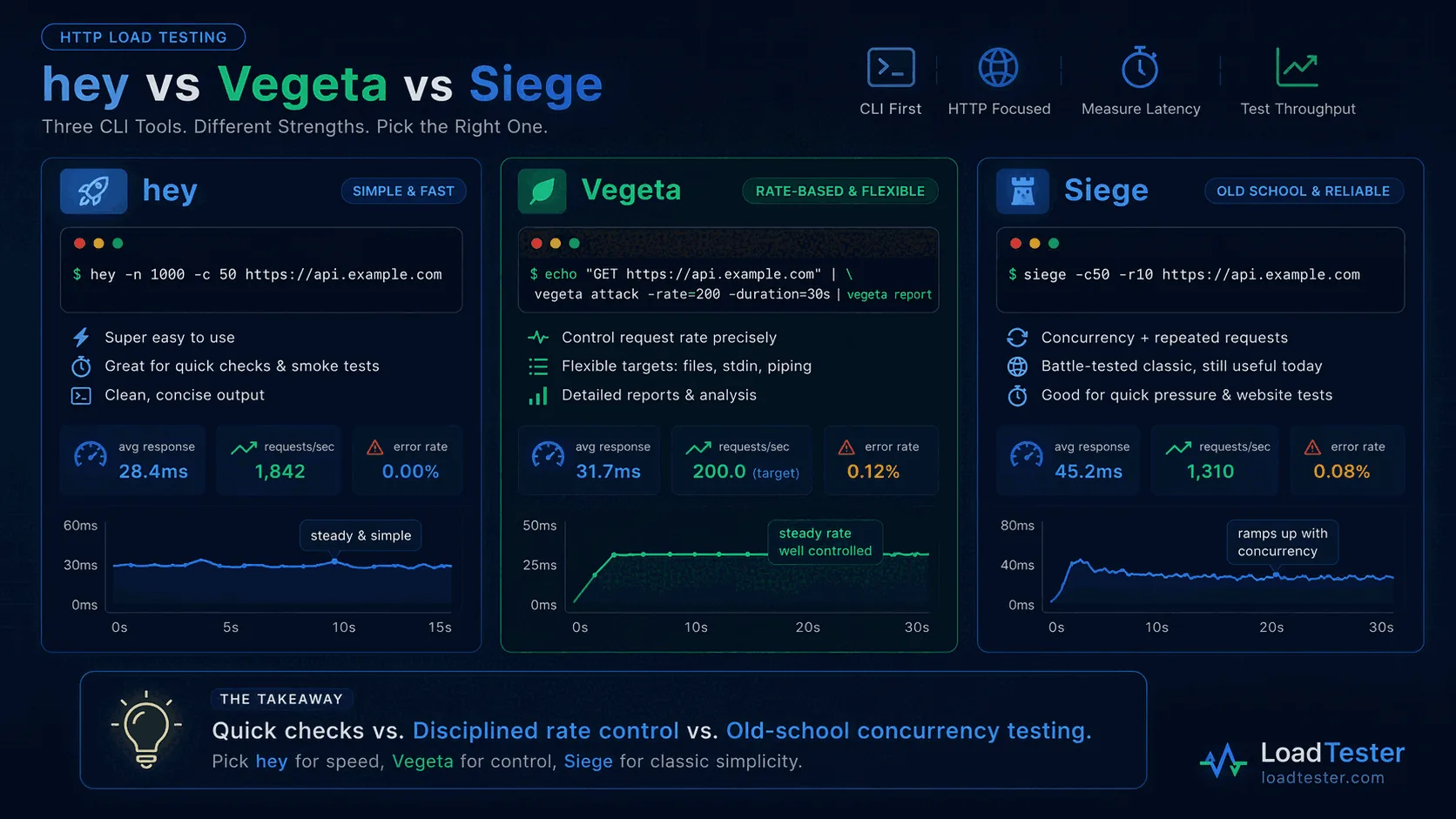
hey
hey is often the easiest to recommend when a developer wants something faster and cleaner than older tools. It is small, straightforward, and ideal for a quick check like this:
hey -n 1000 -c 50 https://api.example.com/users
You get a concise summary of request rates and latency, and you can see quickly whether an endpoint behaves reasonably under light concurrency. That makes hey attractive for smoke tests, quick experiments during development, or one-off checks in CI.
The advantage of hey is its simplicity. There is less syntax and less mental overhead than with some alternatives. If you want a minimal tool that gets to the point, it is excellent.
The downside is that hey remains deliberately simple. It is not designed to become a full performance workflow. It lacks the rate-based model and richer reporting flow that make Vegeta appealing for more disciplined CLI testing.
Vegeta
Vegeta is a favorite among engineers who want to keep the CLI workflow but care more about repeatability and rate control. Instead of only saying “run N requests with concurrency C,” Vegeta is built around a rate-based model. That is powerful because production traffic often resembles a sustained request rate more than a single concurrent blast.
echo "GET https://api.example.com/users" | vegeta attack -rate=200 -duration=30s | vegeta report
That rate-based design makes it easier to ask questions such as “can this endpoint sustain 200 requests per second for 30 seconds?” Vegeta also lets you save results and inspect them later, which is valuable when you want to compare runs or integrate the tool into a more repeatable process.
The tradeoff is that Vegeta is slightly less friendly to beginners than hey. It is still simple enough for most developers, but it has more concepts and flags. For many teams that structure is a benefit, not a drawback.
If your team values precision and can handle a slightly more structured workflow, Vegeta is often the strongest pure CLI choice of the three. If you want a direct comparison with a managed platform, continue with Vegeta vs LoadTester.
Siege
Siege is an older tool but still useful, especially in Linux-heavy environments. It is often used for simple website or HTTP endpoint testing with repeated requests and configurable concurrency.
siege -c50 -r10 https://api.example.com
Unlike Vegeta, Siege is not strongly centered around rate-based traffic. It feels more like classic concurrency testing. That can be enough when you just want to apply some pressure to a site or API and inspect overall behavior.
The benefits of Siege are familiarity and availability. Many engineers know it, and it remains easy to install. It can be useful for quick website checks or concurrency experiments in Linux environments.
The downside is that it feels more dated than hey or Vegeta and is not as pleasant for repeatable analysis. Like the other tools, it does not solve the collaboration and historical comparison problem that appears in real release workflows.
Feature comparison and practical fit
If you care most about ease of use, hey usually wins. It is quick to install, quick to understand, and perfectly adequate for a fast endpoint smoke test.
If you care most about rate control and repeatability, Vegeta is generally the strongest option. Its rate-based model is more useful for API testing, and its reporting flow scales better into serious CLI-based performance checks.
If you care most about simple concurrency testing with older, battle-tested tooling, Siege still has a place. It is especially familiar to administrators who have used it for website testing over many years.
All three are far better for ad hoc checks than for broader team workflows. None of them, by itself, gives you scheduled checks, rich dashboards, historical comparison across releases, or easy collaboration.
Are they enough for CI/CD?
They can be, but “can run in CI” is not the same as “provides useful release confidence.” A small hey or Vegeta command can run in a pipeline and fail the build if latency or error rates cross a threshold. That is a good start.
The problem is that pipeline logs are not dashboards, and a single pass/fail result is not the same thing as a performance practice. Over time, teams want to compare current latency with past baselines, inspect percentiles, and share results with teammates.
If your team is seriously integrating performance checks into CI/CD, read Load Testing in CI/CD and Is CLI HTTP Load Testing Enough for CI/CD?.
Where LoadTester fits
LoadTester is useful when the team has moved beyond the “one engineer with a shell command” stage. It lets teams run application and HTTP load tests without managing infrastructure, inspect live metrics, and compare results across runs. That makes it much easier to use performance checks as part of real release decisions.
The point is not that CLI tools are bad. They are often the fastest way to ask a narrow question. The point is that once your organization wants scheduled checks, dashboards, shared visibility, and easier historical comparison, a managed workflow saves time and avoids accidental complexity.
For example, with LoadTester you can give teammates a single place to view results instead of pasting terminal output into chat. You can define thresholds, rerun tests consistently, and see whether p95 and p99 latencies are drifting in the wrong direction over time.
Which one should you choose?
Choose hey if your goal is the quickest possible smoke test and you value minimal syntax.
Choose Vegeta if you want more disciplined rate-based testing and a CLI workflow that scales better into serious performance checks.
Choose Siege if you are comfortable with older concurrency-oriented tooling and want a simple way to pressure-test endpoints or websites.
Choose LoadTester if your team needs more than ad hoc CLI commands and wants shareable dashboards, live metrics, and repeatable release confidence.
Picking between hey, Vegeta, and Siege
All three are credible CLIs. The right pick depends on what you actually need.
- Pick hey if you want the simplest possible invocation. It is a small Go binary with sensible defaults, the Apache-style output, and basically no learning curve. "Quick check of one endpoint" is its sweet spot.
- Pick Vegeta if you want pipeable attack-rate control and flexible output formats. The
attack | report | plotchain is genuinely well-designed and composes well with other shell tools. Best for engineers who want to script around it. - Pick Siege if you want browser-style "hit many URLs from a file" behaviour and a longer-running soak-test model. Siege has been around long enough that a lot of existing runbooks already use it; its config-file approach fits established ops practices.
Where all three stop being the right answer: saved test definitions, shared dashboards, scheduled recurring runs, threshold-based gates in CI, and regression comparisons across releases. For that shape of work you want a platform, not a CLI — but if you're in CLI territory, one of these three is almost certainly the answer, not a heavier tool.
Frequently asked questions
Which of hey, Vegeta, and Siege is best for a one-off API benchmark?
Reach for hey if the goal is the simplest possible terminal command and you only need overall RPS and percentile latency. Vegeta wins when you need precise constant request rates, a structured report you can pipe into other tools, or distributed attackers. Siege is the right pick if your scenario is browsing a list of URLs as a 'user', not hammering one endpoint.
Does Vegeta really enforce the request rate exactly?
Yes — that is its main differentiator. Vegeta uses an open-loop model with target-rate scheduling, so requested RPS is held constant regardless of how slow responses get. hey and Siege use closed-loop concurrency, where rising response time naturally throttles request rate. For latency-under-target-load measurements, Vegeta's model is more accurate. For finding saturation points, closed-loop is fine.
When should none of these be your CI/CD release gate?
When the test needs to be re-run and compared by someone who didn't write it. None of hey, Vegeta, or Siege store run history, expose pass/fail thresholds natively, or produce a shareable result page. You can build that around them with scripts and dashboards, but at that point the maintenance overhead usually exceeds what a managed platform would cost.
These are the official docs, specs, or operational references most relevant to this topic.
How this comparison was evaluated
For the hey, Vegeta, and Siege page, we evaluated the tools as lightweight HTTP probes. The comparison emphasizes command simplicity, rate control, local reproducibility, CI usage, result readability, storage, and the point at which a quick benchmark becomes an operational workflow.
The page should keep praising small CLIs where they deserve it. LoadTester only wins the recommendation when the organization needs shared ownership, historical comparison, and recurring decisions rather than a minimal binary.
When LoadTester is not the right option
LoadTester is intentionally focused on repeatable HTTP and API load testing workflows. For this page, the honest recommendation depends on whether your team needs hey, Vegeta, and Siege for its native strengths or needs LoadTester for repeatable team execution.
- Use hey for quick concurrency checks. When the only goal is a short burst against one endpoint, a tiny command can be the most efficient tool.
- Use Vegeta for rate-based terminal workflows. If a team already likes Vegeta targets files and shell pipelines, keeping that workflow may be cleaner.
- Use Siege for simple URL-list exercises. For lightweight local browsing-pattern tests, Siege can be enough without adopting a platform.