
Is CLI HTTP Load Testing Enough for CI/CD?
Written by Kristian Razum
Reviewed and updated by the LoadTester editorial team. Review process: see the editorial policy.
Quick verdict
A CLI in CI can be perfectly valid until the result becomes hard to review, compare, or govern. This page focuses on the point where performance gates need durable context rather than another build-log artifact.
Why LoadTester is different
Cli http load testing in ci/cd is best understood as a simple way to add performance checks to pipelines when the scenario, result storage, and ownership model are intentionally small. LoadTester is best understood as a managed release-gate workflow for teams that need saved tests, history, alerts, thresholds, and readable results attached to the delivery process.
That means the comparison is not only about raw request generation. The harder part of load testing is the operating model around the run: storing the scenario, protecting secrets, deciding pass/fail thresholds, comparing results over time, sharing the report, and repeating the same check before the next release. LoadTester moves more of that workflow into the product; CLI HTTP load testing in CI/CD keeps more control close to the engineer or existing toolchain.
What LoadTester does better
- Separates signal from CI noise. LoadTester keeps performance results as first-class run records instead of burying them inside build logs and artifacts.
- Centralizes release policy. Thresholds and assertions live with the saved test, so every pipeline calls the same performance rule instead of maintaining local scripts per repository.
- Makes failures easier to review. A failed CI gate can link to charts, history, and comparison context, which shortens the conversation about whether a regression is real.
- Supports non-pipeline schedules. Teams can run the same checks on a timer, after an incident, or before a launch without waiting for a CI job.
Why teams use CLI tools in pipelines
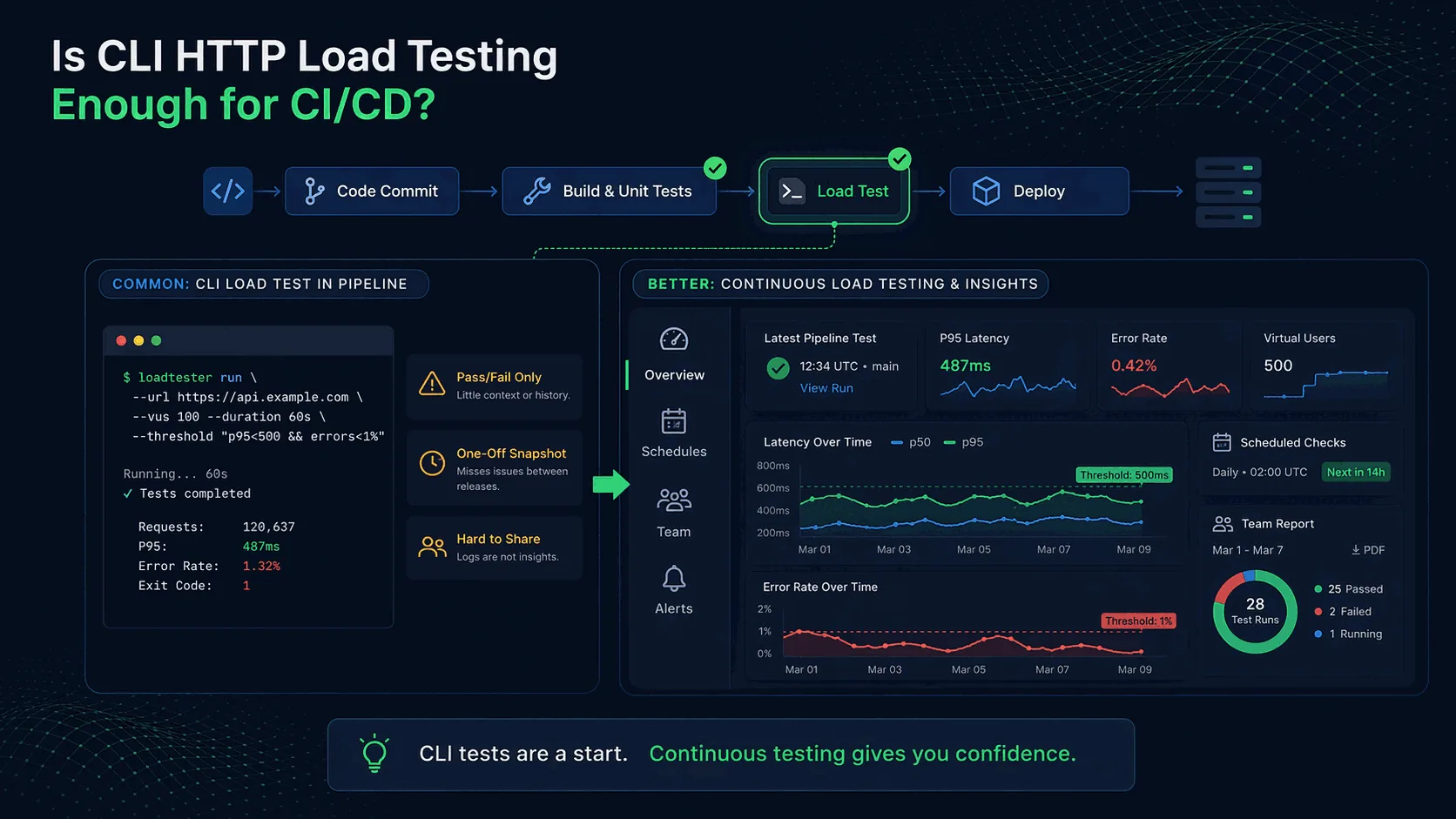
Command-line tools are attractive in CI because they are lightweight, scriptable, and easy to add to existing workflows. A simple job can build the application, start a staging environment, run a few HTTP requests with a CLI tool, and report pass/fail status. That is far better than shipping without any performance checks at all.
CLI tools also fit the culture of many engineering teams. Developers already use shell scripts, Makefiles, and pipeline YAML. Adding a single command feels natural and keeps the test close to the code. That is one reason tools such as Vegeta, hey, or k6 are often evaluated for CI pipelines.
For example, a pipeline step might fail if p95 latency exceeds a threshold or if error rates climb above 1%. That can catch obvious regressions before production, which is valuable.
Where CLI testing genuinely helps
CLI tools are useful in CI/CD when the goal is to run a small, repeatable check against a critical endpoint or scenario. For example, you may want to ensure that a /health endpoint still responds under concurrency, or that a key API route does not suddenly double in latency after a code change.
They are also useful because they can live in the same repository as the application. That means the performance test evolves alongside the service, and the team can update thresholds as the system changes.
In short, CLI tests are good for fast, automatable smoke checks and basic guardrails. They are especially useful when you already understand the risk and just need to make sure nothing has obviously broken.
Where CLI testing falls short
The limitations appear when the team needs more than a single pass/fail number in a pipeline log.
Lack of historical comparison. A build may fail today because p95 latency is 420 ms. But is that worse than last week? Is it a regression or ordinary variance? A terminal log alone does not tell you much about the trend.
Difficult collaboration. Pipeline logs are not pleasant to share with product teams or even with other engineers who were not involved in the original script. The more people care about the result, the more you need readable dashboards or reports.
Poor visibility between releases. Many performance issues appear over time rather than at the exact moment the pipeline runs. A one-off CLI check during deployment cannot tell you what happens tomorrow or next week as workloads change.
Limited scenarios. A small script may hit only one or two endpoints. Real-world traffic often involves multiple routes, authentication, request bodies, caches, and varying usage patterns.
Ownership risk. Many “CI performance checks” are really one engineer’s scripts. If thresholds live in YAML or shell history and the original author leaves, the workflow can decay quickly.
What good CI/CD performance checks look like
A useful CI/CD performance check has a clear purpose. It might protect a critical API, validate a fix for a regression, or ensure that p95 latency remains under a target at a certain request rate. The point is that the team knows why the check exists and how to interpret it.
Good checks also use metrics that reflect user experience. Averages are rarely enough. Percentiles such as p95 and p99, combined with error rate and throughput, are more informative. If you need a refresher, read p95 vs p99 Latency Explained.
Finally, good checks are repeatable. They run consistently, report failures clearly, and do not depend on one person remembering how to invoke them.
Why continuous load testing is different
CI/CD checks happen at release time. Continuous load testing adds something else: scheduled checks, historical comparison, and broader visibility. It asks not only “did this build pass?” but also “are we drifting in the wrong direction over time?”
That distinction matters because regressions are often gradual. A service may technically pass a simple pipeline check while tail latency is getting worse with each release. Without history and dashboards, the team may not realize that users are increasingly seeing slow behavior.
Continuous testing is also useful because it separates performance validation from a single deployment event. It gives the team recurring signals rather than one snapshot buried inside a CI job.
Where LoadTester fits
LoadTester is designed for teams that want application and HTTP load testing without managing infrastructure. It is especially useful when the organization wants to move beyond raw CLI output and into a workflow that supports live metrics, historical comparison, and team collaboration.
For example, a team can run named tests, compare current runs with earlier baselines, and share dashboards instead of copying terminal output into chat. That makes performance checks more useful for release decisions and easier for the whole team to interpret.
LoadTester also fits naturally into CI/CD because the same scenarios can be reused across deployments while preserving a history of results. That is much closer to a sustainable performance practice than a single terminal command hidden in a pipeline step.
When CLI is enough — and when it is not
CLI HTTP load testing is enough when you need a small, well-defined check in a pipeline and the team understands the limitations. It is useful for smoke testing, simple threshold checks, and catching obvious regressions.
It is not enough when your team needs recurring baselines, scheduled checks, multi-endpoint scenarios, easy sharing, or historical analysis across releases. That is where platforms like LoadTester or broader performance engineering workflows become much more useful.
Frequently asked questions
Can a single Vegeta or k6 command really protect a release?
For a single service with a small, stable scenario surface and one engineer who maintains it, yes — a CLI invocation in a CI step can catch obvious regressions. The protection is shallow, though: you get a pass/fail on the metrics you remembered to assert, no comparison to last week's build, and no shared visibility for anyone investigating an incident. It works until the team or scenario count grows.
What is the failure mode of CLI-only release gates?
Three patterns recur. First, the test passes but for the wrong reason — a backend changed, the assertion did not, and the CI step still says green. Second, the test starts flaking and engineers add retries instead of investigating, which silently raises the failure threshold. Third, the test breaks during a refactor, gets disabled 'temporarily', and is never re-enabled. None of these are tool problems; they are visibility problems.
When is the right moment to graduate from CLI to a platform?
When more than one person needs to read a result without the original author's help. That single criterion catches almost all the real upgrade triggers: cross-team incident reviews, on-call rotation, release approvals by a manager who wasn't in the engineering channel, and audit requirements. CLI tools assume one engineer in a terminal; everything else is a workaround.
These are the official docs, specs, or operational references most relevant to this topic.
How this comparison was evaluated
For the CI/CD page, we evaluated whether a CLI-only approach remains enough after the first pipeline integration. The criteria were failure visibility, threshold consistency, artifact retention, secrets handling, branch and release workflows, historical comparison, and who reviews a failed performance gate.
CLI checks are still a good fit for small repositories and engineer-only workflows. LoadTester becomes stronger when CI output needs to become durable evidence for release approval and regression analysis.
When LoadTester is not the right option
LoadTester is intentionally focused on repeatable HTTP and API load testing workflows. For this page, the honest recommendation depends on whether your team needs CLI HTTP load testing in CI/CD for its native strengths or needs LoadTester for repeatable team execution.
- Keep CLI gates for tiny services. If one short command and one threshold fully cover the risk, a managed workflow may not be necessary.
- Use local CI runners for private systems. If the target is only reachable inside the CI network, hosted execution may not fit.
- Avoid migration when reporting is already excellent. Teams with strong artifact retention, dashboards, and ownership around CLI results may not gain enough to switch.