
Production Load Testing Checklist: How to Test Safely Without Breaking Things
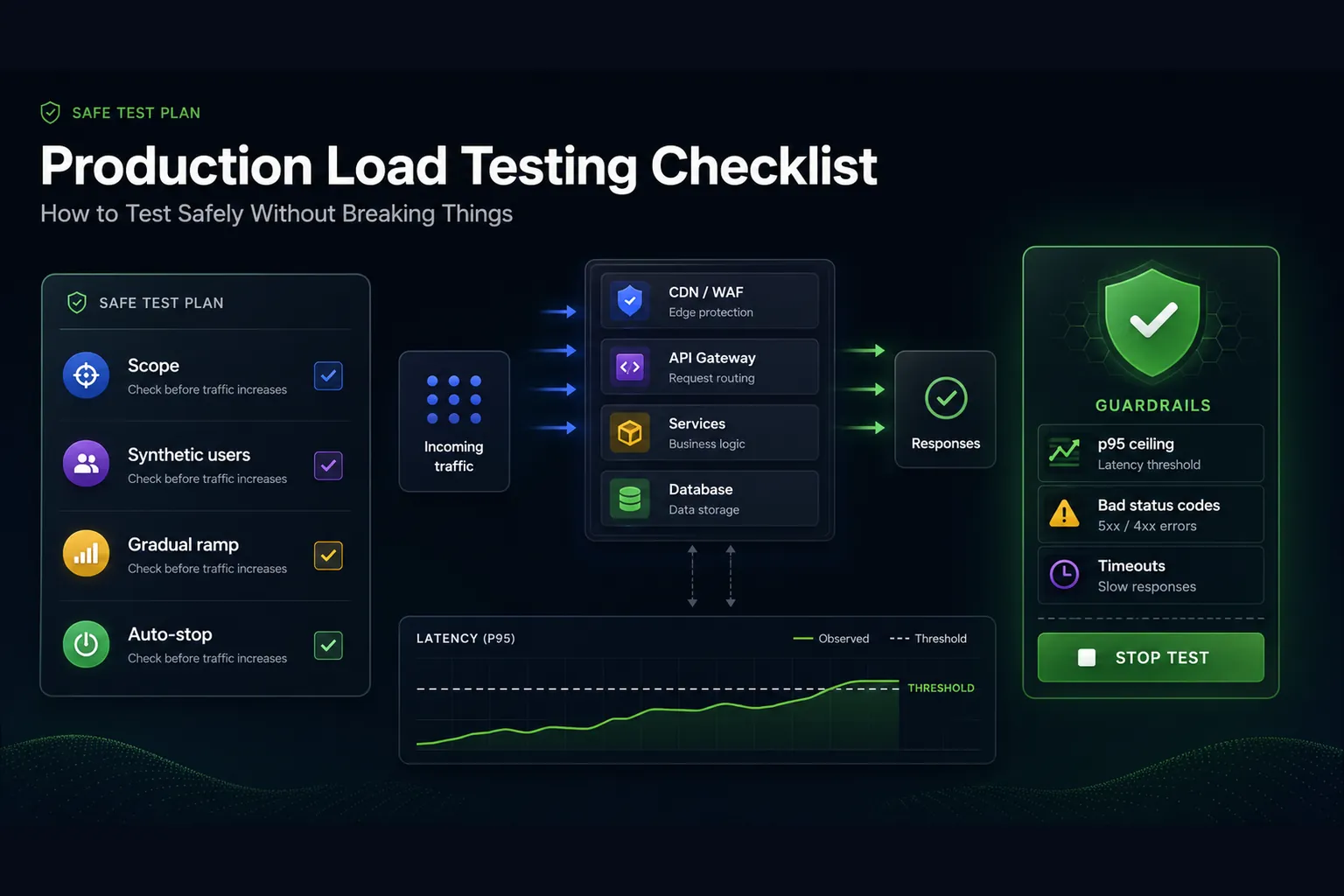
Production load testing is useful because it removes guesswork from release decisions, capacity planning, incident preparation, and launch readiness. It is also dangerous when it is treated like a benchmark instead of an operational event. The same test that gives a team confidence before Black Friday, a product launch, a major API customer onboarding, or a database migration can also create customer-visible latency if the team runs it without guardrails.
This checklist is written for engineering teams that need practical confidence, not theoretical load testing advice. It assumes you are testing HTTP APIs, web applications, backend services, or critical user journeys where failures matter. Some teams will run the full test in a production-like environment. Some will run small, controlled synthetic traffic against production. Some will do both. The safe process is similar in each case: define the decision, control the blast radius, make the workload realistic, instrument the system, set hard stop conditions, run in layers, and turn the result into an action.
A safe production load test is not “send traffic and watch graphs.” It is a controlled release-safety exercise with owners, traffic limits, observability, rollback paths, and assertions that stop or fail the test when p95 latency, p99 latency, error rate, timeout rate, bad status codes, or infrastructure saturation crosses a threshold you defined before the run.
Use production testing for
- Major launches and campaigns
- Capacity validation after infrastructure changes
- Release gates for critical APIs
- Validating autoscaling, caching, queues, and rate limits
Do not run it without
- A rollback owner and live monitoring
- Gradual traffic ramp-up
- Abort thresholds and assertions
- Clear test data, target scope, and stakeholder approval
What production load testing actually means
Production load testing does not always mean pushing your live system to failure while real users are active. In mature teams, it usually means one of three things. The first is a production-like test: you run the workload against an environment that mirrors production infrastructure, configuration, data shape, network paths, and dependency behavior as closely as possible. The second is a controlled production probe: you run limited synthetic traffic against the real production system to validate assumptions that staging cannot prove. The third is a release or launch readiness exercise: you combine load testing with observability, incident response, rollback planning, and stakeholder review.
The distinction matters because the risk profile is different. A production-like environment lets you test aggressively, but it may hide real-world behavior such as CDN cache state, WAF rules, database replicas, third-party API latency, noisy neighbors, region-specific routing, or customer data distribution. A production probe reveals real behavior, but the margin for error is smaller. A launch readiness test sits between those extremes: the goal is not to break the system; the goal is to prove that the system can handle a realistic version of the traffic you expect.
The mistake I see often is that teams treat production load testing as one big event. They wait until a few days before a launch, run a heavy test, find several ambiguous bottlenecks, and then discover that nobody knows whether to delay the release. A safer approach is to build confidence in layers. Validate the scenario in staging. Run a small production probe. Compare against a known baseline. Increase traffic only when the previous step is healthy. Stop immediately when the pre-agreed thresholds say the test is no longer safe.
Start with the decision the test must support
Every production load test should be attached to a decision. If the team cannot say what decision will change based on the result, the test is not ready. A vague goal like “see how the system performs” usually produces vague analysis. A useful goal sounds more specific: “Can the checkout API handle 800 requests per second for 20 minutes with p95 under 450 ms and less than 0.5% 5xx errors?” or “Can the login flow survive a 3x traffic spike after the marketing campaign email goes out?”
That decision determines the workload, the environment, the metrics, the duration, and the stop conditions. A release gate test may be short, strict, and repeatable. A launch readiness test may be longer and include spike behavior. A capacity planning test may intentionally search for the degradation point, but it should usually do that in production-like infrastructure, not in front of real users. A resilience test may be coordinated with SRE or infrastructure owners because autoscaling, queue depth, circuit breakers, and database limits are part of the experiment.
Write the decision down before building the test. Include the target service, the expected traffic level, the success criteria, the owner who can stop the run, and the action that follows pass or fail. This forces alignment. It also prevents the common failure mode where the charts look mediocre, nobody wants to call the test failed, and the team ships anyway because the result was never tied to a release policy.
Classify the risk level before you choose traffic
Not all load tests carry the same operational risk. A low-risk test might hit a read-only endpoint with cacheable responses, synthetic accounts, tight traffic ceilings, and auto-stop enabled. A high-risk test might include checkout, payment initiation, inventory writes, account creation, email sending, or third-party dependencies. Treating those two tests the same is how teams accidentally create production incidents.
Use a simple risk classification before execution. Low-risk tests can usually run more frequently if traffic is small and monitoring is solid. Medium-risk tests need coordination with engineering and support. High-risk tests need a runbook, business approval, maintenance window or low-traffic period, rollback owners, and explicit abort criteria. The risk level should also influence whether the run belongs in production at all. Many destructive or write-heavy scenarios are better tested in a production-like clone with carefully seeded data.
| Risk level | Typical scenario | Required control |
|---|---|---|
| Low | Read-only public API, CDN-backed page, health-like endpoint | Small ramp, p95 and error thresholds, monitoring owner |
| Medium | Authenticated user journey, search, dashboard, account read path | Synthetic users, rate limits, app and infrastructure dashboards, support awareness |
| High | Checkout, payment, inventory, message sending, data mutation, third-party calls | Runbook, rollback owner, business approval, data cleanup, strict auto-stop, low-traffic window |
Define and limit the blast radius
The safest production load tests are intentionally boring. They do not rely on luck. They constrain where traffic goes, how fast it ramps, which accounts it uses, how long it runs, and what happens when something looks wrong. Blast radius is the maximum damage the test can cause if your assumptions are wrong. You reduce it by limiting scope before you send traffic.
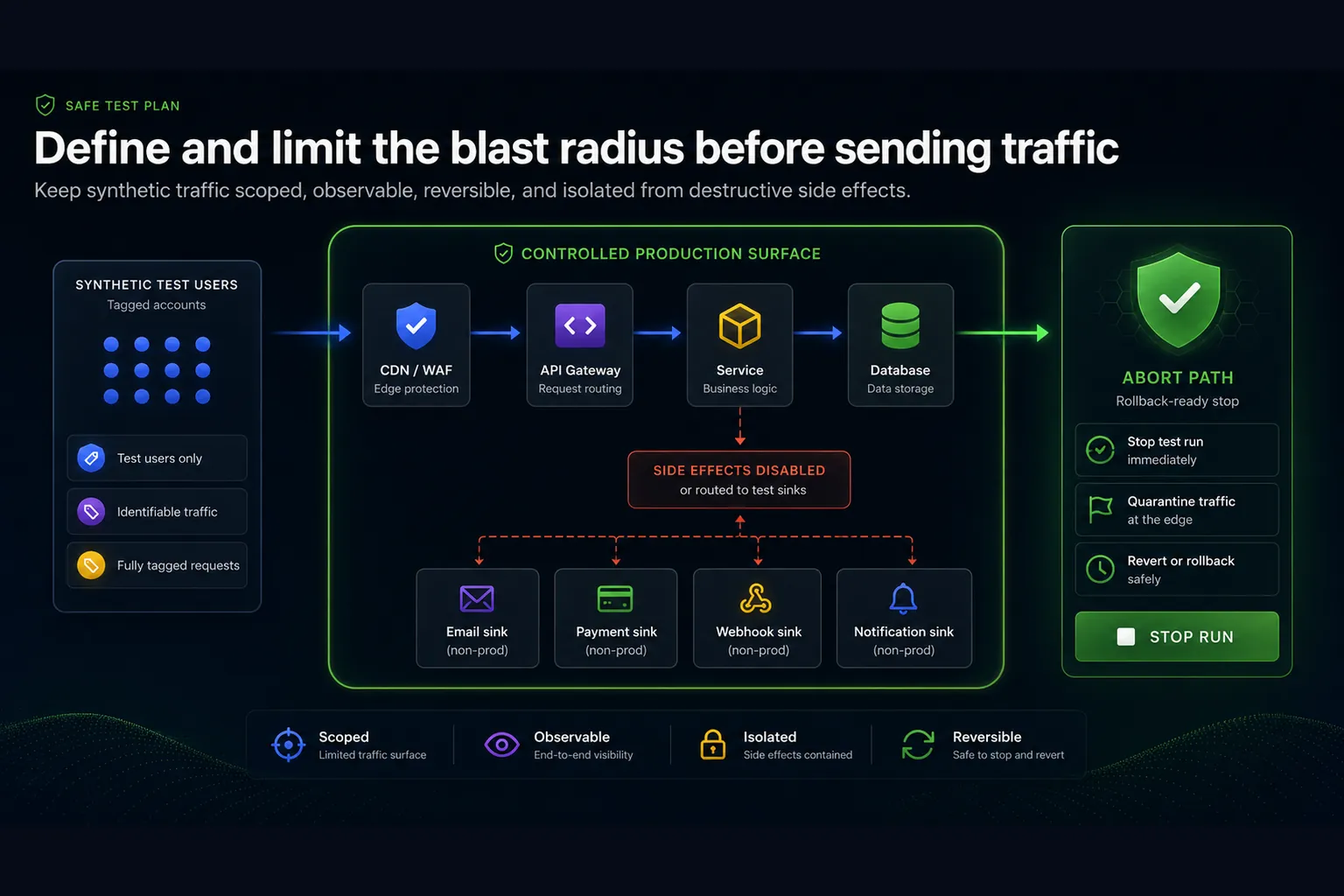
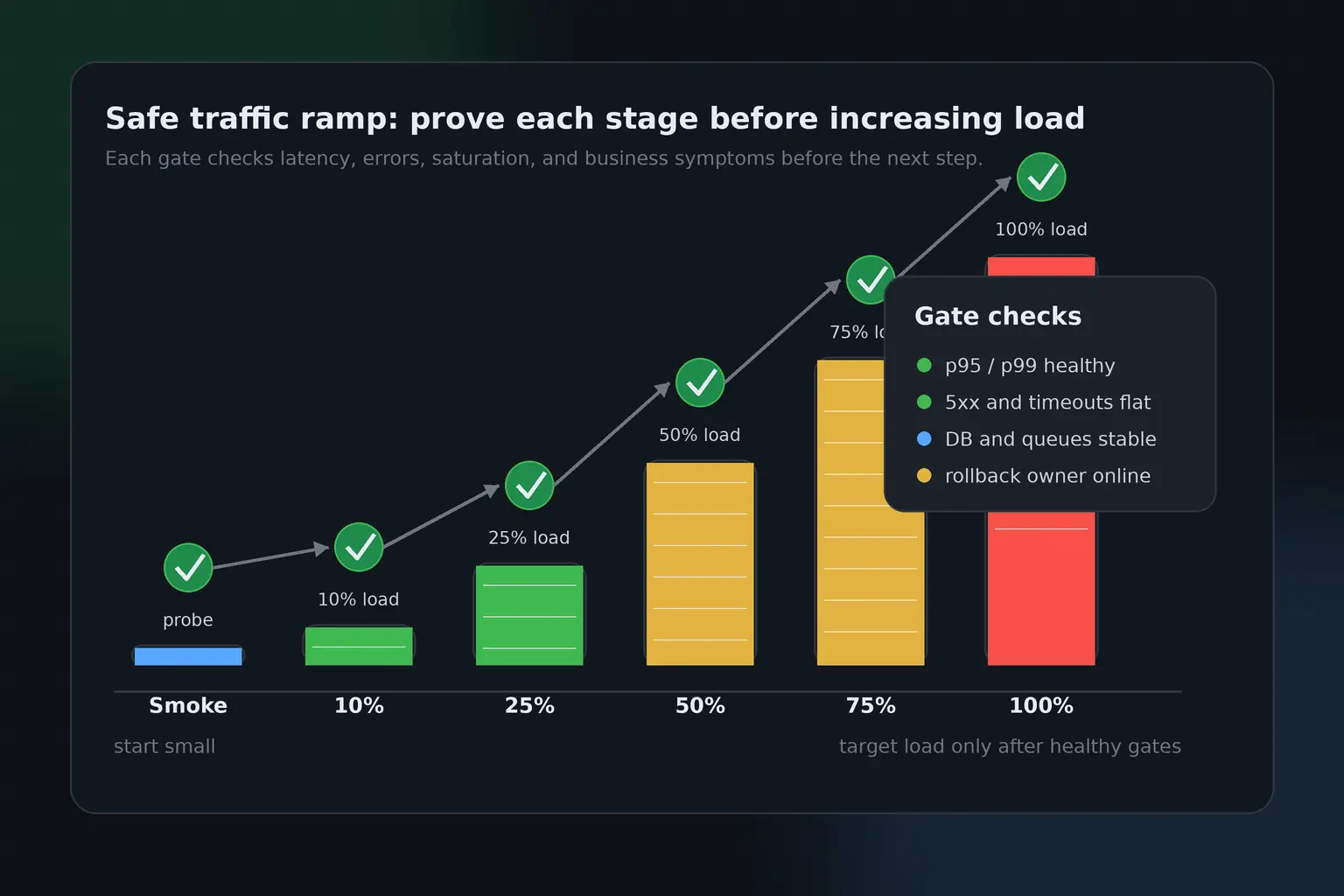
Start with the target surface. Are you testing one endpoint, one scenario, one region, one tenant, one API customer path, or the whole application? Smaller scope is safer and usually more diagnostic. Then set traffic boundaries. Use a ramp profile instead of jumping immediately to target load. For example, run 10%, 25%, 50%, 75%, and 100% of expected traffic with short observation windows between stages. If the system is healthy at each step, continue. If not, stop and analyze before increasing pressure.
Use dedicated test accounts and test markers whenever possible. If the system writes data, make test writes identifiable and easy to clean up. If the workflow sends emails, webhooks, invoices, SMS messages, push notifications, or downstream events, either disable those side effects for test users or route them to controlled sinks. If your workload touches third-party services, confirm whether your test violates their rate limits or terms. A load test that accidentally stress tests a payment provider or email provider is not a good test; it is an avoidable operational mistake.
Make the workload realistic enough to trust
A production load test does not need to simulate every user perfectly, but it must represent the behavior that matters for the decision. If real users authenticate, browse, search, write, wait, and retry, a single endpoint hammer test will miss important bottlenecks. If real traffic has a mix of small and large payloads, testing only tiny requests gives false confidence. If real customers come through specific regions or networks, a test from one location may hide routing and latency issues.
For APIs, model the endpoint mix. A common pattern is to start with the top business-critical flows rather than the top raw traffic endpoints. The highest-volume endpoint is not always the highest-risk endpoint. Login, checkout, search, quote calculation, pricing, order creation, authorization, and webhook handling often matter more than a simple cached read route. For web applications, model the journey: entry page, key API calls, static assets or CDN behavior, authenticated actions, and the step where users actually create business value.
Think time matters too. Virtual users that send requests in a tight loop may produce unrealistic concurrency and database pressure. Exact RPS mode is useful when you want to validate a service at a known throughput. Virtual-user mode is useful when you want to model concurrent actors moving through a journey. A serious checklist should explicitly choose between them instead of treating them as interchangeable. In LoadTester, you can use RPS-style tests for throughput validation and virtual-user scenarios for user-flow behavior, which makes it easier to match the model to the decision.
Set thresholds, assertions, and auto-stop rules before the run
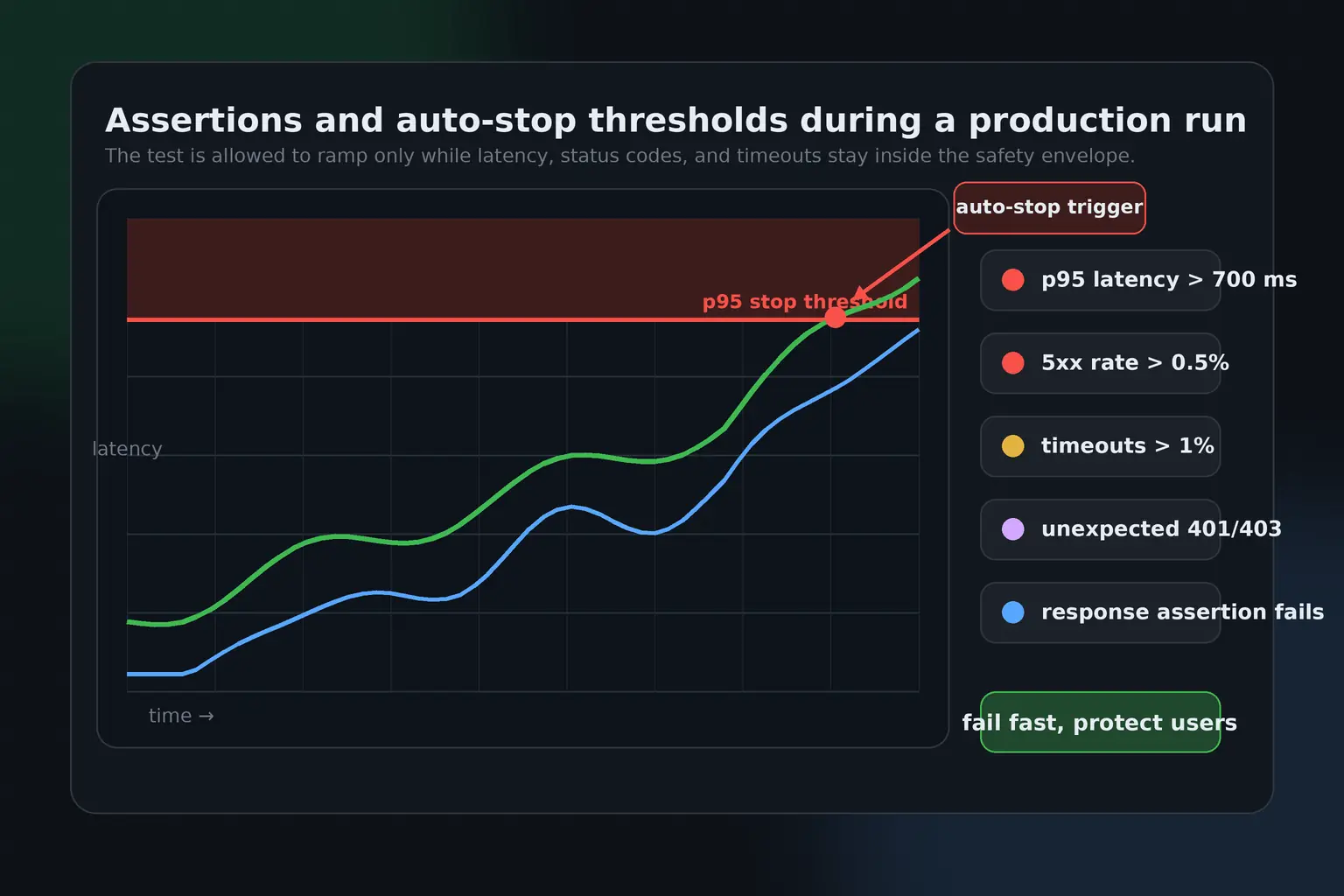
This is the most important safety section. Do not wait until the test is running to decide what “too slow” or “too broken” means. Production load tests need pre-defined thresholds and assertions. Thresholds define unacceptable performance, such as p95 latency above a ceiling or error rate above a limit. Assertions define unacceptable behavior, such as a bad status code, missing response field, invalid body, failed login, or unexpected redirect. Auto-stop rules protect the system by ending the run when the result is clearly unsafe.
For example, you might configure a test to stop if p95 latency stays above 700 ms for more than one minute, if 5xx responses exceed 0.5%, if timeout rate exceeds 1%, or if an authenticated step returns 401 or 403. You might fail the run if any checkout step returns a non-2xx status code, if the response body does not contain an expected order status, or if a GraphQL response includes an errors array. These rules turn a load test from a passive chart into an active guardrail.
LoadTester supports assertions and stop conditions for this exact reason. You can define latency thresholds, error thresholds, and response expectations so the test can fail or stop when the application crosses the boundary you care about. That matters in production because the correct behavior is often not “finish the scheduled duration no matter what.” The correct behavior is “stop the moment the test is no longer safe or no longer useful.”
Example production safety gates
- Stop the test if p95 latency is above 700 ms for 60 seconds.
- Stop the test if HTTP 5xx responses exceed 0.5%.
- Fail the test if any critical step returns 401, 403, 404, 409, 429, or 5xx unexpectedly.
- Fail the test if the response body is missing a required field.
- Stop the test if timeout rate exceeds 1%.
- Stop manually if production monitoring shows customer-visible impact.
Be careful with status code rules. Not every non-2xx response is automatically a failure. A 404 may be valid for a negative test. A 409 may be expected for an idempotency conflict. A 429 may be expected if you are validating rate limits. The assertion should reflect the scenario. The important part is that the expected behavior is explicit. Ambiguous tests produce ambiguous decisions.
Prepare observability before generating traffic
Load testing without observability is just pressure. You need to see how the system behaves while the pressure is applied. At minimum, the test owner should have live visibility into application latency, error rate, throughput, logs, database health, cache hit rate, queue depth, CPU, memory, network, autoscaling, and dependency behavior. For distributed systems, traces are often the fastest way to see which internal service or dependency is responsible for tail latency.
Prepare dashboards before the test starts. Do not build them during the run. The dashboard should show both user-facing symptoms and backend causes. User-facing symptoms include p95 latency, p99 latency, HTTP status codes, timeout rate, failed steps, and throughput. Backend causes include database connections, slow queries, lock waits, queue backlog, worker saturation, cache evictions, garbage collection, thread pools, event loop lag, load balancer errors, and upstream dependency latency.
Also decide who watches what. One person should own the load testing tool. One person should watch application dashboards. One person should watch infrastructure and database health if the test is medium or high risk. One person should have authority to stop the test. In small teams this may be the same engineer, but the roles still need to be clear. During a production run, confusion is expensive.
Create a runbook with stop, rollback, and communication steps
A production load test should have a short runbook. It does not need to be a twenty-page incident manual, but it should answer the questions that matter when pressure is on. Who starts the test? Who can stop it? What is the target traffic? What are the thresholds? Which dashboards are open? Which Slack channel or incident room is used? Who owns rollback if the test reveals a release problem? Who informs support or customer-facing teams if the test may be visible?
The runbook should include manual abort criteria in addition to automated thresholds. Automated rules are excellent, but they do not replace judgment. Stop the test if customer support reports live impact, if synthetic traffic escapes the intended target, if test data begins causing side effects, if a dependency owner asks you to stop, if monitoring becomes unavailable, or if the team cannot explain what is happening. A safe test is one you can stop quickly.
Communication is part of safety. Tell the right people before the run begins. For low-risk tests, that may only be the engineering team. For high-risk tests, include support, product, infrastructure, security, and business owners. Make it clear that synthetic errors or alerts may appear. Label the test traffic where possible so responders do not waste time diagnosing expected activity as an unknown incident.
Validate data, authentication, and side effects
Many production load tests fail before they become performance tests because the data model is wrong. Tokens expire. Test accounts get locked. Carts fill with invalid items. Search indexes do not contain representative records. Permissions differ from real customers. Webhooks fire to real endpoints. Email queues fill with test messages. Inventory changes. Payment flows create real authorization attempts. These are not load testing problems; they are preparation problems.
Use dedicated synthetic identities. Give them realistic permissions. Confirm token lifetime and refresh behavior. Make sure the test can run long enough without all users reauthenticating at the same second unless that is part of the scenario. Seed data that resembles production shape without exposing sensitive customer information. If the workflow writes records, mark them with a test prefix or metadata field so cleanup is possible. If the system is multi-tenant, decide whether the test belongs in a dedicated tenant or across multiple synthetic tenants.
Side effects need special attention. Checkout, billing, notifications, and integrations should not be tested casually in production. If you must include them, use sandbox modes, blocked external delivery, test payment credentials, disabled notification routing, and explicit cleanup. The safest production load tests exercise the performance-sensitive path without creating business damage.
Run in layers: smoke, baseline, target, spike, and sustained
The right way to run a production load test is gradually. A smoke test verifies that the scenario works and the assertions are not wrong. A baseline test verifies the current healthy state. A target test validates the expected traffic level. A spike test validates sudden demand. A sustained test validates behavior over time. You do not always need every layer, but you should rarely jump straight to the largest one.
Start with a very small run. Confirm that requests hit the right environment, use the right accounts, produce the expected status codes, and appear correctly in dashboards. Then run a baseline at normal traffic or a small percentage of expected traffic. Compare it against historical results if you have them. Only after that should you move to target traffic. If the target run passes, decide whether a spike or sustained test is needed for the decision.
Layered execution gives you better diagnostics. If the smoke test fails, the scenario is broken. If the baseline is worse than normal, the environment may already be unhealthy. If target traffic fails but baseline passes, you found capacity or scaling pressure. If the spike fails but target steady-state passes, autoscaling, queueing, or cold-cache behavior may be the issue. If the sustained test degrades over time, look for leaks, saturation, pool exhaustion, slow queues, or data growth.
Watch tail latency, not only averages
Average latency is useful as a rough signal, but it is not enough for production decisions. Users feel the slow requests, and systems often fail gradually in the tail before they fail in the average. Watch p95 and p99 closely. Rising p95 often means a growing subset of users is experiencing poor performance. Rising p99 may reveal retries, lock contention, slow dependencies, garbage collection, queue buildup, or noisy infrastructure.
Tail latency should be tied to thresholds. A release gate that says “average latency under 250 ms” can pass while p95 is painful. A better gate says something like: p95 under 500 ms, p99 under 1.5 seconds, error rate under 0.5%, and no unexpected 5xx responses during the target window. The exact numbers depend on your product, but the principle is stable: decide what users and the business can tolerate, then encode that into the test.
In LoadTester, latency thresholds and assertions help keep this disciplined. Instead of manually reviewing a chart after the fact, you can make the run fail or stop when latency reaches the threshold you defined. That is especially useful for release validation because it turns performance into a clear pass/fail signal rather than a subjective dashboard review.
Treat bad status codes as behavior failures, not just errors
Status codes are one of the most valuable signals in production load testing because they tell you how the application is failing. A rising 500 rate usually points to server-side errors. A rising 502 or 503 may point to gateway, load balancer, upstream, or saturation issues. A rising 504 often means timeouts. A rising 429 may mean rate limits are working or too aggressive. A sudden 401 or 403 in an authenticated scenario may mean token handling, session expiry, permission checks, or auth dependencies are failing under pressure.
Do not only track the total error rate. Track status codes per step. If the login step is healthy but the write step returns 503, the bottleneck is different from a test where auth fails first. If most failures are 429, the system may be protecting itself correctly but your test profile may be unrealistic. If 404 appears on a route that should exist, the test may be generating invalid data or routing incorrectly.
This is where assertions are more useful than generic error counting. You can define which status codes are acceptable for each step and fail the test when a bad status code appears. For a critical checkout confirmation step, the assertion may require a 200 or 201. For an idempotency retry, a 409 might be acceptable. For a protected route, 401 should fail because it means the test is not exercising the intended path. Production confidence comes from precise expectations.
Coordinate with autoscaling, caches, queues, and rate limits
Modern systems often survive load through adaptive behavior: autoscaling adds capacity, caches absorb reads, queues smooth bursts, rate limits protect dependencies, and circuit breakers preserve partial availability. A production load test should intentionally observe these mechanisms. Do not just ask whether the API survived. Ask whether the protective systems behaved the way you expected.
Autoscaling has delay. A sudden spike can hurt users before new capacity is ready. Caches can make early results look good until working sets change or TTLs expire. Queues can make request latency look acceptable while downstream work silently falls behind. Rate limits can protect the system but break important customer workflows if configured too aggressively. Circuit breakers can prevent total failure while hiding partial degradation from simple success-rate charts.
Before the run, write down what you expect these systems to do. At 50% target traffic, maybe no scaling should occur. At 100%, maybe one additional task group should start. During spike traffic, maybe the queue can grow but must drain within five minutes. If the test proves those assumptions wrong, that is valuable. The best production load tests improve operational understanding, not just raw performance numbers.
Use load tests as release gates carefully
Load testing can be a strong release gate, but only when the gate is designed for the release process. Heavy tests should not block every small commit unless your team has the infrastructure, speed, and stability to support that. A better pattern is layered gating: small smoke performance checks in CI, scheduled baselines for drift detection, and deeper load tests before high-risk releases or infrastructure changes.
For example, a pull request might trigger a short API check with strict assertions on status codes and a modest latency ceiling. A release candidate might trigger a five-minute target-load test in staging or pre-production. A major launch might require a coordinated production probe, target test, and spike test with live monitoring. The gate should match the risk of the change.
LoadTester fits this workflow because it supports repeatable tests, thresholds, assertions, scheduled runs, and CI/CD-friendly execution. The value is not only traffic generation. The value is that the same test definition can run repeatedly, fail when a threshold is crossed, and produce results the team can compare over time. That is how performance validation becomes a release habit instead of a once-a-quarter fire drill.
Analyze results like an engineer, not like a dashboard tourist
After the run, resist the urge to summarize the result as simply “passed” or “failed.” Start with the decision the test was supposed to support. Did the system meet the target traffic, latency, and error criteria? Did assertions pass? Did any auto-stop rule trigger? Did infrastructure behave as expected? Did queues drain? Did caches, autoscaling, and rate limits behave correctly? Did any customer-visible metric move?
Compare against a baseline whenever possible. One test result in isolation is easy to misread. A p95 of 480 ms may be excellent if the previous baseline was 700 ms, or concerning if the previous baseline was 250 ms. Error rate may look acceptable overall while one critical step is failing. Throughput may look stable while latency grows. The analysis should connect symptoms to likely causes and next actions.
Document what changed. If the test followed a release, record the build, configuration, infrastructure size, database version, cache state, region, test profile, and relevant feature flags. Without this context, the next team member cannot compare results honestly. Performance engineering is a history-dependent discipline. The more repeatable and annotated your tests are, the more valuable they become over time.
Do post-test cleanup and follow-up
The run is not finished when traffic stops. Check for leftover data, queued jobs, cache pollution, locked accounts, generated records, failed retries, pending webhooks, test emails, and unexpected alerts. Confirm that autoscaled resources returned to expected levels. Confirm that queues drained. Confirm that database replicas, caches, and background workers are healthy. If support or incident channels were notified before the test, send a short completion note.
Then turn findings into actions. If the test passed, record the baseline and the confidence level. If it failed, create specific follow-up work: optimize a query, adjust autoscaling, increase connection pool size, add caching, fix timeout settings, tune rate limits, improve retry behavior, or update the test scenario. Avoid vague tickets like “improve performance.” A good load test should produce concrete engineering work.
Finally, update the checklist itself. Production systems change. Traffic grows. Dependencies move. New endpoints appear. Thresholds that were acceptable six months ago may no longer match user expectations or business risk. Treat the checklist as a living operational asset.
The production load testing checklist
Use this checklist before any medium- or high-risk production load test. For lower-risk tests, you may not need every item, but skipping an item should be intentional.
Planning
- Define the decision the test supports.
- Identify the target service, endpoint, scenario, tenant, region, and environment.
- Classify risk as low, medium, or high.
- Choose whether the run belongs in production, production-like staging, or both.
- Define expected traffic, target duration, ramp pattern, and maximum allowed load.
- Confirm business stakeholders understand the goal and risk.
Safety controls
- Assign a test owner, monitoring owner, and stop/rollback owner.
- Prepare dashboards before the run.
- Configure assertions for expected status codes, response bodies, and scenario steps.
- Configure thresholds for p95 latency, p99 latency, error rate, timeout rate, and bad status codes.
- Enable auto-stop when latency reaches the threshold, bad status codes appear, or failures exceed the accepted limit.
- Write manual abort criteria in the runbook.
Workload realism
- Use production-like authentication, headers, payload sizes, and endpoint mix.
- Use synthetic accounts with realistic permissions.
- Model think time, pacing, and traffic distribution.
- Separate RPS tests from virtual-user journey tests.
- Validate test data and cleanup strategy.
- Control side effects such as emails, payments, webhooks, and notifications.
Execution
- Start with a smoke test.
- Run a baseline before target load.
- Ramp gradually rather than jumping to maximum traffic.
- Watch p95, p99, status codes, throughput, timeouts, and failed steps live.
- Correlate test metrics with application and infrastructure dashboards.
- Stop immediately when automated or manual abort criteria are met.
After the run
- Confirm traffic stopped and the system returned to normal.
- Check queues, autoscaling, background jobs, logs, and test data cleanup.
- Compare the run against previous baselines.
- Record the result, environment, build, configuration, and known anomalies.
- Create specific follow-up actions.
- Update thresholds or scenarios if the test revealed a better operating model.
Common production load testing mistakes
The first mistake is testing too late. If you run your first meaningful load test two days before a launch, you are not validating readiness; you are gambling. The second mistake is testing too hard too quickly. Sudden high traffic without a ramp removes your ability to learn where degradation starts and increases the chance of avoidable impact. The third mistake is testing unrealistic traffic. A synthetic workload that ignores auth, data, think time, endpoint mix, or dependencies can pass while the real system remains fragile.
The fourth mistake is missing abort criteria. Teams sometimes let a clearly failed test continue because the planned duration was ten minutes. That is backwards. If p95 latency crosses the safety ceiling, 5xx errors climb, or customer impact appears, stop. The fifth mistake is looking only at the load testing chart. The test generator sees symptoms. Your application, database, queue, cache, and infrastructure telemetry explain causes.
The sixth mistake is failing to reuse the test. A one-off test may help once, but the real value comes from repeatability. Save the scenario. Save the thresholds. Compare future runs. Move smaller checks into CI/CD. Schedule baselines. Performance confidence compounds when the workflow is repeatable.
How LoadTester helps make production tests safer
LoadTester is designed around the workflow that production load testing actually needs: repeatable HTTP and API tests, live metrics, thresholds, assertions, stop conditions, scheduled runs, CI/CD integration, exports, and shareable results. Those details matter because safety is not just about how much traffic a tool can generate. Safety is about how quickly the team can detect that the test has become unsafe and how clearly the result maps to a decision.
Assertions are especially important. You can configure a test to fail when a response returns a bad status code, when an authenticated route unexpectedly returns 401 or 403, when a critical step returns 5xx, or when the response body does not match what the scenario requires. You can also use latency and error thresholds to stop the test when the system crosses a limit. That is the difference between a chart you inspect later and a guardrail that protects the run while it is happening.
The most useful production load testing process is not tool-only and not process-only. You need both. The process defines the goal, risk, owners, thresholds, and runbook. The tool enforces the repeatable execution, live visibility, assertions, and reporting. When those two sides work together, load testing becomes part of release engineering instead of a stressful manual event.
Final thoughts
Production load testing is one of the fastest ways to learn whether your system is ready for real demand, but it deserves respect. Do it casually and it can create the very incident you were trying to avoid. Do it deliberately and it becomes a powerful release-safety practice.
The safe pattern is straightforward: define the decision, limit the blast radius, model realistic traffic, prepare observability, set thresholds and assertions, ramp gradually, stop when the data says to stop, and turn the result into engineering action. If your test has no owner, no thresholds, no assertions, no rollback path, and no monitoring, it is not production-ready. If it has all of those pieces, it can give the team confidence that dashboards, staging environments, and hope cannot provide.
Production load testing questions
Is production load testing safe?
It can be safe when the blast radius is controlled, stakeholders are informed, observability is live, traffic ramps gradually, and abort thresholds are defined before the run starts. It is risky when teams run high traffic without limits, monitoring, or rollback ownership.
What thresholds should stop a production load test?
Common stop conditions include p95 or p99 latency crossing a defined ceiling, elevated 5xx responses, unexpected 401 or 403 responses on authenticated flows, high timeout rates, saturation of databases or queues, and any user-impacting symptom confirmed by production monitoring.
Should load testing be part of release validation?
Yes, but heavy production tests should not run on every commit. Use smaller tests in CI, scheduled baselines for drift detection, and carefully coordinated production or production-like runs before major releases, infrastructure changes, launches, or capacity-sensitive campaigns.