
AWS Distributed Load Testing Alternative: A Practical Guide for API and HTTP Load Testing Teams
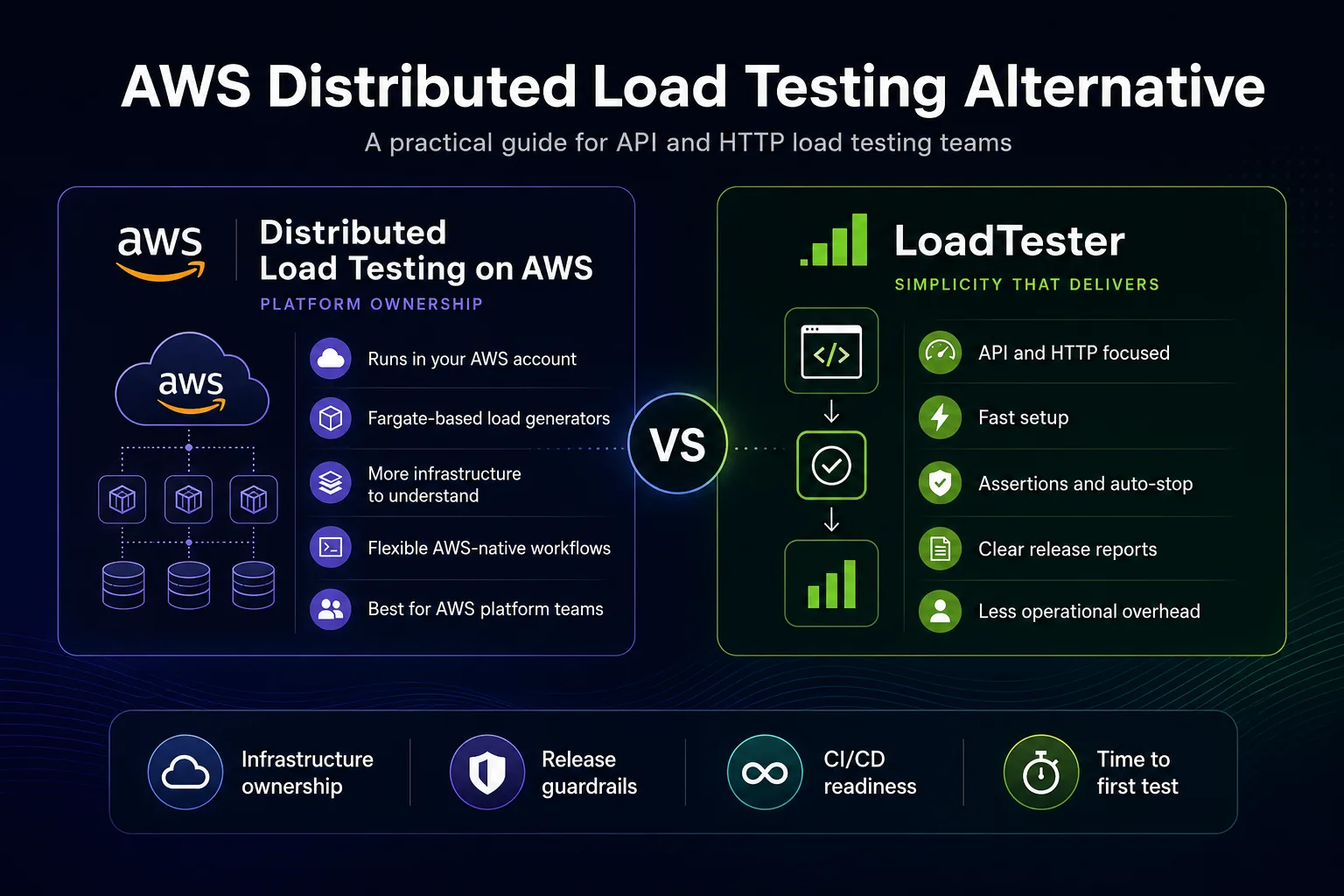
Distributed Load Testing on AWS is a serious option for teams that want to run high-scale load tests from inside their own AWS environment. It is not a small toy tool, and it is not the same category as a browser-only uptime checker. It is an AWS Solutions implementation that deploys a working load testing system into your AWS account, including a web console, API layer, authentication, orchestration, storage, metrics, and load generator tasks. For platform teams that already operate deeply in AWS, that can be exactly the right model.
But many teams searching for an AWS Distributed Load Testing alternative are not only comparing raw traffic generation. They are comparing operating models. One model says: deploy an AWS solution, own the stack, configure AWS services, understand the architecture, manage costs, handle updates, and customize as needed. The other model says: use a purpose-built product for API and HTTP load testing, avoid operating the testing platform, and focus on test design, thresholds, bad status codes, reports, and release decisions.
This guide compares those models honestly. AWS is excellent at giving you flexible cloud building blocks. Distributed Load Testing on AWS uses those building blocks to create a scalable testing system. LoadTester is built for the narrower but very common job of running practical HTTP and API load tests with less setup, clearer guardrails, and faster team adoption. Neither answer is universally correct. The right choice depends on whether your team values AWS-native control more than operational simplicity.
What Distributed Load Testing on AWS actually is
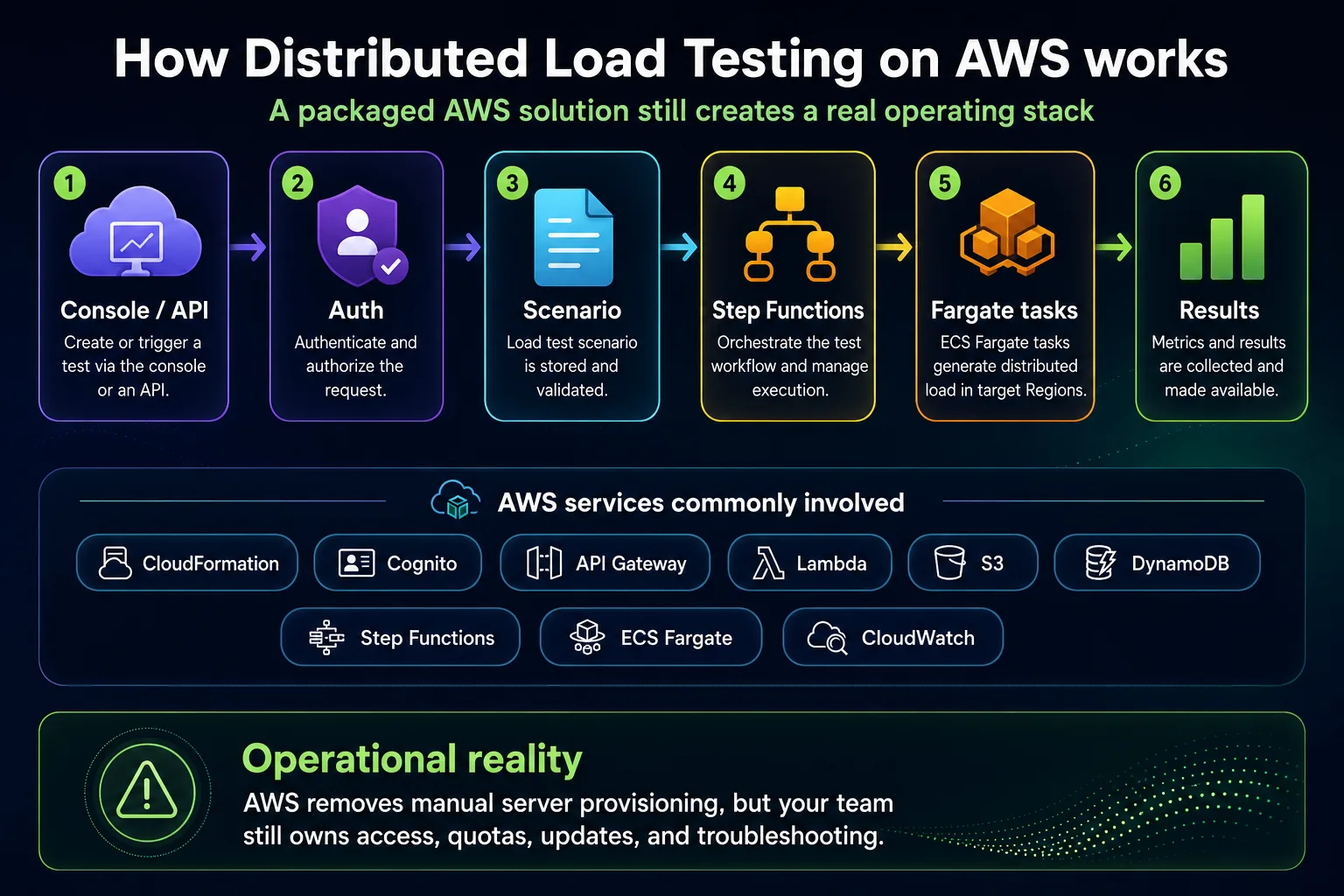
Distributed Load Testing on AWS is an AWS Solutions implementation for running distributed load tests using AWS infrastructure. According to the official AWS documentation, the solution can distribute load across AWS Regions, analyze test results, support different console hosting models, and run load generation using AWS-managed infrastructure. The architecture uses AWS services such as Amazon S3, Amazon DynamoDB, AWS Step Functions, Amazon ECS on AWS Fargate, Amazon API Gateway, AWS Lambda, Amazon Cognito, Amazon CloudFront, and Amazon CloudWatch, depending on how you deploy and operate the solution.
The important distinction is that this is not the same as signing into a simple SaaS product and clicking “start test.” You deploy a solution into your AWS account. That gives you control, but it also gives you ownership. Your team needs to understand the stack well enough to operate it responsibly, especially if tests are large, multi-region, scheduled, tied into CI/CD, or aimed at production-like environments.
The AWS implementation uses a test scenario model. A scenario describes details such as the name, task count, concurrency, Region, ramp-up, hold duration, test type, schedule, and recurrence. When a test runs, the solution stores scenario data, orchestrates execution, launches load generator tasks, collects results, and exposes metrics for review. For teams that already know AWS well, that is a reasonable and transparent architecture. For teams that simply want to validate API performance before releases, it may be more infrastructure than they want to own.
How the AWS load testing workflow works
A typical AWS Distributed Load Testing workflow starts when a user creates a test scenario in the console or through an API. The configuration is stored, orchestration begins, and AWS Step Functions launches ECS tasks on Fargate in the selected Regions. Those tasks run the load testing engine and generate traffic against the target. Results and metrics are collected so the team can inspect latency, error summaries, throughput, and raw performance data after the run.
That workflow is attractive because it avoids a common problem in performance engineering: manually building load generator infrastructure. Instead of maintaining a fleet of EC2 instances or writing custom orchestration scripts, the AWS solution packages a reference architecture around Fargate, Step Functions, API Gateway, Lambda, S3, DynamoDB, CloudWatch, and other services. You get distributed execution without starting from a blank AWS account.
However, the phrase “without managing servers” should not be interpreted as “without managing anything.” You still need to deploy the solution, grant access, review quotas, understand Regions, monitor AWS costs, secure endpoints, update the stack, and decide how test scripts or scenarios will be owned. If your team is comfortable with that model, it can be a strength. If your team wanted a straightforward API load testing tool, it can feel like too much operational surface area.
Where Distributed Load Testing on AWS is strong
A fair comparison should start by acknowledging where the AWS solution is genuinely useful. There are teams for whom Distributed Load Testing on AWS is not just adequate; it is the right architectural choice.
1. You want the stack in your AWS account
Some teams prefer not to send test configuration, operational metadata, or execution control to a third-party platform. They want the system inside their AWS account, connected to their IAM model, their networking controls, and their internal operational practices. For these teams, the AWS solution’s deployment model is a feature, not a burden.
This is especially true for organizations with strict platform engineering standards. If the internal rule is that operational tooling should be deployed as approved infrastructure inside the company’s AWS environment, Distributed Load Testing on AWS aligns with that preference. You can inspect the architecture, tag resources, monitor costs, and integrate the system into existing AWS governance processes.
2. You need distributed regional load generation
Distributed traffic matters when geography is part of the test question. If you need to simulate users from multiple AWS Regions, compare regional behavior, or understand how edge, network, or backend dependencies respond under geographically distributed demand, AWS gives you a natural execution environment. The AWS solution is designed around launching load generation through AWS infrastructure, including regional execution patterns.
3. You want test-tool flexibility through the AWS stack
The AWS architecture documentation describes the use of Taurus in the load generator image, with support for tools such as JMeter, k6, Locust, and others. That matters if your team already has existing test assets, prefers a particular scripting model, or wants to keep the load execution framework flexible. A product that only supports one style of test may be too narrow for a platform team standardizing performance tooling across many application types.
4. You are willing to customize and extend
A deployed AWS solution is more customizable than a closed product workflow. If you have platform engineers who want to adapt the stack, integrate with internal dashboards, build around APIs, add internal controls, or modify deployment models, the AWS approach gives them room to do that. This is valuable in large organizations where one team builds the internal performance platform and many application teams consume it.
5. You prefer pay-per-use infrastructure economics
The AWS cost model can be attractive when load testing is occasional, well-governed, and operated by a team that understands AWS billing. The official implementation guide explains that you are responsible for the cost of the AWS services used by the solution, and that total cost depends on the number of tests, test duration, and generated data. That model can work well when the organization already has FinOps practices and wants to tie spending to actual cloud resource use.
Where teams tend to feel friction
Most teams looking for an AWS Distributed Load Testing alternative are not saying that the AWS architecture is bad. They are saying that the architecture is heavier than the problem they need to solve. The friction is not always technical. It is often organizational, operational, or workflow-related.
Deployment is still a project
Even when a solution is packaged, deployment is not zero work. Someone needs to review the implementation guide, launch or update the stack, configure access, understand the resources created, and verify the system behaves correctly in your account. Security teams may ask what is being deployed. Platform teams may ask about network boundaries. Finance teams may ask about cost categories. Operations teams may ask who owns failures or updates.
That is acceptable for a platform-level tool. It is less attractive when the user is a product engineer who just wants to run a realistic load test against a staging API before a launch. In that case, every AWS resource and configuration step competes with the real job: define the workload, run the test, read the result, and decide whether the release is safe.
You own the lifecycle
Ownership does not end after the first successful test. AWS solutions evolve. Dependencies change. Quotas need attention. Users need access. Logs and metrics need review. Cloud budgets need monitoring. Updates may require care, especially if tests are scheduled or the tool is part of a release process. The more teams depend on the system, the more it becomes internal infrastructure.
This is the core tradeoff. If your organization wants an internal load testing platform, ownership is expected. If you wanted a straightforward testing product, ownership becomes friction.
Cost is transparent, but not always simple
Cloud resource pricing is transparent in the sense that every service has a price. It is not always simple in the sense that every run has an obvious all-in cost that every engineer can understand at a glance. Distributed Load Testing on AWS can involve Fargate task duration, Lambda, Step Functions transitions, storage, data transfer, logging, monitoring, and optional features. The official cost page provides a sample default estimate, but your actual cost depends on usage patterns.
Teams that already manage AWS costs well may like this. Teams that want predictable pricing and fewer moving parts may prefer a product where the load testing workflow and its commercial model are easier to explain to a non-platform stakeholder.
Test design still requires expertise
Distributed load generation is only one part of performance testing. You still need to decide the right target, traffic model, duration, ramp-up, test data, authentication method, status code expectations, latency thresholds, timeout limits, and pass/fail criteria. A powerful AWS stack will not automatically tell you whether the test represents real users or whether a failing p99 result should block release.
This is where product experience matters. A good load testing workflow should push the team toward safer and more repeatable decisions: define thresholds up front, assert on bad status codes, avoid destructive side effects, ramp traffic gradually, and make results understandable to people who were not present during the run.
Release workflows need clarity, not just metrics
A release check is different from an exploratory performance test. During exploratory testing, teams may tolerate complexity because the purpose is investigation. During release validation, teams need a clear answer: did this build stay inside the agreed performance guardrails or not? If the workflow produces metrics but not a clean go/no-go signal, the team can still end up debating the result manually.
That is one of the most important reasons to consider an alternative. If your main use case is repeatable API performance validation, you need the workflow to be easy enough that it actually happens every time it matters.
When LoadTester is the better fit
LoadTester is usually the better fit when your team wants to avoid operating the load testing platform and focus directly on HTTP and API performance checks. It is not trying to replace AWS as an infrastructure platform. It is trying to remove the infrastructure decision from a narrower workflow: create a test, run it, apply assertions, stop when thresholds are breached, and read results quickly.
1. Your workload is mostly APIs and HTTP endpoints
If your main scenarios are REST APIs, HTTP endpoints, authenticated request flows, webhook-like workflows, customer-facing application URLs, or release checks for backend services, an API-first tool can be more effective than a broad infrastructure solution. You do not need every possible protocol path. You need good control over request behavior, concurrency or request rate, latency tracking, status code assertions, and repeatable reports.
2. You want faster onboarding
The biggest hidden cost of testing tools is adoption. A tool with more moving parts may be powerful, but if only one platform engineer knows how to use it properly, it becomes a bottleneck. Product teams need performance workflows that backend developers, QA engineers, DevOps engineers, and release owners can understand without weeks of setup.
LoadTester is a better fit when you want more people on the team to participate in performance validation. A simpler workflow increases the chance that load testing becomes a routine quality practice instead of a special event that only happens before major launches.
3. You need assertions and auto-stop to be first-class
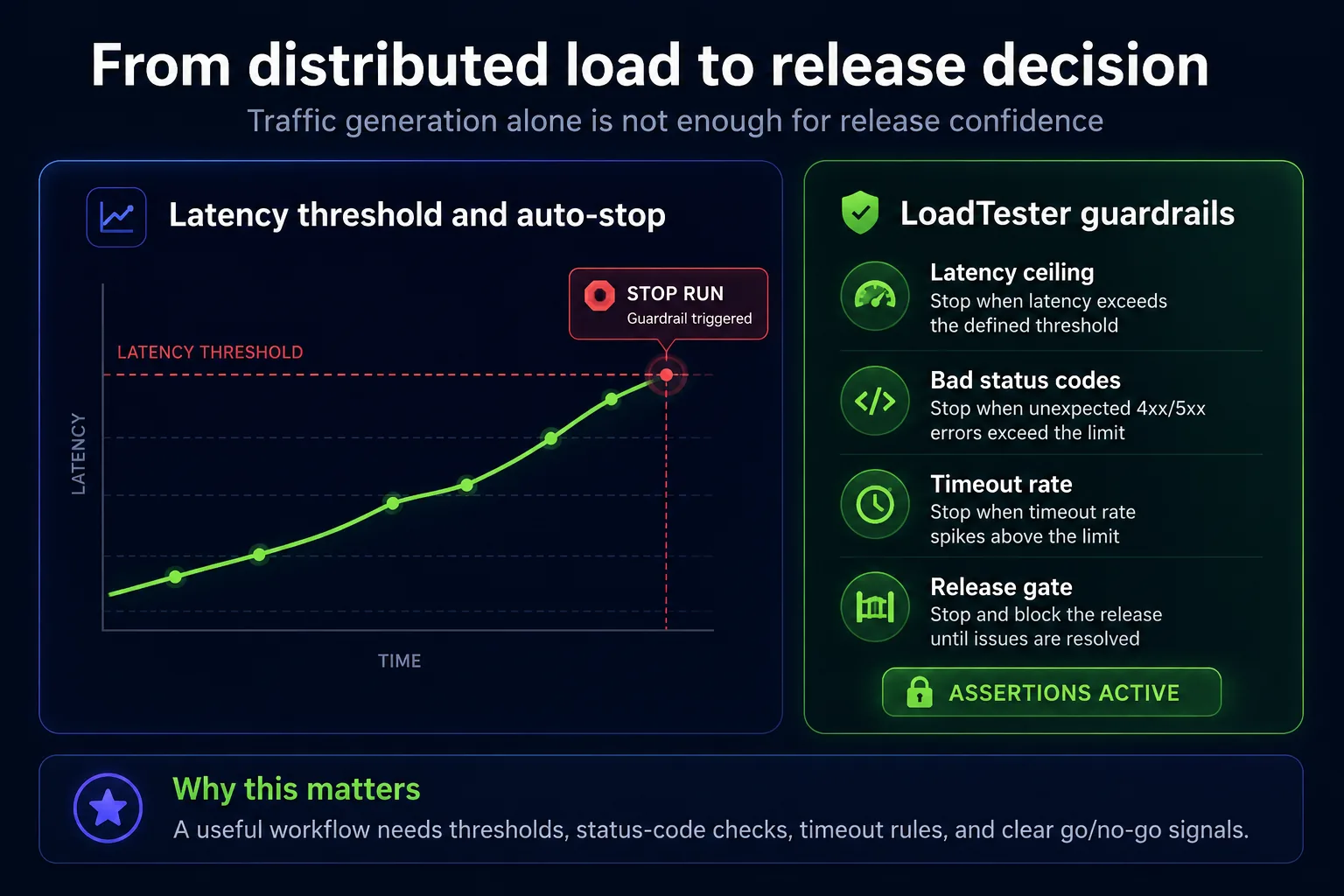
A useful load test should not wait until the end to tell you that the run was obviously unsafe or invalid. If p95 or p99 latency crosses a defined ceiling, if 5xx errors spike, if an authentication flow starts returning unexpected 401 or 403 responses, if timeout rate rises above the agreed limit, or if the target returns bad status codes, the tool should help the team fail fast.
LoadTester is designed around this release-safety mindset. Assertions can stop a test if latency reaches over an X threshold, if bad status codes are returned, if timeouts increase, or if other agreed failure conditions are hit. That matters because performance tests consume real time, real infrastructure, and sometimes real production capacity. Guardrails reduce the chance that a test keeps running after it has already answered the question.
4. You want simpler CI/CD performance checks
CI/CD performance testing should be boring in the best possible way. The team should know which test runs, how long it runs, what thresholds apply, where the report is, and which result blocks the release. If the test workflow requires too much platform knowledge, it is less likely to be used consistently.
LoadTester is a better fit when the team wants to turn performance into a repeatable check rather than an infrastructure project. That does not mean every commit needs a large load test. It means the right checks can run at the right points: before production deploys, after major API changes, before high-traffic campaigns, or on scheduled baselines.
5. You want results that product teams can act on
Performance reports should not be readable only by the person who configured the test. A useful report should show latency distribution, throughput, error behavior, bad status codes, timeouts, and threshold outcomes clearly enough that engineering and product stakeholders can understand the risk. In many teams, the best tool is the one that reduces interpretation time, not the one that exposes the most raw infrastructure detail.
Feature-by-feature comparison
Setup and first test
Distributed Load Testing on AWS: stronger when you want an AWS-deployed solution and are comfortable launching a stack, configuring access, and understanding the architecture. It is packaged, but it is still an infrastructure deployment.
LoadTester: stronger when you want the first useful API or HTTP test quickly, without deploying CloudFormation, configuring Cognito, reviewing Fargate task settings, or explaining a new internal stack to the team.
Ownership model
Distributed Load Testing on AWS: gives you ownership inside your AWS account. That is good for control, governance, customization, and internal platform standardization. It also means your team owns lifecycle, updates, cost monitoring, access, and operational troubleshooting.
LoadTester: moves the testing platform ownership out of your team’s backlog. The team still owns good test design, but not the infrastructure required to run the tool.
Scale and regions
Distributed Load Testing on AWS: is attractive for AWS-native distributed scale and regional execution patterns. It is especially useful when the geography and infrastructure location of the load generators is part of the test question.
LoadTester: is attractive when you want enough scale for practical API and HTTP performance validation without making the load generator architecture the center of the workflow.
Test tools and scripting
Distributed Load Testing on AWS: is more flexible for teams that want to run or adapt test assets based on common load testing tools. That flexibility is useful, but it also means someone must maintain the scripts and understand the framework-specific behavior.
LoadTester: is better when the team does not want performance checks to depend on specialist scripting knowledge. It is usually a better fit for common HTTP and API workflows where ease of setup matters more than tool-framework breadth.
Observability and analysis
Distributed Load Testing on AWS: integrates naturally with AWS metrics and CloudWatch-oriented workflows. This can be powerful for platform teams already diagnosing bottlenecks inside AWS.
LoadTester: focuses on direct test result clarity: latency, throughput, errors, status codes, thresholds, assertions, and release-friendly reports. That is often what application teams need most.
Cost visibility
Distributed Load Testing on AWS: cost depends on the AWS services used, test duration, number of runs, task configuration, and generated data. This can be cost-effective, but it requires AWS cost awareness.
LoadTester: is usually easier to explain to teams that want predictable usage and fewer AWS cost dimensions attached to routine performance validation.
Cost model: what to evaluate before choosing
Do not compare these tools only by the visible service price. Compare the total cost of running the workflow correctly.
For Distributed Load Testing on AWS, the direct cost comes from AWS resources such as Fargate tasks, Lambda invocations, Step Functions transitions, storage, monitoring, networking, and related services. The official AWS cost page provides a sample default estimate, but it also makes the important point that total cost depends on the number of tests, duration, and amount of data generated. If your team already has strong AWS cost governance, that may be acceptable and even preferred.
The indirect cost is the time spent deploying, understanding, securing, updating, and operating the stack. This cost is easy to underestimate because it does not appear as a single line item. It appears as platform engineering time, internal support, documentation, debugging, quota reviews, and ownership conversations.
For LoadTester, the cost question is different. The value is not that AWS cannot run load; AWS obviously can. The value is that your team spends less time operating the testing platform and more time using performance testing as a repeatable engineering practice. If that simplicity causes the team to test more often, catch regressions earlier, and make better release decisions, the operational value can be larger than the raw infrastructure comparison suggests.
Migration checklist from AWS DLT to LoadTester
If you already use Distributed Load Testing on AWS and are considering a simpler workflow for API and HTTP checks, do not migrate everything blindly. Use this checklist.
- Separate platform tests from release checks. Keep deep AWS-native scenarios if they still require AWS control, but move frequent API release checks to the simpler workflow.
- Inventory active scenarios. Identify which tests are actually used, which ones are stale, and which ones exist only because nobody cleaned them up.
- Define performance thresholds before migration. Agree on p95, p99, error rate, timeout, and bad-status-code rules before building the new test.
- Start with one representative API. Choose an endpoint or workflow that matters to a real release decision.
- Compare setup time and result clarity. Measure how long it takes to create, run, review, and explain the test in both tools.
- Wire the successful test into CI/CD only after the manual workflow is trusted. Automation should preserve a good process, not hide an unclear one.
- Document ownership. Decide who changes thresholds, who reviews failures, and who can approve exceptions.
A good migration does not have to be ideological. Many teams should keep AWS DLT for some scenarios and use LoadTester for others. The point is to match the tool to the job instead of forcing every performance question through one platform.
Which one should your team choose?
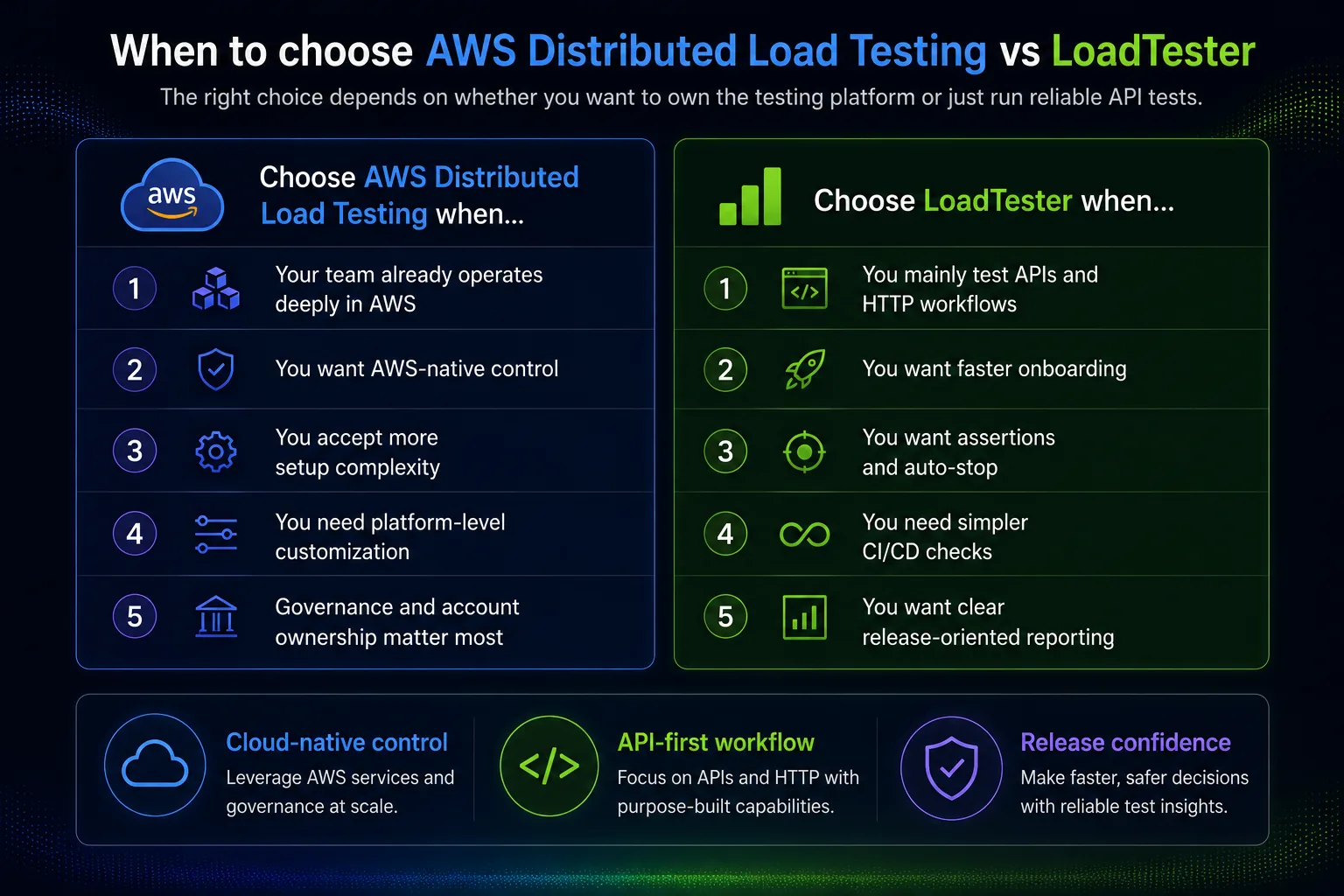
Choose Distributed Load Testing on AWS when most of the following are true:
- Your team already has strong AWS platform engineering capability.
- You want the load testing stack deployed inside your AWS account.
- You need regional AWS execution or AWS-native network placement.
- You want flexibility around existing load testing tools and scripts.
- You are comfortable owning updates, costs, access, and operations.
- Your organization prefers internal platform services over external SaaS tools.
Choose LoadTester when most of the following are true:
- Your primary use case is HTTP and API load testing.
- You want a faster path from test idea to useful result.
- You do not want to deploy or maintain a load testing stack.
- You want built-in assertions for latency thresholds, bad status codes, and timeouts.
- You want auto-stop behavior when a test becomes unsafe or already failed.
- You want release-friendly reports that more of the team can understand.
- You want performance checks to become routine in CI/CD or release validation.
Expert recommendation
If I were advising a platform team at a large AWS-heavy organization, I would not dismiss Distributed Load Testing on AWS. It gives that team control, flexibility, and a deployable reference architecture. If the organization has people who can own it properly, and if AWS-native placement is important, it is a valid choice.
If I were advising a SaaS product team that mostly needs API and HTTP performance confidence before releases, I would usually recommend starting with LoadTester. The reason is not that AWS lacks scale. The reason is that the simplest workflow that produces a trusted result is usually the workflow that survives contact with real delivery pressure. When deadlines are close, teams do not want to debug the test platform. They want to know whether the API is fast enough, stable enough, and safe enough to ship.
In performance engineering, the best tool is not always the one with the broadest architecture diagram. It is the one that creates the most reliable habit. For AWS platform teams, that habit may be an internal AWS-based testing solution. For API-first product teams, it is often a simpler product workflow with thresholds, assertions, auto-stop rules, and clear reports.
FAQ
Is Distributed Load Testing on AWS a managed service?
It is an AWS Solutions implementation that deploys AWS resources into your environment. It uses managed AWS services such as ECS on Fargate, Step Functions, Lambda, S3, DynamoDB, API Gateway, Cognito, CloudFront, and CloudWatch, but your team still owns the deployed solution and its operational lifecycle.
Can AWS Distributed Load Testing run high-scale tests?
Yes. The solution is designed for distributed load generation using AWS infrastructure, including Fargate-based load generator tasks and regional execution patterns. The practical scale depends on configuration, quotas, target capacity, test design, and budget.
Is LoadTester better than AWS Distributed Load Testing?
LoadTester is better for teams that mainly need simple, repeatable HTTP and API load testing with clear reports, assertions, thresholds, and auto-stop rules. AWS Distributed Load Testing is better for teams that want AWS-native control, internal deployment, custom architecture, and platform ownership.
Final verdict
Distributed Load Testing on AWS is powerful because it gives you a real AWS-based load testing platform. It is a strong choice when you want control, regional execution, AWS-native architecture, and flexibility. But that power comes with ownership. You are not only choosing a test runner; you are choosing to operate a stack.
LoadTester is the better alternative when your team wants to reduce that operational burden and focus on the performance checks that matter most for API and HTTP releases: realistic traffic, latency thresholds, bad status code detection, timeouts, assertions, auto-stop behavior, and reports that support a clear release decision.
For AWS platform teams, the AWS solution can be the right foundation. For product engineering teams that want fast, repeatable, release-ready load testing without managing another AWS stack, LoadTester is usually the more practical choice.